
Font size
 Worksheets
Operating System — Snap Recap
Total questions: 60
Worksheet time: 50mins
What is an operating system?
Which are the common operating systems?
Why do you need an operating system?
Types of booting: Warm Boot means pressing the Restart button while the computer is already on. Choose the correct meaning of Warm Boot.
Press the Restart button when the computer is already on
Press the Power button when the computer is switched off
Load the operating system into RAM
Run a hardware test called POST
Types of booting: Cold Boot means pressing the Power button when the computer is switched off. Choose the correct meaning of Cold Boot.
Press the Restart button while the computer is on
Press the Power button when the computer is switched off
Run BIOS POST
Copy system files to a hard disk
The booting process states that BIOS conducts a Power-On Self Test (POST) to make sure all components of the computer are working with a proper power supply. Which component performs POST?
BIOS
MBR
Operating system kernel
RAM
According to the booting process, BIOS first looks for the special boot programs on a floppy disk on drive A. Where does BIOS look first for boot programs?
A floppy disk on drive A
A USB drive
A CD-ROM
A network server
In the booting process, the information that stores the location of the operating system on the hard disk and copies it into RAM is known as the Boot Record or Master Boot Record (MBR). What is this called?
Master Boot Record (MBR)
Device driver
POST
Graphical User Interface (GUI)
After the MBR program loads the operating system files into RAM, the operating system is ready to take control of the system. What happens after the system files are loaded into RAM?
The operating system is ready to take control of the system
The computer performs POST again
The computer restarts automatically
The hard disk is erased
Functions of an operating system include Process Management, Device Management, Memory Management, and File Management. Which of the following are functions of an operating system? (Select all that apply)
Process Management
Device Management
Memory Management
File Management
Photo editing
Process management is responsible for allocating the CPU’s time to each process and scheduling the processes for execution by the CPU. What does process management do?
Allocates CPU time and schedules processes
Installs printers
Saves files to folders
Draws pictures on the screen
Device management controls the input and output devices attached to the computer. When the system is ready to take input, the input device is made available to the user, and when the process job is over, the output is redirected to the output device. What does device management control?
Input and output devices attached to the computer
Only the wallpaper image
Internet websites
Battery charging
The operating system needs software called a device driver, which recognises the input and output devices attached to the computer. What is a device driver?
Software that recognises devices attached to the computer
A storage area on the hard disk
A physical restart button
A visual desktop icon
Memory management: Whenever you start any application software, it gets loaded onto the system memory. Where is an application loaded when you start it?
System memory
Printer
Monitor
Recycle Bin
File management: A lot of data is stored on the hard disk, which has millions of tracks and sectors. It is the job of an operating system to read the data from different tracks and sectors and to store it in the available space. What is file management responsible for?
Reading and storing data on the hard disk’s tracks and sectors
Controlling screen brightness
Painting desktop icons
Connecting to the internet
Housekeeping includes services necessary to ensure the smooth operation of the computer system like security, protection, resource accounting, and back up. Which task is part of housekeeping in an operating system?
Providing security and backup
Changing desktop background art
Playing games
Printing photos
Types of operating system: A single-user operating system is designed so that only one user can use the computer at a time. Which statement describes a single-user operating system?
Designed for only one user at a time
Supports hundreds of networked users at once
Allocates time to many users simultaneously
Requires device drivers to work
Graphical User Interface (GUI): In a GUI, the operating system provides a graphical environment where the mouse acts as a pointing device and the user can perform an action just by a mouse-click. What allows the user to perform actions in a GUI?
A mouse acting as a pointing device
Typing only text commands
Pressing the Power button
BIOS settings
Importance of Shut Down: If you switch off the computer without giving a proper shut down command when the computer is on, files present in the computer memory will not be saved back to the hard disk and there is a high risk of losing the data; it may also damage the Windows operating system. Why should you use Shut Down to turn off the computer?
To save files to the hard disk and avoid data loss or system damage
To speed up the mouse pointer
To increase screen brightness
To make new folders
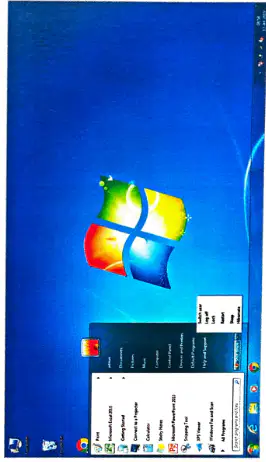
Using the Start menu to shut down Windows shows the following options. Which option switches the user without closing the programs currently in use?
Switch user
Log off
Lock
Restart
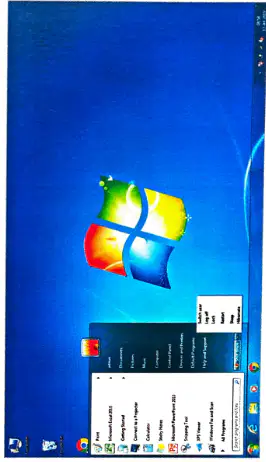
Using the Start menu to shut down Windows shows the following options. Which option closes all programs running on the computer while the computer still runs?
Switch user
Log off
Lock
Restart
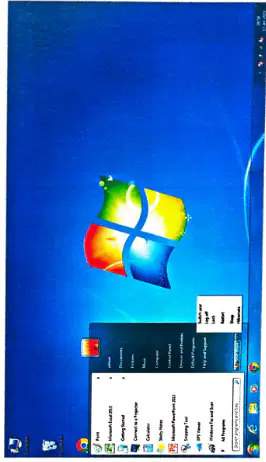
Using the Start menu to shut down Windows shows the following options. Which option locks the computer so work can be resumed on unlocking?
Switch user
Log off
Lock
Restart
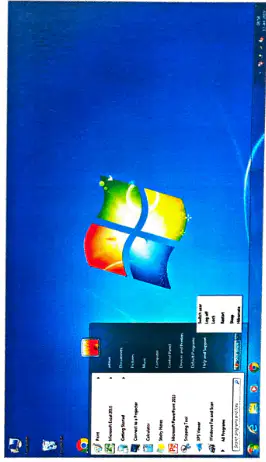
Using the Start menu to shut down Windows shows the following options. Which option shuts down Windows completely and then starts it again immediately?
Switch user
Log off
Lock
Restart
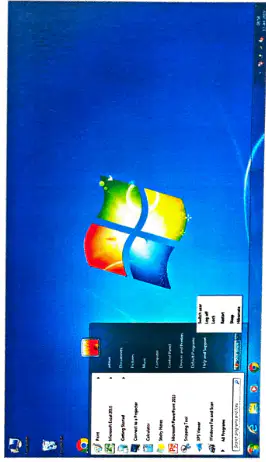
Using the Start menu to shut down Windows shows the following options. Which option properly shuts down the computer?
Switch user
Log off
Lock
Restart
Shut down
True or false: Pressing the Power button when the computer is switched off is called a warm boot.
True
False
True or false: An operating system sends output to the display screen.
True
False
True or false: When the system is switched on, the BIOS loads onto the RAM.
True
False
True or false: A multi-user operating system is selected when one user needs to do one thing at a time.
True
False
True or false: An operating system is an application software.
True
False
Give one word for: Pressing the Restart button while the computer is already on.
(a)
Give one word for: An interface between the user and the computer.
(a)
Give one word for: A graphical environment where a mouse acts as a pointing device.
(a)
Give one word for: The process of pressing the Power button when the computer is switched off.
(a)
Give one word for: A process that starts the operating system when the user turns on a computer system.
(a)
Answer in brief: What is an operating system? What basic tasks does it perform?
Answer in brief: List the steps in the booting process.
Answer in brief: Explain the difference between the two operating system interfaces.
Answer in brief: Why is it important to properly shut down your computer?
Answer in brief: Discuss the various types of operating systems.
In the context of computer networks, what does the acronym 'IP' stand for?
Internet Protocol
Internal Process
Input Power
Integrated Program
Which of the following is a common file extension for a Microsoft Word document?
.pptx
.xlsx
.txt
.docx
What is the primary function of an operating system?
To run applications only
To connect to the internet
To create graphics
To manage hardware and software resources
What is the purpose of generating questions in an educational context?
To assess knowledge and understanding
To reduce study time
To create confusion among students
To increase screen time
When generating questions, which of the following should be considered to ensure clarity?
Using complex jargon
Using ambiguous terms
Providing clear and concise wording
Making questions as long as possible
In the context of quizzes, what is a key benefit of generating multiple-choice questions?
They are less engaging for students
They can be graded quickly and objectively
They allow for subjective answers
They require extensive written responses
When creating questions for assessments, which of the following is essential to ensure they are effective?
Limiting the number of answer choices
Using vague language
Aligning questions with learning objectives
Making questions overly complicated
What is a common mistake to avoid when generating questions for a quiz?
Using a variety of question types
Making questions too easy or too hard
Including clear instructions
Providing feedback on answers
In the context of generating questions, what is the purpose of a rubric?
To create multiple-choice options
To provide a framework for evaluating answers
To grade the questions
To limit the number of questions
What is a key benefit of generating questions for assessments in an educational setting?
To limit student engagement
To increase the workload for teachers
To assess understanding and retention of material
To confuse students
When creating questions, which of the following is important to ensure they are relevant to the subject matter?
Aligning questions with the curriculum
Making questions overly complex
Using unrelated topics
Using only true/false formats
In the context of generating questions, what is the significance of using clear and concise language?
To increase the length of the questions
To confuse the students
To make questions more difficult
To ensure students understand what is being asked
What is a key factor to consider when generating questions for a standardized test?
Including irrelevant information
Using only numerical answers
Making all questions subjective
Ensuring questions are aligned with learning standards
Which of the following is an effective strategy for generating questions that promote critical thinking?
Using complex jargon
Asking open-ended questions
Limiting responses to yes or no
Focusing solely on memorization
When generating questions for a quiz, what is an important aspect to ensure clarity?
Using ambiguous terms
Making questions overly lengthy
Including multiple topics in one question
Using clear and concise language
When generating questions for a quiz, what is the primary goal of ensuring clarity in the wording?
To make the questions longer
To confuse the participants
To ensure participants understand the questions
To limit the number of questions asked
Which of the following is a common method for generating questions that assess higher-order thinking skills?
Incorporating scenario-based questions
Focusing on rote memorization
Using true or false statements
Asking multiple-choice questions only
In the context of question generation, what is the benefit of using a variety of question types?
To make the assessment more predictable
To engage different learning styles
To reduce the time spent on assessments
To limit the scope of the content covered
What is a key factor to consider when generating questions for a diverse audience?
Using technical jargon
Considering different cultural backgrounds
Focusing only on one learning style
Limiting the topics covered
Which of the following is an effective way to encourage student engagement when generating questions?
Asking questions that require only factual recall
Making questions overly complex
Using only multiple-choice formats
Incorporating real-world scenarios
When generating questions for assessments, what is the importance of aligning them with learning objectives?
To ensure questions are challenging
To assess the relevance of the content
To limit the scope of the assessment
To confuse the students

