
 Worksheets
DataAnalyticsModule9
Total questions: 187
Worksheet time: 2hrs 34mins
What feature in Power BI allows users to explore datasets and gain quick insights?
Dataset exploration
Data encryption
Data deletion
Data migration
Which of the following best describes the function of the "Get Insights" feature in Power BI?
It runs algorithms on datasets and highlights trends.
It deletes unnecessary data from datasets.
It exports data to external applications.
It encrypts sensitive information in datasets.
Suppose you are tasked with identifying performance drivers in a business process. How can Power BI dashboards assist you in this task?
By providing visual insights and highlighting trends through charts and graphs
By deleting irrelevant data automatically
By sending automated emails to stakeholders
By creating backup copies of datasets
Which method is used to create dashboards in Power BI?
Importing data from Excel
Pinning visualizations from BI reports
Writing SQL queries
Exporting to PDF
Which of the following describes the process of creating a dashboard in Power BI?
Import data, create a report, and pin visualizations using Power BI Desktop or Power BI Service
Write code, export to PDF, and email the file
Use PowerPoint to design slides and upload them
Create a Word document and attach charts
What is the first step to pin a visual in Power BI Service?
Open the BI report in Power BI Service.
Create a new dashboard.
Export the visual to Excel.
Share the report with others.
Where can you find the Pin icon when you want to pin a visual in Power BI Service?
At the top of the visual
At the bottom of the report
In the settings menu
On the left navigation bar
Which icon should you select to pin a visual in Power BI Service?
Pin icon
Share icon
Refresh icon
Edit icon
A teacher asks you to explain the process of pinning a visual in Power BI Service. Which of the following best describes the correct sequence?
Open the BI report, locate the visual, and select the Pin icon at the top of the visual.
Create a new report, save it, and then click the Share icon.
Open the dashboard, click Edit, and then select the Export option.
Open the BI report, click on the left menu, and select the Refresh icon.
What does the arrow in the diagram indicate?
The location of the Pin icon used to pin a visual.
The location of the Share icon to share the report.
The location of the Refresh icon to update data.
The location of the Edit icon to modify the report.
According to the image, which option is selected for pinning the visual?
Existing dashboard
New dashboard
Shared dashboard
Temporary dashboard

A user wants to change the options available on a dashboard. Which process should they use?
Configure the dashboard.
Delete the dashboard.
Export the dashboard.
Archive the dashboard.
What is the name of the dashboard shown in the image?
Sales Overview
Prod Analysis
Data Insights
Market Trends
Based on the interface shown, which of the following is NOT a section available in the left navigation pane?
Favorites
Recent
Notifications
Apps
What is one way reports and dashboards can be shared in Power BI?
By printing them out
By sharing within the organization
By exporting to Excel only
By emailing screenshots only
What is the first step to share a dashboard in Power BI Service?
Export the dashboard
Open the dashboard
Print the dashboard
Delete the dashboard
What is the correct sequence to activate the Power BI Pro trial?
Click Start Trial → Try Pro for free → Finish
Click Try Pro for free → Start Trial → Finish
Click Finish → Start Trial → Try Pro for free
Click Start Trial → Finish → Try Pro for free
Why might a user want to activate the Power BI Pro trial?
To access basic data import features
To use the sharing feature not available in the free version
To create simple charts
To download Power BI Desktop
What is required to access the feature mentioned in the "Upgrade to Power BI Pro" message?
A Power BI Pro license
A Microsoft Word license
A PowerPoint subscription
A free Power BI account
How long can you try Power BI Pro for free, as mentioned in the message?
60 days
30 days
14 days
90 days
Which of the following is NOT listed as an additional sharing option for the dashboard?
Allow recipients to re-share the dashboard
Send email notifications
Provide a direct URL link
Print the dashboard
A teacher wants to notify users when a dashboard is shared with them. Which feature should they use?
Allow recipients to re-share the dashboard
Send email notifications
Provide a direct URL link
Enter email ID
Suppose you want to give access to the dashboard without specifying individual email IDs. Which sharing option would be most suitable?
Allow recipients to re-share the dashboard
Send email notifications
Provide a direct URL link
Enter email ID
Which option allows recipients to further share the dashboard with others?
Allow recipients to share your dashboard
Send email notification to recipients
Include an optional message
Enter email addresses
What is the primary focus of dashboards for Cyber Security roles?
Threats, Incidents, Compliance
Profit, Expenses, ROI
Project delivery, Quality metrics
Financial performance indicators
Why is it important for dashboards to display role-specific KPIs?
Because different roles have unique responsibilities and need relevant information to make decisions
Because all employees need the same information
Because dashboards are only used by managers
Because KPIs are not important for decision-making
What is the main purpose of Power BI Workspaces?
To enable collaboration among teams
To store emails
To manage user passwords
To create websites
How do My Workspace and Shared Workspaces differ in Power BI?
My Workspace is personal, while Shared Workspaces are team-oriented
My Workspace is for teams, Shared Workspaces are for individuals
Both are only for personal use
Both are only for public sharing
A team wants to collaborate on creating dashboards and datasets in Power BI. Which type of workspace should they use?
Shared Workspaces
My Workspace
Private Workspace
Archive Workspace
How do workspaces facilitate collaboration among users?
By limiting user access
By providing a single-user environment
By facilitating collaboration among users
By deleting old reports
Which feature of workspaces allows administrators to determine who can view or edit content?
Publishing reports
Controlling access and permissions
Increasing storage
Reducing user activity
Why is the ability to publish and distribute apps to a wider audience important in a workspace environment?
It helps keep data private
It allows for broader sharing and impact of applications
It reduces the number of users
It limits collaboration
A company wants to ensure only certain employees can edit sensitive reports while others can only view them. Which workspace feature should they use?
Organize reports & datasets in one place
Facilitate collaboration among users
Control access and permissions
Publish and distribute apps to wider audience
Which role can publish and update content but cannot manage permissions in a Power BI Workspace?
Admin
Contributor
Viewer
Member
If a company wants to ensure that a user cannot change permissions but can still update content, which Power BI Workspace role should they assign?
Admin
Contributor
Viewer
Member
Compare the permissions of a Member and a Contributor in a Power BI Workspace. Which additional capability does a Member have?
Can only view content
Can manage permissions
Can edit content, publish, and modify reports & datasets
Can configure workspace settings
What does Role-Based Access Control (RBAC) primarily use to restrict access?
User roles
User passwords
Network location
Device type
Which of the following is NOT a benefit of Role-Based Access Control (RBAC)?
Ensures right people have the right level of access
Protects sensitive data
Simplifies management of permissions
Increases the number of user roles unnecessarily
Which of the following is a step in how RBAC works in Power BI?
Assign users to workspaces
Create custom dashboards
Install additional plugins
Export data to Excel
What are some of the roles that can be defined in Power BI RBAC?
Admin, Member, Contributor, Viewer
Owner, Editor, Designer, Reader
Supervisor, Operator, Analyst, Guest
Manager, Developer, Tester, User
When permissions are set in Power BI RBAC, how are they applied?
Automatically
Manually by each user
Through a third-party tool
By exporting a permissions file
Why do users in Power BI only see certain information?
Because they only see what they are allowed to access
Because all data is public by default
Because they have to request access for every report
Because Power BI hides all sensitive data automatically
What does the "least privilege principle" in RBAC ensure?
Users get maximum access
Users get minimum required access
Users get no access
Users get access to all data
Which benefit of RBAC helps organizations manage users more efficiently?
Easy user management
Increased security risks
Complex user interfaces
Manual data entry
How does RBAC support scalability in organizations?
By limiting access to a single user
By allowing scalability across teams and organizations
By reducing the number of users
By increasing manual processes
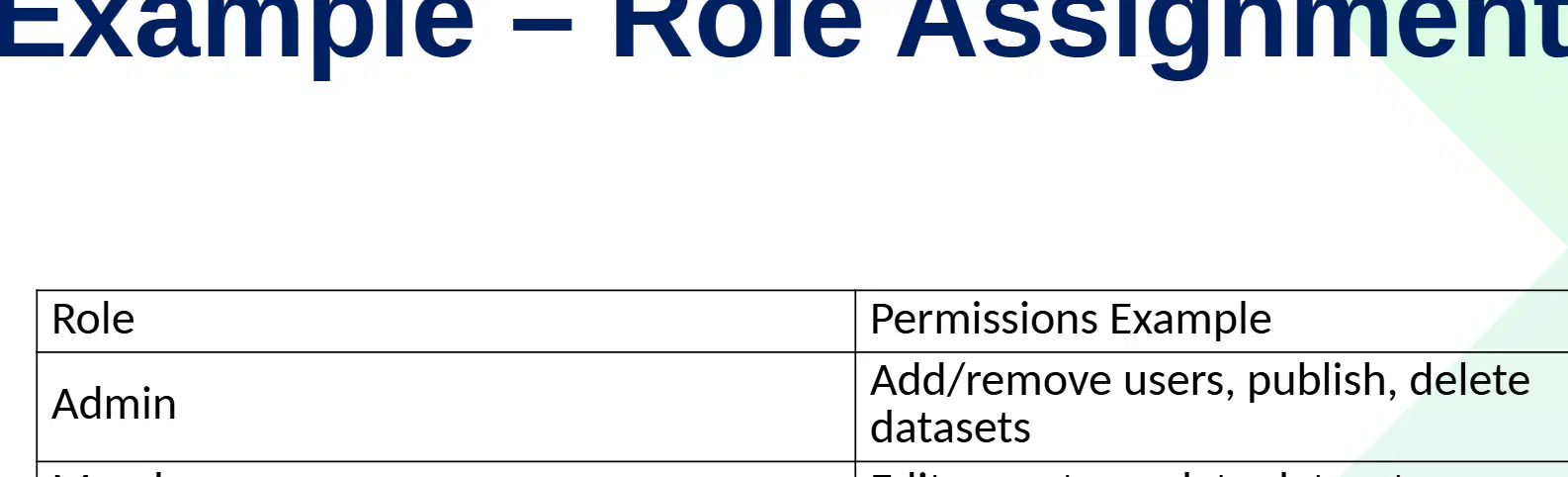
Which role has the permission to add or remove users, publish, and delete datasets?
Admin
Member
Contributor
Viewer
Which role is responsible for publishing reports and refreshing datasets?
Contributor
Admin
Member
Viewer
If a user needs to edit reports and update datasets, which role should they be assigned?
Member
Admin
Contributor
Viewer
A company wants to ensure that only certain users can delete datasets and manage user access. Which role should these users have, and why?
Admin, because they have permissions to add/remove users, publish, and delete datasets.
Member, because they can edit reports and update datasets.
Contributor, because they can publish reports and refresh datasets.
Viewer, because they can view dashboards.
Which principle should be followed when assigning roles to users in a workspace?
Principle of least privilege
Principle of maximum access
Principle of random assignment
Principle of shared responsibility
Why is it recommended to use security groups instead of assigning permissions to individual users?
It simplifies management and improves security
It increases the number of users
It reduces the need for passwords
It allows users to share accounts
How do workspaces and RBAC together benefit a Power BI reporting environment?
They make the environment more colorful
They ensure efficient, secure, and scalable reporting
They increase the number of users
They reduce the need for data
Suppose an organization wants to improve collaboration and security in their Power BI reports. Which two features should they focus on implementing together, and why? (DoK 3)
Workspaces and RBAC, because together they create an efficient, secure, and scalable reporting environment
Data import and export, because they increase data volume
Visualization and formatting, because they improve appearance
User training and documentation, because they reduce errors
What does Row Level Security (RLS) restrict?
Data access at row level
Data access at column level
Data access at table level
Data access at file level
Which of the following best describes the purpose of Row Level Security (RLS)?
To allow users to see all data in a database
To restrict users to only see the subset of data relevant to them
To encrypt all data in a database
To back up data automatically
Why might a salesperson only see their region’s sales data in a system with RLS?
Because RLS restricts access to only relevant rows of data
Because the data is encrypted
Because the system is offline
Because the data is stored in a different format
What is the purpose of defining DAX filters for each role in Power BI?
To create new dashboards
To filter data based on user roles
To assign users to different workspaces
To export data to Excel
After assigning roles to users in Power BI Service, what happens automatically?
Users are logged out
Users see filtered data
Users receive email notifications
Users can edit DAX filters
Which step comes immediately after creating roles in Power BI Desktop when setting up RLS?
Assign roles to users in Power BI Service
Define DAX filters for each role
Users automatically see filtered data
Publish the report to the web
Which of the following is a benefit of RLS related to data protection?
Data privacy & compliance
Increased hardware costs
Reduced user access
Manual data entry
Which benefit of RLS helps organizations handle growth and expansion?
Scalability across large organizations
Decreased data accuracy
Increased manual processing
Limited user roles
RLS can improve performance in data systems by:
Loading less data, resulting in faster performance
Increasing the number of users
Duplicating data across servers
Removing all security measures
The most relevant RLS benefit for a rapidly expanding company that needs scalable data access policies is:
Personalized dashboards
Scalability across large organizations
Improved performance (less data loaded)
Data privacy & compliance
Which of the following is an example of Object Level Security (OLS) in action?
Encrypting all user passwords
Hiding the Salary column from non-HR users
Allowing all users to view financial data
Backing up the database daily
At what level can restrictions be applied when working with OLS?
Table or column level
Database or server level
File or folder level
User or group level
Why is it important to assign users to OLS roles in a data model?
To ensure users have the correct access restrictions
To increase the speed of data processing
To allow users to edit the data model
To automatically generate reports
How does OLS provide stronger security compared to just hiding visuals?
By encrypting all data
By restricting access at the data level, not just the visual level
By deleting sensitive fields
By allowing users to bypass restrictions
Why is ensuring compliance with governance policies considered a benefit of OLS?
It helps organizations meet regulatory requirements
It allows users to access any data they want
It removes the need for security measures
It only affects the appearance of data
How does OLS provide stronger security compared to just hiding visuals?
By encrypting all data
By restricting access at the field level
By allowing users to bypass restrictions
By deleting sensitive information
Why is ensuring compliance with governance policies considered a benefit of OLS?
It helps organizations meet regulatory requirements
It increases the speed of data processing
It allows users to access all data
It removes the need for user authentication
Which statement best describes how OLS prevents users from bypassing restrictions?
Users can’t bypass restrictions via queries
Users can access all data through queries
Users can modify governance policies
Users can hide sensitive fields themselves
Which visibility characteristic is associated with Object Level Security (OLS)?
Restricted data visible
Hidden completely
Data partially visible
Data encrypted
A company wants to allow only regional managers to see sales data for their own region. Which security method should they use?
Object Level Security (OLS)
Row Level Security (RLS)
File Level Security
Network Level Security
If an organization needs to hide salary or financial details from certain users, which security approach is most appropriate?
Row Level Security (RLS)
Object Level Security (OLS)
Column Encryption
User Authentication
Which feature is implemented using DAX filters?
Object Level Security (OLS)
Row Level Security (RLS)
Both RLS and OLS
Neither RLS nor OLS
Why is it recommended to combine RLS and OLS in a security strategy?
To reduce storage costs
For layered security
To increase data redundancy
For faster data retrieval
What is a recommended ongoing practice for maintaining security roles?
Regularly review and audit security roles
Only assign roles once
Ignore role changes
Share roles with all users
What is the primary purpose of RLS and OLS in Power BI?
To ensure data security and governance
To increase data redundancy
To improve data visualization speed
To reduce storage costs
Which of the following best describes the function of RLS in Power BI?
Hides sensitive objects at the table or column level
Limits data visibility on a row-based level
Encrypts all data in the database
Provides data backup solutions
Suppose a company wants to ensure that only certain users can see specific columns in a table, but all users can see all rows. Which security feature should they use in Power BI?
RLS (Row-Level Security)
OLS (Object-Level Security)
Data Encryption
Data Masking
Why is security considered critical when accessing business data in Power BI?
To improve data visualization
To access more data sources
To protect sensitive business data
To reduce storage costs
Which of the following is a key element when connecting Power BI to data sources?
Data Source Gateway
Data Compression
Data Formatting
Data Export
What is another key element, besides Data Source Gateway, that is important for Power BI connections?
Data Visualization
Authentication Methods
Data Cleaning
Data Export
Suppose a company wants to ensure only authorized users can access their Power BI reports. Which key element should they focus on?
Data Formatting
Authentication Methods
Data Export
Data Visualization
A company wants to keep its data on-premises but still use Power BI Service for analytics. Which solution should they implement?
Data Gateway
Cloud Storage
Data Warehouse
Data Lake
Which of the following is a feature of the On-premises Data Gateway (Standard)?
It is only for individual use.
It is shared across multiple services like Power BI, Power Apps, Logic Apps, and Power Automate.
It connects to Power BI only.
It is not suitable for enterprise use cases.
What is the primary use case for the On-premises Data Gateway (Personal Mode)?
Enterprise use cases
Shared use across multiple services
For individual use
For collaboration in large teams
Which type of On-premises Data Gateway is best suited for enterprise use cases?
Personal Mode
Standard
Power BI Only
Logic Apps Mode
What is the purpose of the Gateway connecting securely to an on-prem data source?
To store data permanently
To retrieve and send data back to the service
To delete data from the source
To display data on the local machine only
Arrange the following steps in the correct order for how the Gateway works: 1. Gateway encrypts request 2. Query sent from Power BI Service 3. Retrieves and sends data back to service 4. Connects securely to on-prem data source.
2, 1, 4, 3
1, 2, 3, 4
2, 4, 1, 3
4, 2, 1, 3
Why is it important for the Gateway to encrypt requests when working with Power BI Service?
To increase the speed of data transfer
To ensure secure communication and protect data
To reduce the size of the data
To allow public access to the data
Which of the following is a benefit of using a Data Gateway?
Secure access to on-premises data
Increased hardware requirements
Limited to a single Microsoft service
Manual data refresh only
A company wants to use several Microsoft cloud services with their on-premises data. Which Data Gateway benefit supports this requirement?
Works with multiple Microsoft cloud services
Only supports one cloud service
Requires no cloud integration
Only works with non-Microsoft services
A business is considering implementing a Data Gateway. Analyze how the centralized management of data connections could impact their IT operations.
It could simplify administration and improve security.
It would increase the complexity of managing data.
It would require each user to manage their own connections.
It would eliminate the need for any data management.
Which of the following is NOT listed as an authentication option for secure access in Power BI?
Windows Authentication
OAuth 2.0
Two-Factor Authentication
Single Sign-On (SSO) using Kerberos
What authentication method in Power BI is specifically mentioned for use with cloud sources like Azure and Salesforce?
Windows Authentication
OAuth 2.0
Basic Authentication
Single Sign-On (SSO)
How does Single Sign-On (SSO) using Kerberos enhance security in Power BI compared to Basic Authentication?
SSO allows users to access multiple resources with one login, reducing password fatigue and risk of password reuse, while Basic Authentication requires entering credentials each time, increasing risk of interception.
SSO requires users to remember multiple passwords, while Basic Authentication uses only one password.
SSO is only available for cloud sources, while Basic Authentication is for on-premises sources.
SSO does not require any authentication, while Basic Authentication does.
Which protocol is mentioned as being compatible with SSO Gateway?
OAuth2
SAML
Kerberos delegation
LDAP
In what way does SSO with Gateway enhance the system?
It only improves user experience
It only improves security
It enhances both security and user experience
It decreases both security and user experience
How can Single Sign-On (SSO) with Gateway improve both security and user experience in an organization?
By allowing users to share passwords and reduce login attempts
By enabling users to use multiple accounts for different services
By providing seamless access with their own credentials and reducing the need for multiple logins
By disabling credential delegation and requiring manual authentication for each service
What is recommended for shared scenarios to enhance gateway security?
Use Personal Gateway
Use Enterprise Gateway
Use Public Gateway
Use Temporary Gateway
Why is configuring least privilege access important in gateway security?
It allows everyone full access
It restricts access to only what is necessary
It disables all user accounts
It increases the number of administrators
A company wants to ensure that only necessary permissions are granted to users accessing the gateway. Which best practice should they implement?
Enable SSO
Configure least privilege access
Use Enterprise Gateway
Monitor activity logs
If an organization is using a gateway in a shared environment, which type of gateway should they use according to best practices?
Personal Gateway
Enterprise Gateway
Temporary Gateway
Public Gateway
Which of the following best describes the purpose of Authentication Security in Power BI?
To ensure data is always encrypted
To ensure only authorized users access sensitive data
To backup data automatically
To increase data storage capacity
How do Data Gateways and Authentication Security work together in Power BI?
They provide a robust, compliant, and scalable security model
They increase the speed of data processing
They reduce the cost of data storage
They simplify the user interface
Why is it important for a security model in Power BI to be robust, compliant, and scalable?
To ensure it can handle different security needs and grow with organizational requirements
To make the interface more colorful
To reduce the number of users
To limit data access to only one user
Why is data protection considered critical in modern BI solutions?
It helps reduce storage costs
It ensures data is classified, protected, and governed
It increases the speed of data processing
It eliminates the need for data backups
Sensitivity labels contribute to data governance in Power BI by:
Providing encryption for all data
Helping classify, protect, and govern data based on its sensitivity
Deleting old data automatically
Generating automatic reports
What is the primary purpose of sensitivity labels?
To indicate the sensitivity level of data
To organize files alphabetically
To assign user permissions
To track document versions
Which of the following is NOT an example of a sensitivity label?
Public
Internal
Archived
Highly Confidential
Why might an organization use sensitivity labels for its data?
To help classify and protect information based on its sensitivity
To increase the size of datasets
To improve the speed of data processing
To reduce the number of users accessing the data
Which of the following is a primary reason for using sensitivity labels in a business environment?
To increase internet speed
To protect sensitive business information
To reduce software costs
To improve graphic design quality
Which of the following best describes a benefit of using sensitivity labels for team collaboration?
Ensuring secure collaboration across teams
Increasing the number of team members
Reducing the need for communication
Improving office decoration
Why is consistent classification across Microsoft 365 apps important when using sensitivity labels?
It ensures all documents are classified the same way, improving security and compliance.
It makes the user interface more colorful.
It increases the number of available fonts.
It reduces the need for software updates.
Where does an admin define sensitivity labels for use in Power BI?
In Microsoft Purview or M365 Compliance Center
In Power BI Desktop only
In Excel settings
In SharePoint Online
What happens to sensitivity labels when data is exported from Power BI to Excel, PDF, or PowerPoint?
The labels are removed
The labels are persisted
The labels are converted to comments
The labels are encrypted
Which of the following can users apply sensitivity labels to in Power BI? (Select the best answer)
Only to dashboards
Only to datasets
To reports, datasets, dashboards, or dataflows
Only to exported files
Which data protection feature ensures secure storage and transfer of data?
Persistent Labeling
Auditing & Monitoring
Encryption
Access Restrictions
How does persistent labeling contribute to data protection?
By tracking data usage for compliance
By ensuring labels follow data even when exported
By encrypting data during storage
By restricting access to sensitive data
What type of protection is applied to information labeled as "Confidential"?
No restrictions
Access limited to employees
Encryption + limited sharing
Encryption + watermarking + strict access control
Which of the following is an example of data classified as "Internal"?
Training data
Sales dashboards
Financial reports
HR records
Why might a company choose to classify financial reports as "Confidential" rather than "Internal"?
Financial reports are meant for public distribution
Financial reports require encryption and limited sharing
Financial reports are only for HR staff
Financial reports do not need any protection
Which of the following is a benefit of using sensitivity labels?
Increases data redundancy
Consistent data classification
Reduces network speed
Limits user access to hardware
How do sensitivity labels help organizations comply with regulations?
By supporting regulatory compliance
By increasing storage costs
By disabling user accounts
By deleting old data
Which statement best explains how sensitivity labels enhance trust in BI reports?
They make reports more visually appealing
They ensure data in reports is classified and protected
They increase the number of reports generated
They reduce the need for data analysis
Why is it important to use default labels in data classification?
To reduce misclassification
To increase data size
To speed up data deletion
To avoid employee training
How can organizations enhance data security beyond labeling?
Combine with Row-Level Security (RLS) and Object-Level Security (OLS)
Only use default labels
Avoid employee training
Delete all datasets
A company wants to minimize the risk of data misclassification. Which best practice should they implement?
Use default labels
Ignore sensitivity labels
Apply labels after data is shared
Only train new employees
Which action involves engaging employees in understanding how to handle data?
Train employees on data classification policies
Apply labels at the earliest stage
Use default labels
Combine with RLS and OLS
What is the result of combining Sensitivity Labels and Data Protection according to the conclusion?
Complete security framework
Partial security solution
Data loss prevention only
User authentication system
Which of the following is NOT mentioned as a benefit of using Sensitivity Labels and Data Protection for organizations?
Classifying BI data
Securing BI data
Governing BI data
Increasing data storage capacity
Which of the following must organizations ensure data usage complies with?
Only internal policies
Only legal policies
Legal, regulatory, and internal policies
Only regulatory policies
Which built-in tools does Power BI provide to help organizations manage data usage?
Data visualization, reporting, and exporting
Compliance, auditing, and monitoring
Data entry, storage, and deletion
Encryption, backup, and recovery
Which portal is Power BI integrated with for compliance management?
Microsoft Azure Portal
Microsoft Purview Compliance Portal
Microsoft Teams Portal
Microsoft Dynamics Portal
Which of the following is NOT an industry standard supported by Power BI compliance?
GDPR
HIPAA
ISO 27001
PCI DSS
What is one of the features provided by Power BI to help with compliance?
Data visualization templates
Sensitivity labels
Custom dashboards
Report scheduling
How does Power BI help prevent unauthorized data sharing?
By providing data loss prevention (DLP) policies
By offering free storage
By enabling automatic report generation
By supporting only local data storage
Which of the following activities can be captured by Audit Logs in Power BI?
Viewing or sharing reports
Installing new software
Changing computer hardware
Updating Windows OS
Which tool is NOT listed as a way for admins to monitor activity in Power BI?
Microsoft Purview
Office 365 Security & Compliance Center
Power BI Admin Portal
Google Analytics
What is the primary purpose of Audit Logs in Power BI?
To capture user activities such as viewing, sharing, exporting, and workspace management
To create new dashboards automatically
To update user passwords
To backup all Power BI data
Suppose an admin wants to check if a user has exported data from Power BI. Which feature should they use?
Audit Logs
Data Import Wizard
Power Query Editor
Visualization Pane
Which of the following is NOT typically monitored continuously in Power BI?
Data refreshes
Gateway health
Workspace usage
User password changes
What is the purpose of alerts and notifications in Power BI monitoring?
To remind users to update their dashboards
To notify users of unusual activity
To schedule regular meetings
To backup data automatically
Suppose you are responsible for monitoring a Power BI environment. If you notice a sudden spike in workspace usage, what should you do to address this situation?
Ignore the spike as it is not important
Investigate the cause of the spike and check for any unusual activity
Immediately delete the workspace
Turn off all notifications
Why is it important to monitor performance metrics in Power BI?
To ensure the system is running efficiently and to identify potential issues early
To increase the number of users
To reduce the size of reports
To change the color scheme of dashboards
Which portal is used for compliance monitoring in Microsoft environments?
Power BI Admin Portal
Microsoft Purview Compliance Portal
Azure Monitor
Activity Logs (Office 365 Unified Logs)
If an organization wants to review unified logs from Office 365, which tool should they use?
Power BI Admin Portal
Azure Monitor
Activity Logs (Office 365 Unified Logs)
Microsoft Purview Compliance Portal
Which of the following is a benefit of compliance, auditing, and monitoring?
Increase marketing expenses
Ensure regulatory compliance
Reduce employee salaries
Limit stakeholder engagement
Why is tracking user activity important in the context of compliance and auditing?
To increase system downtime
For accountability purposes
To reduce the number of users
To promote data misuse
How does compliance, auditing, and monitoring contribute to building trust with stakeholders?
By hiding organizational processes
By ensuring transparency and accountability
By reducing communication
By ignoring regulatory requirements
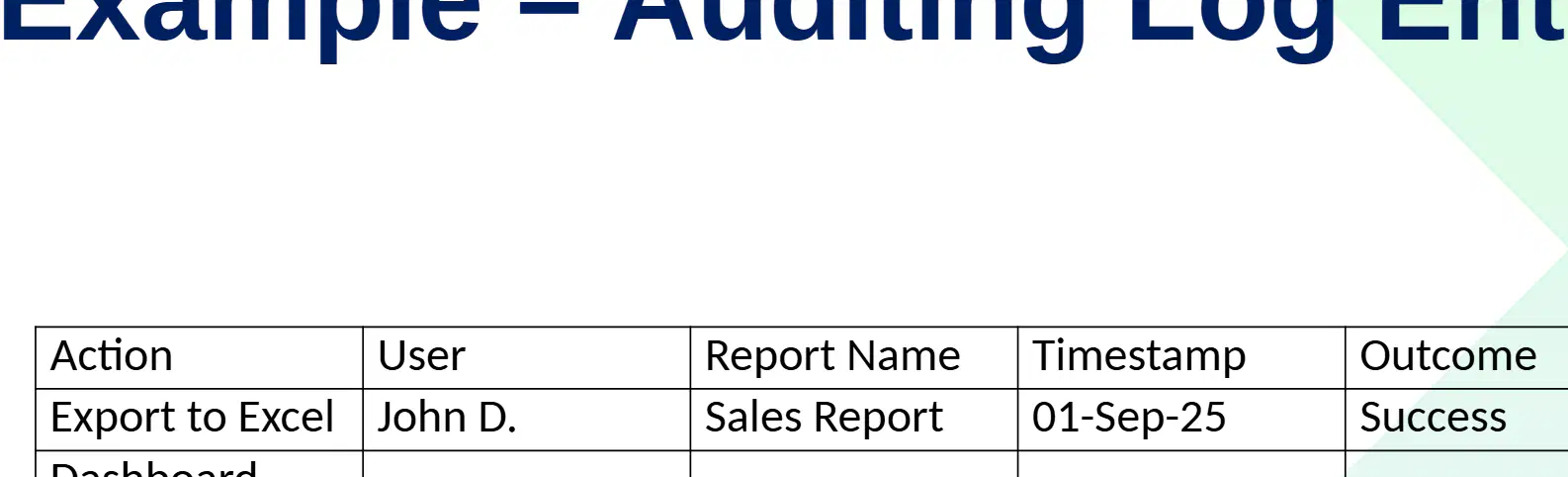
Which user performed the "Export to Excel" action according to the auditing log entry example?
Sarah K.
Admin
John D.
Michael S.
What was the outcome for the "Workspace Deleted" action in the auditing log entry example?
Failure
Success
Pending
Error
If you were to add a new entry to this auditing log for a user named "Alex P." who exported the "Annual Report" to Excel on 02-Sep-25 with a successful outcome, which columns would you need to fill in?
Action, User, Report Name, Timestamp, Outcome
User, Report Name, Timestamp
Action, Outcome
Report Name, Timestamp, Outcome
What is the purpose of using sensitivity labels according to best practices?
To label confidential reports
To automate monitoring
To export data
To delete old files
Why is it important to regularly review compliance dashboards?
To ensure ongoing adherence to regulations and policies
To increase the number of exports
To delete confidential reports
To disable monitoring tools
If you want to track activities such as exports and deletions, which best practice should you implement?
Set up alerts for high-risk activities
Use compliance dashboards for all reports
Enable auditing only for confidential workspaces
Automate monitoring with sensitivity labels
How does monitoring contribute to a data protection framework?
By ensuring adherence to standards
By capturing who did what and when
By providing proactive oversight
By increasing employee productivity
Why is it important to combine compliance, auditing, and monitoring in an organization?
To create a strong governance and data protection framework
To reduce the number of employees
To increase marketing effectiveness
To improve customer service
A company wants to ensure that it knows who accessed sensitive data, what actions they took, and when. Which process should it focus on improving?
Compliance
Auditing
Monitoring
Marketing
Why is security important when sharing and publishing reports in Power BI?
To prevent data leaks or unauthorized access
To make reports look more attractive
To reduce the size of reports
To increase the speed of report generation
Which of the following is a method to share reports directly with users or groups in Power BI?
Share reports directly
Publish to Web
Use Excel Export
Print to PDF
What is a key difference between Secure Embed and Publish to Web in Power BI?
Secure Embed is for internal use, while Publish to Web is not secure and should be used cautiously.
Secure Embed is for external sharing, while Publish to Web is for internal use.
Both are equally secure.
Secure Embed is only for dashboards, while Publish to Web is only for reports.
A company wants to share a Power BI report with the public, but is concerned about security. Which sharing option should they avoid?
Secure Embed
Publish to Workspaces
Publish to Web
Apps
What can happen if there is a lack of auditing on external sharing?
Unauthorized activities may go undetected
Data becomes more secure
Compliance is automatically ensured
Public exposure is prevented
Which of the following is a recommended best practice for secure sharing?
Share with specific users/groups instead of "Everyone"
Share with everyone by default
Avoid using any security labels
Never review access permissions
Why should sensitivity labels be used in data sharing?
To classify and protect data
To make data public
To delete data automatically
To increase data size
What is the importance of regularly reviewing access permissions in secure sharing?
To ensure only authorized users have access
To make sharing easier for everyone
To avoid using security labels
To increase the number of users
Which of the following is a recommended secure publishing practice for sensitive reports?
Publish from any available workspace
Publish only from trusted workspaces
Share reports via email attachments
Use public file-sharing services
Why should you avoid using "Publish to Web" for certain reports?
It is too expensive
It is not compatible with Power BI Apps
It is not secure for sensitive reports
It does not support data refresh schedules
What is the purpose of configuring Data Refresh Schedules securely?
To reduce report size
To ensure data is up-to-date and secure
To improve report aesthetics
To increase report download speed
A company wants to distribute sensitive reports to a large audience while maintaining security. Which combination of practices should they follow based on the secure publishing practices?
Use Power BI Apps and configure Data Refresh Schedules securely
Publish to Web and use audit logs
Share via email and avoid trusted workspaces
Use public file-sharing and skip data refresh
Which of the following is a responsibility of admins in secure sharing?
Define governance policies for sharing
Create user passwords
Design website layouts
Write application code
At what level should admins restrict the 'Publish to Web' feature to enhance secure sharing?
Tenant level
User level
File level
Network level
Why is it important for admins to monitor user activity logs in the context of secure sharing?
To detect unusual access
To increase storage space
To improve user interface
To reduce internet speed
Which policies should admins enforce to protect sensitive information during sharing?
Sensitivity labels and DLP policies
Password expiration policies
Network speed policies
Software update policies
How can admins help users participate in secure sharing practices?
By training users on secure collaboration practices
By giving users administrative rights
By disabling all sharing features
By allowing anonymous access
A company is experiencing frequent data leaks due to improper sharing practices. As an admin, which combination of actions would best address this issue?
Enforce sensitivity labels, monitor user activity logs, and train users on secure collaboration practices
Increase internet bandwidth, allow all users to publish to web, and ignore user activity logs
Disable all sharing features, remove all governance policies, and avoid user training
Focus only on password policies and ignore sharing practices
Which of the following is a secure practice for sharing with users?
Everyone access
Specific AD groups
No restrictions
Publish to Web
What is the insecure method for publishing reports?
Workspace Apps
RLS + Sensitivity
Publish to Web
Admin audit logs
Which combination is used for secure data protection?
No restrictions
RLS + Sensitivity
Admin audit logs
Workspace Apps
If an organization wants to monitor sharing activities securely, which method should they use?
No tracking
Publish to Web
Admin audit logs
Everyone access
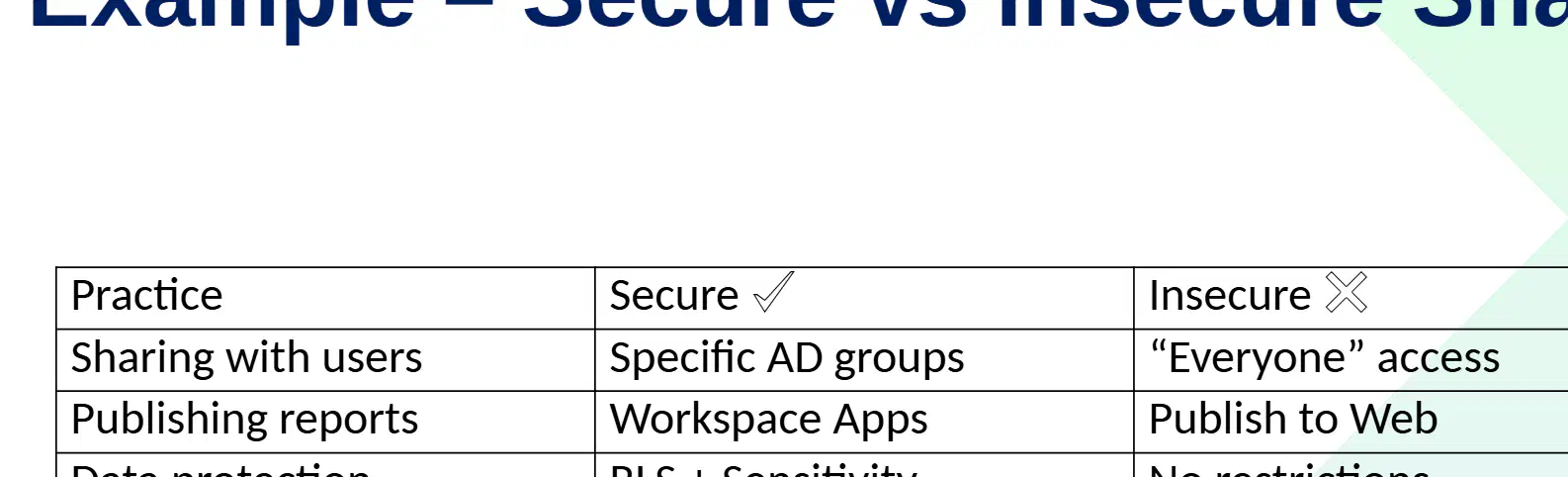
Using 'Everyone' access for sharing with users is considered insecure because:
It limits access to specific users only.
It allows unrestricted access, increasing security risks.
It enables admin audit logs for monitoring.
It applies RLS and sensitivity labels.
A company wants to improve its governance and control over data. Which practice should it implement based on the benefits listed?
Open sharing without restrictions
Secure sharing and publishing
Ignoring compliance requirements
Disabling collaboration features
Which of the following is a key reason for secure sharing in data management?
To ensure the right people see the right data
To increase the amount of data available
To reduce collaboration
To avoid using any security features
Publishing practices in an organization should align with which of the following?
Enterprise governance
Individual preferences
Random selection
Outdated policies
A company wants to implement secure data sharing. Which combination of Power BI features would best support this goal?
Workspaces, RLS, Sensitivity Labels, Admin Policies
Workspaces, Email Marketing, Social Media
Sensitivity Labels, Public Forums, RLS
Admin Policies, Blogging, RLS