
 Worksheets
Page 1
Total questions: 30
Worksheet time: 15mins
Which step of the computer cycle happens when you type facts using a keyboard?
Storage stage to hard drive
Output stage on monitor
Processing stage by CPU
Input stage of the cycle
What is processing in a computer?
Entering facts with a mouse
Converting data to information
Saving files to storage
Showing results on a screen

You draw a picture using the mouse. Which stage happens while you move the mouse to make shapes?
Input from the device
Processing by CPU
Storage to a file
Output on the screen
Which statement best describes computers from the page?
They are natural tree parts
They are magical objects
They are living smart animals
They are human-made machines
Which part of a computer can you see and touch?
Hardware like monitor and mouse
Software you install and run
Result shown after processing
Data entered by a user
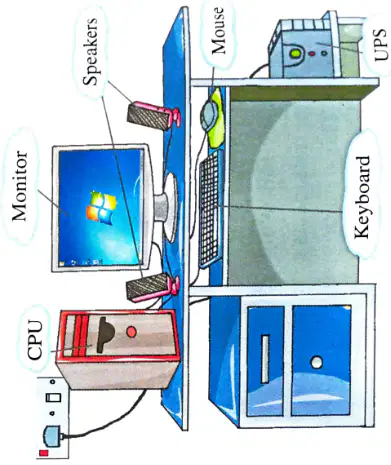
Which device displays pictures on the screen?
UPS power box
Monitor on the desk
Keyboard with keys
Mouse with buttons
Which item is an example of software?
Windows operating system
CPU metal box
Keyboard with keys
Speakers on the table
Which statement best describes software?
The screen where pictures are shown
Physical computer parts you can touch
Electric power that runs a computer
Instructions that tell hardware what to do
Which of these is hardware in the TV example?
The channels list stored inside
The remote control buttons layout
The TV set you can see and touch
The movies playing on the TV
Which statement is true about hardware and software?
Hardware is always inside the screen
Hardware can be touched; software cannot
Software is metal; hardware is plastic
Software is heavier than hardware
Which option names a software program used for creating text documents?
Keyboard for typing physical letters
Monitor for viewing bright images
Scanner for copying paper pages
Microsoft Word for writing documents
In the Input–Process–Output cycle, which part most closely relates to software?
The input from keyboard and mouse
The case that holds computer parts
The output shown on the monitor
The processing that applies instructions
Which statement best describes system software?
Tools used only for the internet browsing
Games and apps for entertainment
Software that manages the computer itself
Programs for creating documents and drawings
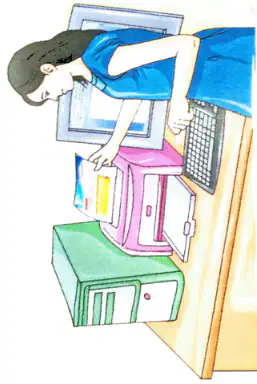
A student scans a drawing and then prints it. What sequence shows the IPO steps?
Input, output, process
Input, process, output
Process, input, output
Output, process, input
Which device is an output device in this scenario?
Scanner used to copy paper to computer
Keyboard used to type letters
Printer used to get a paper copy
Mouse used to move the pointer
Which type of software helps you perform a specific task like writing a story?
Hardware for computer parts
System software for control
Firmware for permanent code
Application software for tasks
A student wants to draw a picture and color it on the computer. Which software should they open?
Database software like Access
Word processing like MS Word
Multimedia software like Paint
System software like BIOS
What do we call the software that manages the hardware and all other programs?
Word processor application
Music player utility
Operating system of computer
Photo editor program
Which statement is true about system software?
It helps write stories only
It is needed to run the computer
It plays movies automatically
It draws pictures and shapes
Which statement best explains an operating system for a computer?
It cleans the keyboard and mouse
It draws pictures on the computer screen
It gives internet to the computer
It tells programs when and how to run
Microsoft Windows runs on almost what share of home computers worldwide, according to the fact file?
About 20 per cent
About 50 per cent
About 5 per cent
About 90 per cent
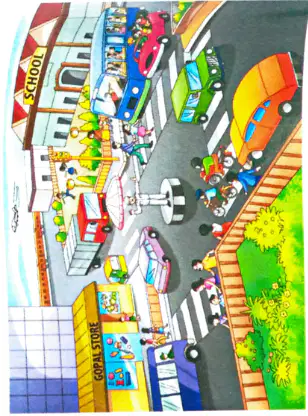
Which example shows how an operating system controls a computer, similar to a traffic policeman?
It paints stripes on the street
It counts cars on the road
It chooses the color of the desk
It decides which program runs first
Which part of a computer can you see and touch?
Hardware parts you can touch
Software instructions you read
Operating system you install
Application icons on screen
What tells the hardware how to perform a task?
User hand signals
Cooling fan speed
Software instructions
Power supply cables
What would a computer be without software?
Of no use for tasks
Faster than normal
Able to work alone
Only better for games
Which is NOT a type of software mentioned?
Application software
Operating system
Firmware upgrade tool
System software
Which two types of software are listed?
Games and videos
Driver and firmware
Input and output
Application and system
What is the set of instructions that tells the hardware how to perform tasks?
Data
Keyboard
Monitor
Software
Which statement is true about MS Windows?
It is hardware
It is an application software
It is only output
It is a keyboard
Who is the famous tech leader described as co‑creator of Macintosh and iPhone, born on 24 February 1955 in California?
Bill Gates
Steve Jobs
Mark Zuckerberg
Tim Berners‑Lee

