
 Worksheets
Internet Uses and the Search Process
Total questions: 33
Worksheet time: 17mins
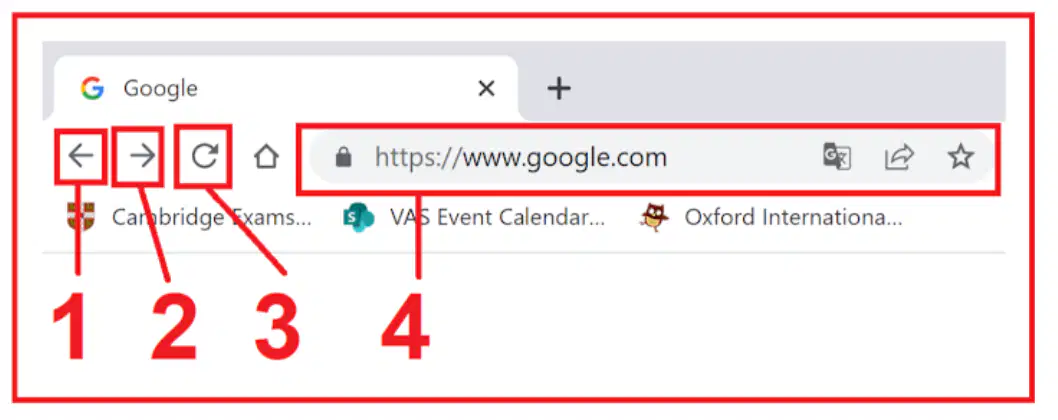
What is the button '1'?
Back
Previous
Refresh
Address bar
What is the button '2'?
Back
Next
Refresh
Address bar
What is the button '3'?
Back
Previous
Refresh
Address bar
What is the '4' box?
Back
Previous
Refresh
Address bar
Which tool do you open first when you want to search online?
Video game console
Drawing canvas app
Web browser
Music player app
What do we call the short words we type to the search box to find information?
Bookmarks list
Usernames tag
Passwords code
Keywords
Which step comes right after going to a search engine when we want to search Information on the Internet?
Turn off the computer
Enter the keywords
Print the results page
Open a new video
You want to learn about dolphins. Which keyword is best to type?
Water and ocean stuff
Fun animals facts
Dolphins
Big sea things
Which activity from the list is used to talk with friends online?
Shopping
Search information
Chat
Music
A friend typed very long sentences into the search box and got poor results. What should they try instead?
Use clear short keywords
Click every single link
Restart the computer
Close the browser quickly
Put these steps in the best order for searching online: A) Read the results, B) Enter the keywords, C) Open a web browser, D) Go to a search engine.
C, B, D, A
B, C, D, A
C, D, B, A
D, C, B, A
Which tool helps you open websites?
A web browser program
A website home page
A single web page
A long URL address

What is the name of the web browser?
Chrome
Edge
Safari
A website is most like which item?
A bookmark
One sheet
A whole book
A single word
A web page is most like which part of a book?
One page
The index
The cover
The title
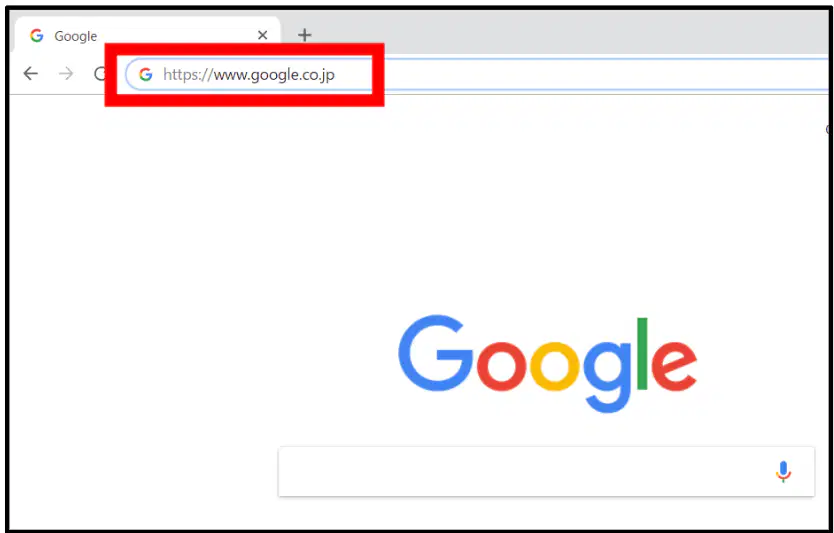
You want to visit a site by typing its address. What is this address called?
The site picture
The web page note
The browser tab
The URL
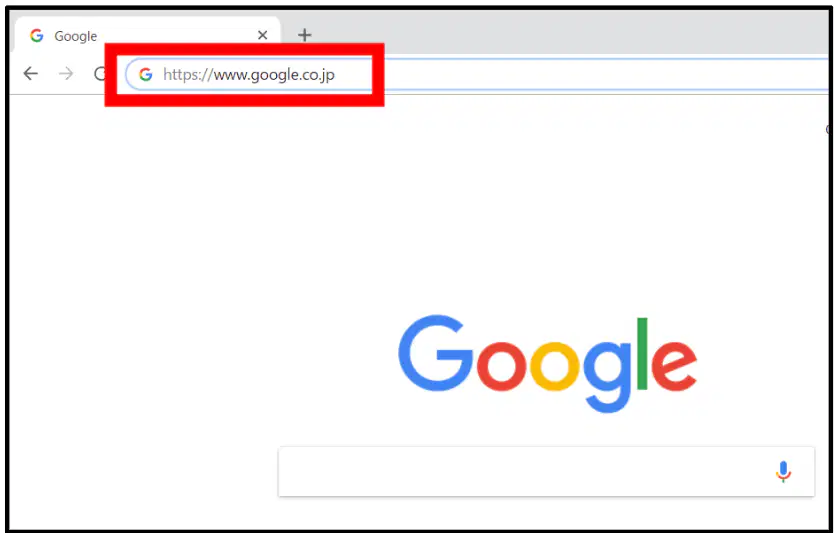
Where do you type a URL in a browser?
On the status line
In the menu list
On the home page
In the address bar
You open Chrome and type a URL. What are you using to reach the website?
An online bookmark
A single web page
A website chapter
A web browser app
Which statement best shows the difference between a website and a web page?
Website is a book, page is one page
Both are one page only
Both are a whole book
Neither is like a book
What does the address bar show in a web browser?
Your favorite bookmarks list
The computer’s battery level
Pictures from the web page
The website address you visit
Which tool helps you find new information on the internet?
Drawing tool palettes
Music player programs
Photo editing apps
Search engine websites
Where do you type a website address to go to a page directly?
In the address bar
On the home screen icon
In the search box field
Inside the page footer
What do you type into a search box?
Long lists of numbers
Only website addresses
Your computer password
Words about what to find
Which is an example of a search engine?
vas.edu.vn
google.com
mail.google.com
office.com
You want pictures of dogs but don’t know a website. What should you use first?
The volume control
The downloads folder
The address bar line
A search engine
You want to go to the website: www.example.com. What should you use?
Type it in the search box
Open the settings menu
Type it in the address bar
Click the refresh button
What is a keyword when using a search engine?
The text typed to find information
A picture you click to open apps
A button that closes a webpage
A tool that saves favorite sites
Which action uses tabs in a browser?
Opening several pages at once
Typing a strong password
Turning off the computer
Saving a site for later visits
What does a bookmark help you do?
Open a brand new browser
Translate words into English
Save a website to visit again
Print a webpage quickly
You want pictures of cats. Which keyword works best?
All the best websites
Many animals everywhere
Cute cat photos
Find interesting things
You are reading news and doing homework online. What is the best way to switch between these pages?
Clear history to move pages
Bookmark both and shut down
Use two tabs to multitask
Type the URLs every time
Your class needs the school library website every day. What should you do to access it quickly?
Search the whole internet again
Type a long address each time
Create a bookmark for the site
Open a new tab each morning
Which sentence is true for better searching?
Type short, specific keywords
Click lots of random results
Use long sentences with many words
Avoid using the search box

