
NEW
Font size
 Worksheets
1. Introduction & 2. Architecture
Total questions: 15
Worksheet time: 8mins
Which statement best describes the event-driven model in Windows Forms?
Code runs strictly top to bottom without waiting
The UI polls continuously for hardware interrupts
All controls execute their methods simultaneously
The application waits for user actions and responds
In a Windows Forms application, what is the primary role of a Form compared to a Control?
Form is a single pre-built button component
Form acts as the main container for controls
Form renders text-based input only
Form is an event handler for click actions
Which action ensures your Windows Forms project targets the correct platform for this course?
Install Xamarin workload before creating the project
Skip framework selection and accept default settings
Select .NET Core template in the new project list
Choose .NET Framework 4.7.2 or later during setup
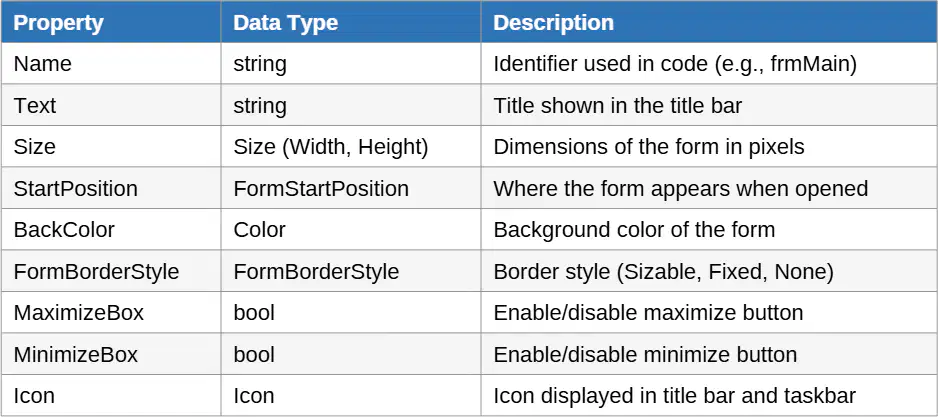
Which property determines where a Windows Form first appears when the application starts?
Size property sets initial location and dimensions
FormBorderStyle property positions the window at launch
StartPosition property controls initial location
BackColor property defines initial location on screen
Which control category primarily allows users to enter or select data in a Windows Forms application?
Output controls for information display
Input controls for data entry
Action controls for user triggers
Container controls for organization
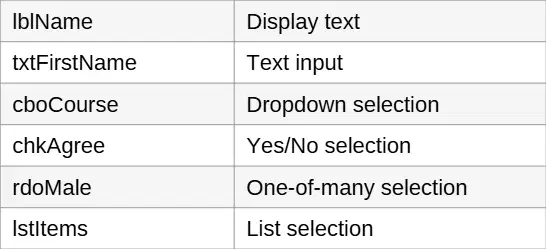
You are naming a TextBox that collects a first name. Which C# prefix follows standard Windows Forms conventions?
lbl for text display
txt for text input
btn for click actions
cbo for dropdowns
Which TextBox property prevents users from modifying its content while still displaying it?
MaxLength property set to zero
ReadOnly property set to true
PasswordChar property set to '*'
Multiline property set to false
A form needs a single choice among several courses while still showing the list. Which control best fits this requirement?
TextBox for manual typing
ComboBox with dropdown list
CheckBox for multiple options
DateTimePicker for scheduling

You must allow users to choose exactly one option from a group and ensure selections in separate groups don’t affect each other. What should you use and how should it be arranged?
RadioButtons placed inside a GroupBox
CheckBoxes placed inside one Panel
ComboBox with DropDownStyle Simple
TextBox with MaxLength and Multiline
In a Windows Forms app, which Label property is responsible for automatically resizing the label to fit its content?
ForeColor sets the displayed text color
BorderStyle changes visual frame style
AutoSize expands or shrinks to fit text
TextAlign adjusts alignment within bounds
You need a confirmation dialog with Yes and No choices plus a Cancel option and a question icon. Which MessageBox.Show configuration best meets this requirement?
MessageBoxButtons.OK with Warning icon
MessageBoxButtons.OKCancel with Information icon
MessageBoxButtons.YesNoCancel with Question icon
MessageBoxButtons.YesNo with Error icon
Which control event is appropriate for validating a TextBox as the user types?
MouseEnter on any control
TextChanged on the TextBox control
Click on the TextBox control
Load on the parent Form control
You need to initialize ComboBox items and set default selections before any user interaction. Which event should you handle?
CheckedChanged to set defaults
KeyPress to populate controls
Load to initialize controls
FormClosing to prepare controls
In the Save button handler, which sequence correctly computes age from a DateTime birthDate while ensuring upcoming birthdays are handled?
age = DateTime.Today.Year - birthDate.Year; if (birthDate > DateTime.Today.AddYears(-age)) age--;
age = (DateTime.Today - birthDate).Days / 365; if (birthDate.Month == DateTime.Today.Month) age--;
age = DateTime.Now.Year - birthDate.Year; if (birthDate < DateTime.Today.AddYears(age)) age--;
age = DateTime.Today.Year - birthDate.Year; if (birthDate >= DateTime.Today) age--;
Which practice best supports a clean, professional Windows Forms UI when arranging controls?
Rely on default positions without adjustments
Place all controls inside a single large GroupBox
Align controls consistently using layout containers
Use random TabIndex values across controls

