
NEW
Font size
 Worksheets
Unit 1: Computer Basics & History
Total questions: 31
Worksheet time: 16mins
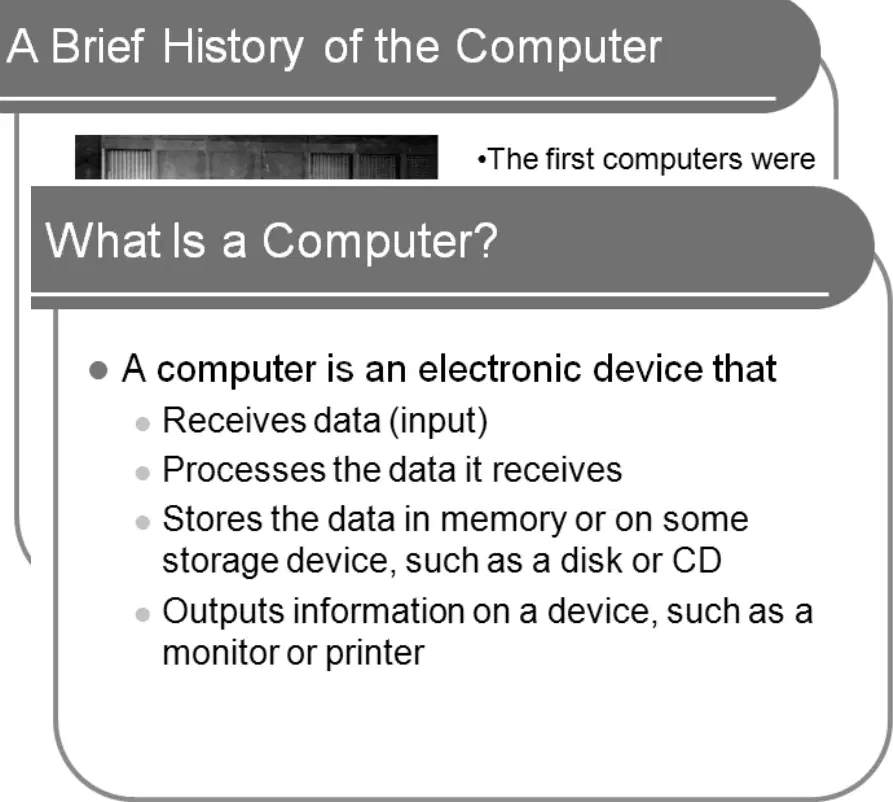
Which statement best defines a computer in the context of basic architecture concepts?
An analog tool that collects inputs but never outputs results
A digital appliance that displays graphics without processing data
A mechanical device that only stores and retrieves information
An electronic device that receives, processes, stores, and outputs data
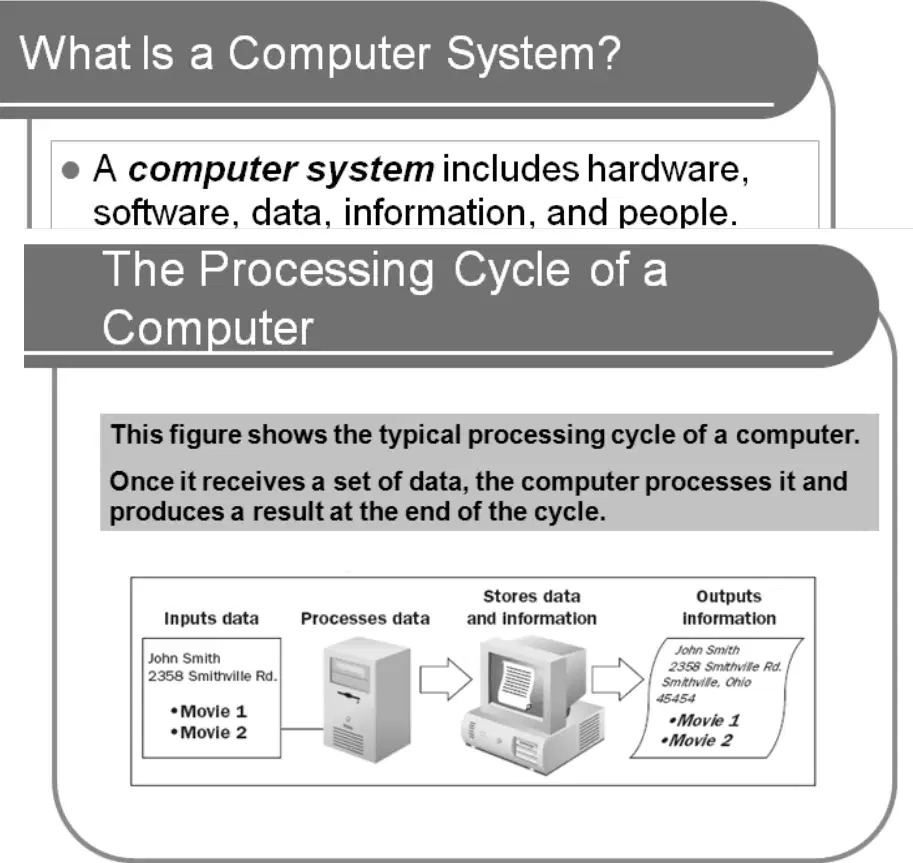
In the processing cycle diagram, what is the correct sequence for handling data in a typical computer system?
Input data → Process data → Store data → Output information
Input data → Store data → Output information → Process data
Process data → Input data → Output information → Store data
Store data → Input data → Process data → Output information
Which statement best distinguishes special-purpose computers from general-purpose computers?
Special-purpose computers run varied applications for many tasks
General-purpose computers cannot be reprogrammed for different uses
Special-purpose computers control dedicated devices with fixed tasks
General-purpose computers are embedded in appliances for one function
A medium-sized company needs to support hundreds of users with shared computing resources. Which class of general-purpose computer is the best fit?
Mobile notebooks for field staff only
Desktop workstation for individual employees
Supercomputer optimized for scientific models
Mid-range server designed for multiuser workloads
Which description correctly matches a high-end computer class with its typical use?
Supercomputer primarily manages company payroll and invoicing
Mainframe performs single-function control in household devices
Supercomputer handles everyday office tasks for small teams
Mainframe supports thousands of users for enterprise processing
Which option correctly identifies the two basic types of computer software?
System software and application software
Cloud platforms and web browsers
Firmware and embedded middleware
Programming suites and user utilities
Which statement best defines a local area network (LAN)?
Computers linked in the same building or department
A single computer storing all programs locally
Computers connected across many cities and countries
A private network shared with outside suppliers only
In a small office where clients connect to a central server through a hub to share a printer, which component primarily stores data and software for all users?
Each client desktop machine
The external internet router
The shared printer hardware
The server in the network room
Which scenario best distinguishes an intranet from an extranet?
Employees only access internal resources securely
Vendors only access public web pages externally
Customers only connect through the open Internet
Students only share files with the general public
Which strategic choice would most effectively leverage the Internet as a business tool described as the largest network used daily by millions?
Disable online access for all remote employees
Limit communication strictly to paper memos
Replace all networks with isolated stand‑alone PCs
Deploy a global cloud platform for collaboration
Which trend aligns with predictions about computers in the near future?
Reduced computing power across new devices
Fewer people working remotely with laptops
Hardware costs increasing for home offices
Wireless devices becoming commonplace for work
A city government plans daily operations using technology listed for everyday life. Which application best matches those examples?
Noncomputer appliances used in all facilities
Mechanical locks without digital monitoring
Manual archives stored in paper file rooms
Electronic security systems for public buildings
Which sequence correctly launches the CAD user interface from a Windows desktop?
Right-click desktop, choose Refresh, then open CAD
Open Task Manager, select CAD, click Run new task
Double-click any folder, then press Enter twice
Click Start, choose the CAD program from the menu
Press Esc, type CAD in Notepad, then save file

In the CAD user interface shown, what primary function does a toolbar button’s tooltip serve when you hover over it?
It displays the button’s name for identification
It provides step‑by‑step usage tutorials
It lists all related commands for reference
It shows the current drawing scale settings
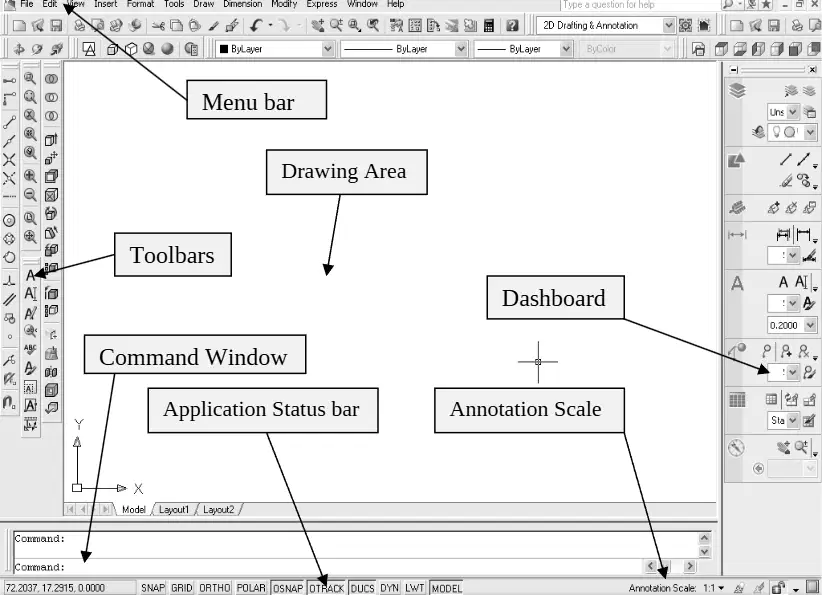
Which component is best used to enter command names and see prompts and messages during drawing operations?
Menu bar at the top area
Command window dockable and resizable
Dashboard with control panels
Application status bar with coordinates

Which statement best distinguishes a floating toolbar from a docked toolbar in a CAD interface?
Floating toolbars snap permanently to window edges
Docked toolbars disappear when a command is active
Floating toolbars can resize and move freely
Docked toolbars cannot be moved or resized ever

You want to toggle Grid and Snap while monitoring cursor coordinates. Which interface element should you use?
Command window history list
Application Status Bar with mode buttons
Drawing canvas right-click context menu
Dashboard control panel for layers

When the drawing status bar is turned on, where do its tools appear, and what happens when it is turned off?
Appear inside dashboard panels; tools move to command window when off
Appear at top of application window; tools are hidden when off
Appear at bottom of drawing area; tools move to application status bar when off
Appear in a floating palette; tools remain unavailable when off
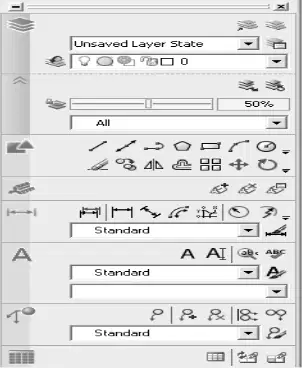
For quick access to annotation scale controls grouped by function with large icons, which interface should you open?
Application status bar coordinate display
Dashboard control panels with panel icons
Floating standard toolbar of common tools
Command window with alias inputs
Which interface element allows you to quickly access frequently used commands in a CAD application?
Menu bar with dropdown options
Floating toolbar with customizable icons
Application status bar with notifications
Command window for direct input
What is the primary function of the command window in a CAD software environment?
To provide access to online help resources
To manage layers and object properties
To enter commands and view system messages
To display graphical outputs of the drawing
In a CAD interface, what does the term 'snap' refer to?
A feature that allows precise alignment of objects
A tool for quickly saving drawings
A method for exporting files to different formats
A command for undoing the last action
Which interface element is essential for managing layers in a CAD application?
Command window for direct input
Layer properties manager
Application status bar
Floating toolbar with layer controls
What is the primary purpose of a rendering engine in CAD software?
To store project files in the cloud
To manage user permissions for file access
To convert 2D drawings into 3D models
To enhance the visual quality of 3D models
Which command is typically used to create a new drawing file in CAD software?
Open
Import
New
Save As
What is the primary function of a database management system (DBMS)?
To create and manage user interfaces
To store, retrieve, and manage data efficiently
To perform calculations and data analysis
To provide network security for data transmission
Which of the following best describes the role of an operating system?
To connect to the internet and manage web traffic
To develop applications and software programs
To manage hardware resources and provide a user interface
To store data in cloud storage solutions
In the context of cybersecurity, what does the term 'phishing' refer to?
A strategy for improving network performance
A process of backing up data to prevent loss
A technique used to trick individuals into revealing sensitive information
A method of securing data through encryption
Which feature in CAD software allows users to quickly access and execute frequently used commands?
Command window for direct input
Application status bar with notifications
Floating toolbar with customizable shortcuts
Menu bar with dropdown lists
In a CAD environment, what is the primary role of the layer properties manager?
To enhance the visual quality of 3D models
To store project files in the cloud
To manage user permissions for file access
To control the visibility and organization of different drawing elements
What is the main purpose of the command history in CAD software?
To manage layers and object properties
To display a list of previously executed commands for reference
To store project files in the cloud
To provide access to online help resources

