
 Worksheets
Adobe Illustrator - Tools and Panels
Total questions: 20
Worksheet time: 20mins
Name
Class
Date
1.
Draws circles and ovals. (L)
a)
Polar Grid tool
b)
Ellipse tool
c)
Circular tool
d)
Oval tool
2.

Draws regular, multi-sided shapes.
a)
Multi-sided tool
b)
Vertical tool
c)
Hexagonal tool
d)
Polygonal tool
3.

Cuts paths at SPECIFIED points. (C)
a)
Eraser tool
b)
Slice tool
c)
Scissors tool
d)
Knife tool
4.
Draws clockwise and counterclockwise spirals.
a)
Spiral tool
b)
Arc tool
c)
Rectangular Grid tool
d)
Polar Grid tool
5.

Cuts objects along a freehand path you draw with the tool, dividing objects into their component-filled faces. (A face is an area undivided by a line segment.)
a)
Eraser tool
b)
Scissors tool
c)
Knife tool
d)
Slice tool
6.

Creates and edits meshes and mesh envelopes. (U)
a)
Gradient tool
b)
Eyedropper tool
c)
Mesh tool
d)
Live Paint Selection tool
7.

Smooths Bezier paths.
a)
Smooth tool
b)
Pencil tool
c)
Shape tool
d)
Line tool
8.

Selects points or path segments within objects. (A)
a)
Selection tool
b)
Direct Selection tool
c)
Group Selection tool
d)
Magic Wand tool
9.
Which graphic is a better option for scaling images without loss of quality
a)
Raster
b)
Vector
10.

What panel is this?
a)
layers
b)
swatches
c)
gradient
d)
pathfinder
11.
Draws freehand and calligraphic lines, as well as art, patterns, and bristle brush strokes on paths. (B)
a)
Mesh tool
b)
Blend tool
c)
Paintbrush tool
d)
Live Paint Bucket tool
12.
Draws and edits freehand lines. (N)
a)
Pencil tool
b)
Flare tool
c)
Line tool
d)
Freehand tool
13.

Which panel is this?
a)
layers
b)
color
c)
swatches
d)
gradient
14.
Samples and applies color, type, and appearance attributes, including effects, from objects. (I)
a)
Eyedropper tool
b)
Gradient tool
c)
Mesh tool
d)
Paintbrush tool
15.
What is a pixel?
a)
Picture element - the small dots that make up an image.
b)
How an image is stored on the computer.
c)
A type of image
d)
A special type of photograph
16.

Name the Tool that is selected
a)
Color
b)
Outline
c)
Stroke
d)
Pink
17.
Erases ANY area of the object over which you drag. (Shift-E)
a)
Eraser tool
b)
Scissors tool
c)
Slice tool
d)
Knife tool
18.

Selects entire objects
a)
Pen tool
b)
Selection tool
c)
Direct Selection tool
d)
Magic wand tool
19.
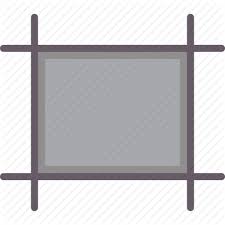
Creates separate artboards for printing or export.
a)
Selection tool
b)
Canvas tool
c)
Artboard tool
d)
Art tool
20.

Name the Tool that is selected
a)
Color
b)
Fill
c)
Swatch
d)
Pink
100 %

