
NEW
Font size
 Worksheets
Bài Khảo Sát Chất Lượng Cuối Học Kỳ I - Tin Học Lớp 3
Total questions: 15
Worksheet time: 8mins
Look at the traffic sign with the words NO OVERTAKING. What type of information does this sign show?
Image only
Sound only
Text and image
Text only
Which body part processes information when you take a test on a computer?
Nose
Hand
Eye
Brain
Which computer part lets people see text, pictures, and movies on the computer?
Keyboard
Computer case
Monitor
Mouse
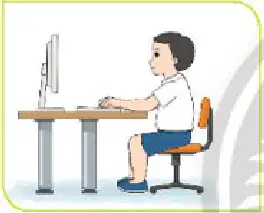
Choose the correct sitting posture when using a computer.
Hunched over desk
Standing and typing
Leaning far back
Sitting upright
When placing both hands on the keyboard, which row should your fingers start on?
Top letter row
Number row
Home row keys
Bottom letter row
Which online content is NOT suitable for Grade 3 students?
Learning English
Reading good articles
Horror videos
Cartoons
What is the best place to sit when working with a computer?
Too dark, light shines into eyes
Bright enough, light not in eyes
Very dark, no light at all
Too bright, light in eyes
After typing a word, where should your fingers return?
Bottom letter row
Space bar row
Top letter row
Home row keys
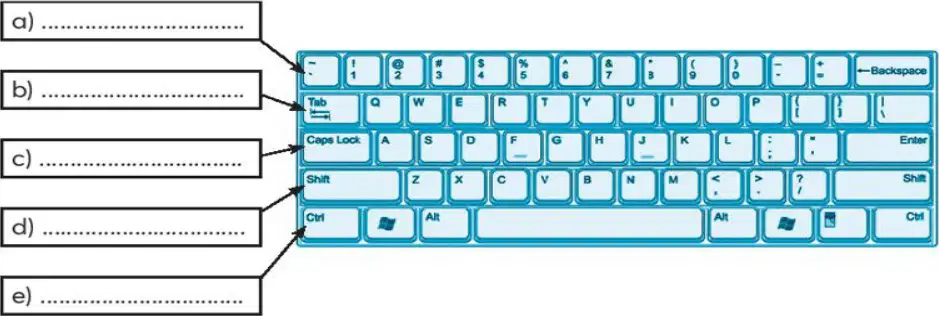
In the keyboard diagram, what is the name of the row labeled b)?
Number row
Function keys
Arrow keys
Home row
Which action online is safe and polite for students?
Go online without adults
Visit age-appropriate sites
Trust every online message
Cyberbullying classmates
Before accessing the Internet, what should a student do?
Download anything quickly
Share passwords with friends
Ask teacher or parents first
Ignore rules and click links
Which is the primary job of the mouse in basic computer use?
Type letters
Select and click
Show pictures
Store files
Why is the home row important for typing?
It is only numbers
It stores programs
It helps fingers find keys
It shows movies
When light shines directly into your eyes from the screen, what should you do?
Ignore and keep working
Sit closer to screen
Increase brightness a lot
Move to reduce glare
If you encounter scary video content online, what is the best response?
Keep watching alone
Tell a trusted adult
Share with friends
Post mean comments

