Wayground
Technology Vocabulary Quiz - Printable ศาสตร์ Worksheets 6th ระดับชั้น - Wayground

Technology Vocabulary Quiz

John Sautel

สร้างโดย John Sautel

20 คำถาม

6th ระดับชั้น

ศาสตร์

อัปเดตแล้ว ส.ค. 2569

แบบทดสอบคำศัพท์ด้านเทคโนโลยีสำหรับนักเรียนชั้นประถมศึกษาปีที่ 6 เป็นแบบฝึกหัดคอมพิวเตอร์ที่สร้างพื้นฐานความรู้เกี่ยวกับฮาร์ดแวร์ ซอฟต์แวร์ หน่วยเก็บข้อมูล หน่วยความจำ เครือข่าย เว็บเบราว์เซอร์ และส่วนติดต่อผู้ใช้แบบกราฟิก แบบทดสอบประกอบด้วยคำถามแบบเลือกตอบ 20 ข้อ ช่วยให้นักเรียนระบุส่วนประกอบต่างๆ เช่น CPU เมาส์ ฮาร์ดไดรฟ์ และ RAM แยกแยะความแตกต่างระหว่างอินพุตและเอาต์พุต เชื่อมโยงไบต์กับจำนวนบิต และจดจำคำศัพท์ต่างๆ เช่น แอปพลิเคชัน เครือข่าย เว็บเบราว์เซอร์ และไอคอน รูปแบบแบบทดสอบช่วยให้นักเรียนได้ฝึกฝนการจับคู่คำจำกัดความและข้อความที่กระชับกับคำศัพท์ด้านเทคโนโลยีที่ถูกต้อง รวมถึงคำถามแบบถูกหรือผิด แบบฝึกหัดนี้มีประโยชน์สำหรับการแนะนำคำศัพท์คอมพิวเตอร์ ทบทวนแนวคิดที่สำคัญหลังการเรียนการสอน หรือตรวจสอบว่านักเรียนสามารถนำคำจำกัดความไปใช้ได้อย่างอิสระหรือไม่ แบบฝึกหัดที่พิมพ์ได้ฟรีนี้มีเฉลยคำตอบครบถ้วนเพื่อการตรวจสอบและตรวจให้คะแนนอย่างมีประสิทธิภาพ เหมาะสำหรับชั้นเรียนคอมพิวเตอร์ชั้นประถมศึกษาปีที่ 6 ศูนย์เทคโนโลยี การบ้าน หรือการตรวจสอบคำศัพท์ในชั้นเรียน

การตั้งค่าแผ่นงาน

ขนาดตัวอักษร

S
M
L
XL
Waygroundแผ่นงาน

Technology Vocabulary Quiz

คำถามทั้งหมด: 20

ชื่อ
ระดับ
วันที่
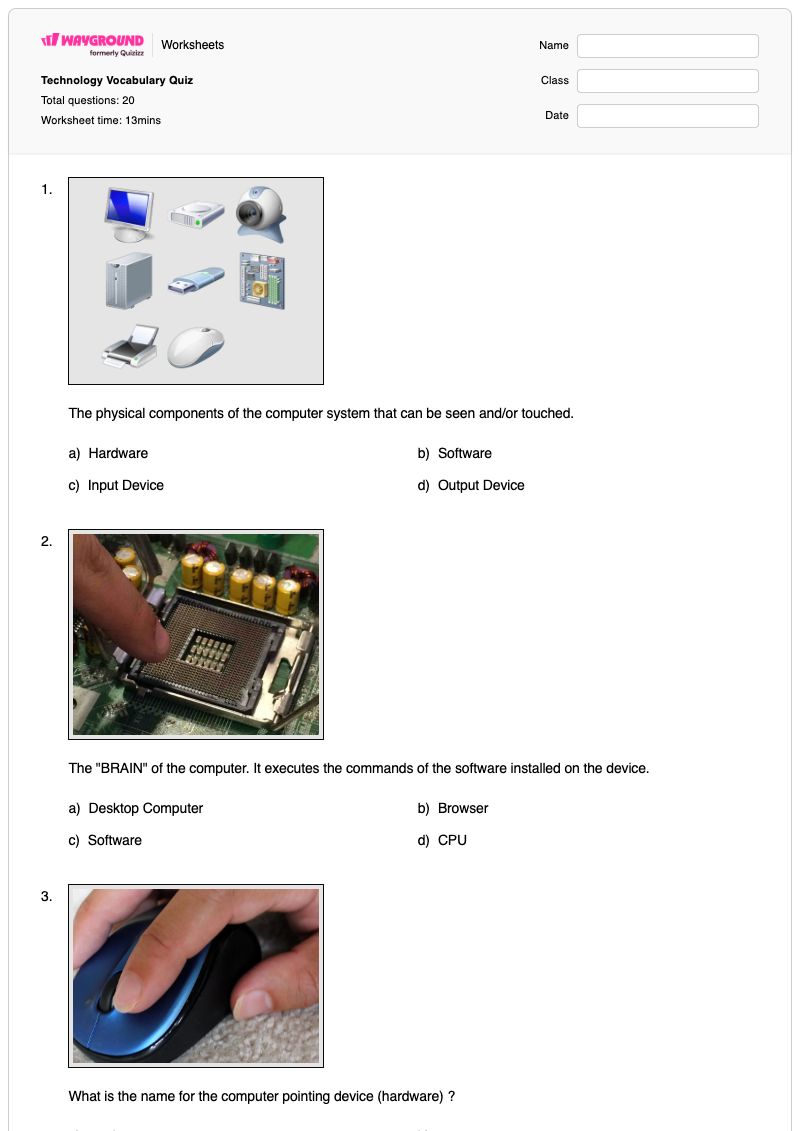
1.
The physical components of the computer system that can be seen and/or touched.

The physical components of the computer system that can be seen and/or touched.

a)

Hardware

b)

Software

c)

Input Device

d)

Output Device

2.
The "BRAIN" of the computer. It executes the commands of the software installed on the device.

The "BRAIN" of the computer. It executes the commands of the software installed on the device.

a)

Desktop Computer

b)

Browser

c)

Software

d)

CPU

3.
What is the name for the computer pointing device (hardware) ?

What is the name for the computer pointing device (hardware) ?

a)

modem

b)

mouse

c)

sound card

d)

button

4.

The CPU is the __________ of the computer

a)

Brain

b)

Body

c)

Heart

d)

Knee

5.
How many bits (ones and zeroes) are there in one byte ?

How many bits (ones and zeroes) are there in one byte?

a)

one

b)

two

c)

eight

d)

they are the same

6.

One keystroke is equal to one byte.

a)

True

b)

False

7.

What is the device inside the computer that reads and/or writes information (stores files)

a)

disk drive

b)

flash drive

c)

hard drive

d)

food drive

8.
A set of instructions done by the computer

A set of instructions done by the computer

a)

applications

b)

software

c)

hardware

d)

browser

9.
A complete, self-contained program that does a specific function

A complete, self-contained program that does a specific function

a)

browser

b)

applications

c)

database

d)

internet

10.
The type of storage that changes, and allows multi-tasking.

The type of storage that changes, and allows multi-tasking.

a)

ROM - Read-only memoryThis is a wrong answer

b)

hard drive

c)

megabyte

d)

RAM - Random Access Memory

11.
A group of computers that are connected

A group of computers that are connected

a)

printer

b)

peripheral

c)

network

d)

woodwork

12.
A program or application used to view Internet pages

A program or application used to view Internet pages

a)

application

b)

database

c)

freeware

d)

browser

13.
a small picture used to represent a file or program in a GUI (graphic user interface)

a small picture used to represent a file or program in a GUI (graphic user interface)

a)

icon

b)

ghost

c)

radio button

d)

folder

14.

INPUT is the data that goes into a computer or device.

a)

true

b)

false

15.

An example of OUTPUT is an image on a monitor.

a)

true

b)

false

16.
Power Supply
a)
A device that provides power to a computer.
b)
A device that cools the internal parts of a computer. Most computers have more than one.
c)
The case that holds all of the internal computer parts.
d)
The card that plugs into the motherboard and runs the monitor(s).
17.
The component that holds all of the internal computer parts.
a)
Case
b)
Optical Drive
c)
Central Processing Unit (CPU)
d)
Hard Drive
18.
Random Access Memory. A chip that stores temporary data that goes away when the computer is turned off.
a)
RAM
b)
Optical Drive
c)
Hard Drive
d)
Central Processing Unit (CPU)
19.
Which of the following is used to store data and programs for repeated use?
a)
Hard Drive
b)
RAM
c)
Internal cache memory
d)
ROM
20.
Identify
Identify
a)
Follower
b)
Admirer
c)
Fan
Waygroundแป้นคำตอบ

Technology Vocabulary Quiz

คำถามทั้งหมด: 20

1.
a)

Hardware

2.
d)

CPU

3.
b)

mouse

4.
a)

Brain

5.
c)

eight

6.
a)

True

7.
c)

hard drive

8.
a)

applications

9.
b)

applications

10.
d)

RAM - Random Access Memory

11.
c)

network

12.
d)

browser

13.
a)

icon

14.
a)

true

15.
a)

true

16.
a) A device that provides power to a computer.
17.
a) Case
18.
a) RAM
19.
a) Hard Drive
20.
c) Fan

คำถามที่พบบ่อย

แบบทดสอบคำศัพท์ด้านเทคโนโลยีนี้ครอบคลุมหัวข้ออะไรบ้าง?

แบบฝึกหัดคอมพิวเตอร์สำหรับนักเรียนชั้นประถมศึกษาปีที่ 6 นี้ ประกอบด้วยคำถามแบบเลือกตอบ 20 ข้อ เพื่อประเมินคำศัพท์และคำจำกัดความพื้นฐานด้านเทคโนโลยี นักเรียนจะได้ระบุฮาร์ดแวร์และซอฟต์แวร์ แยกแยะความแตกต่างระหว่าง CPU เมาส์ ฮาร์ดไดรฟ์ และ RAM ตีความตัวอย่างการป้อนข้อมูลและการแสดงผล และจดจำคำศัพท์ต่างๆ เช่น แอปพลิเคชัน เครือข่าย เบราว์เซอร์ และไอคอน นอกจากนี้ยังมีคำถามแบบถูกหรือผิดเพื่อตรวจสอบความเข้าใจเกี่ยวกับไบต์ การกดแป้นพิมพ์ การป้อนข้อมูล และการแสดงผล

ฉันจะใช้แบบฝึกหัดนี้ในการสอนคำศัพท์พื้นฐานเกี่ยวกับคอมพิวเตอร์ได้อย่างไร?

แนะนำคำศัพท์เป็นกลุ่มๆ ให้ตรงกับแบบทดสอบ ได้แก่ ส่วนประกอบทางกายภาพและการประมวลผล การจัดเก็บและหน่วยความจำ ซอฟต์แวร์และแอปพลิเคชัน และเครือข่ายและอินเทอร์เฟซ ก่อนที่นักเรียนจะทำแบบทดสอบแบบเลือกตอบ ให้พวกเขาอธิบายความแตกต่างระหว่าง CPU ฮาร์ดไดรฟ์ และ RAM จากนั้นให้พวกเขาอธิบายว่าทำไมภาพบนจอภาพจึงแสดงถึงผลลัพธ์ ใช้เฉลยคำตอบเพื่ออธิบายว่าเหตุใดคำจำกัดความแต่ละข้อจึงตรงกับคำศัพท์นั้นๆ แทนที่จะเน้นเฉพาะตัวอักษรที่เลือก

ฉันควรระวังข้อผิดพลาดอะไรบ้างในแบบทดสอบคำศัพท์คอมพิวเตอร์นี้?

นักเรียนอาจสับสนระหว่างฮาร์ดแวร์กับซอฟต์แวร์ หรือเลือกฮาร์ดไดรฟ์เมื่อคำถามอธิบายถึงการเปลี่ยนหน่วยความจำที่ใช้สำหรับการทำงานหลายอย่างพร้อมกัน ซึ่งในแบบฝึกหัดระบุว่าเป็น RAM นอกจากนี้ พวกเขายังอาจสับสนระหว่างเบราว์เซอร์กับแอปพลิเคชัน หรือสับสนระหว่างไอคอนกับโฟลเดอร์หรือองค์ประกอบอินเทอร์เฟซอื่นๆ ตรวจสอบคำตอบถูกหรือผิดอย่างระมัดระวัง โดยเฉพาะอย่างยิ่งข้อที่เกี่ยวกับบิตในหนึ่งไบต์และความแตกต่างระหว่างอินพุตและเอาต์พุต

ฉันจะมอบหมายและตรวจแบบทดสอบคำศัพท์ด้านเทคโนโลยีได้อย่างไร?

แบบทดสอบคำศัพท์ด้านเทคโนโลยีมีให้เลือกทั้งในรูปแบบไฟล์ PDF ที่สามารถพิมพ์ได้ และแบบทดสอบดิจิทัลบน Wayground แบบทดสอบนี้มีเฉลยคำตอบครบถ้วนสำหรับคำถามแบบเลือกตอบ 20 ข้อ และสามารถตรวจงานของนักเรียนที่พิมพ์ออกมาได้โดยการสแกนด้วยแอป Wayground for Teachers รูปแบบไฟล์ที่พิมพ์ได้ยังช่วยให้โรงเรียนสามารถลดเวลาการใช้หน้าจอระหว่างการทบทวนคำศัพท์ได้อีกด้วย

ฉันจะปรับแบบฝึกหัดคำศัพท์คอมพิวเตอร์นี้ให้เหมาะสมกับนักเรียนของฉันได้อย่างไร?

ใช้การตั้งค่าขั้นสูงของแบบฝึกหัดเพื่อปรับระยะห่างระหว่างตัวอักษร หรือเลือกขนาดตัวอักษรที่ใหญ่ขึ้น เพื่อให้รูปแบบคำจำกัดความและตัวเลือกอ่านง่ายขึ้น นอกจากนี้ คุณยังสามารถเปิดใช้งานแบบอักษรที่เหมาะสำหรับผู้ที่มีภาวะดิสเล็กเซียสำหรับคำถามแบบเลือกตอบและแบบถูกหรือผิด หรือแปลแบบทดสอบคำศัพท์เป็นภาษาอื่นเมื่อนักเรียนต้องการความช่วยเหลือด้านภาษา การเปลี่ยนแปลงเหล่านี้จะยังคงเน้นคำศัพท์เกี่ยวกับคอมพิวเตอร์ เช่น CPU, RAM, เบราว์เซอร์ และข้อมูลป้อนเข้า ไว้ในแบบฝึกหัด

ฉันจะหาแบบฝึกหัดแบบนี้เพิ่มเติมได้ที่ไหนบน Wayground?

Wayground มีแบบฝึกหัดและโจทย์ฝึกหัดมากมายให้ดาวน์โหลดฟรีในหลากหลายวิชา พร้อมไฟล์ PDF และเฉลยคำตอบ เพื่อช่วยเสริมสร้างทักษะและความเข้าใจในเนื้อหาสำคัญ ดูแหล่งข้อมูลเพิ่มเติมได้ที่ https://wayground.com/en-us/worksheets
