

Wayground
Computer Basics - Inside a Computer By Mr. B - Printable ศาสตร์ Worksheets 12th - 12th ระดับชั้น - Wayground

Computer Basics - Inside a Computer By Mr. B

Cyber Professor - Mr. B

By Cyber Professor - Mr. B

20 คำถาม

12th - 12th ระดับชั้น

ศาสตร์

21 เล่น

อัปเดตแล้ว ส.ค. 2569

พื้นฐานคอมพิวเตอร์ – ภายในคอมพิวเตอร์ เป็นแบบฝึกหัดคอมพิวเตอร์สำหรับนักเรียนชั้นมัธยมศึกษาปีที่ 6 (เกรด 12) ที่สามารถพิมพ์ได้ฟรี แบบฝึกหัดนี้ช่วยเสริมสร้างความเข้าใจของนักเรียนเกี่ยวกับส่วนประกอบภายในคอมพิวเตอร์และหน้าที่ของแต่ละส่วน นักเรียนจะได้ระบุเมนบอร์ด ซีพียู แรม หน่วยจ่ายไฟ การ์ดแสดงผล ฮีทซิงค์ การ์ดบลูทูธ การ์ดขยาย และฮาร์ดแวร์อื่นๆ พร้อมทั้งเชื่อมโยงแต่ละส่วนประกอบกับบทบาทของมันในด้านการประมวลผล หน่วยความจำ พลังงาน การระบายความร้อน การแสดงผล และการสื่อสาร แบบฝึกหัด 20 ข้อ ประกอบด้วยคำถามแบบเลือกตอบ 13 ข้อ คำถามแบบเติมคำในช่องว่าง 2 ข้อ กิจกรรมลากและวางประโยค 1 ข้อ กิจกรรมติดป้ายภาพ 2 ข้อ กิจกรรมจับคู่ 1 ข้อ และคำถามแบบเลือกหลายข้อ 1 ข้อ นักเรียนยังจะได้ติดป้ายส่วนประกอบคอมพิวเตอร์ที่มองเห็นได้ และแยกแยะความแตกต่างระหว่างฮาร์ดไดรฟ์กับโซลิดสเตทไดรฟ์ รูปแบบที่หลากหลายช่วยเสริมสร้างคำศัพท์ทางเทคนิค ความสัมพันธ์ระหว่างส่วนประกอบและหน้าที่ และการจดจำฮาร์ดแวร์ แบบฝึกหัดนี้มีเฉลยคำตอบครบถ้วนเพื่อความสะดวกในการตรวจสอบและทบทวน

การตั้งค่าแผ่นงาน

ขนาดตัวอักษร

S
M
L
XL
Waygroundแผ่นงาน

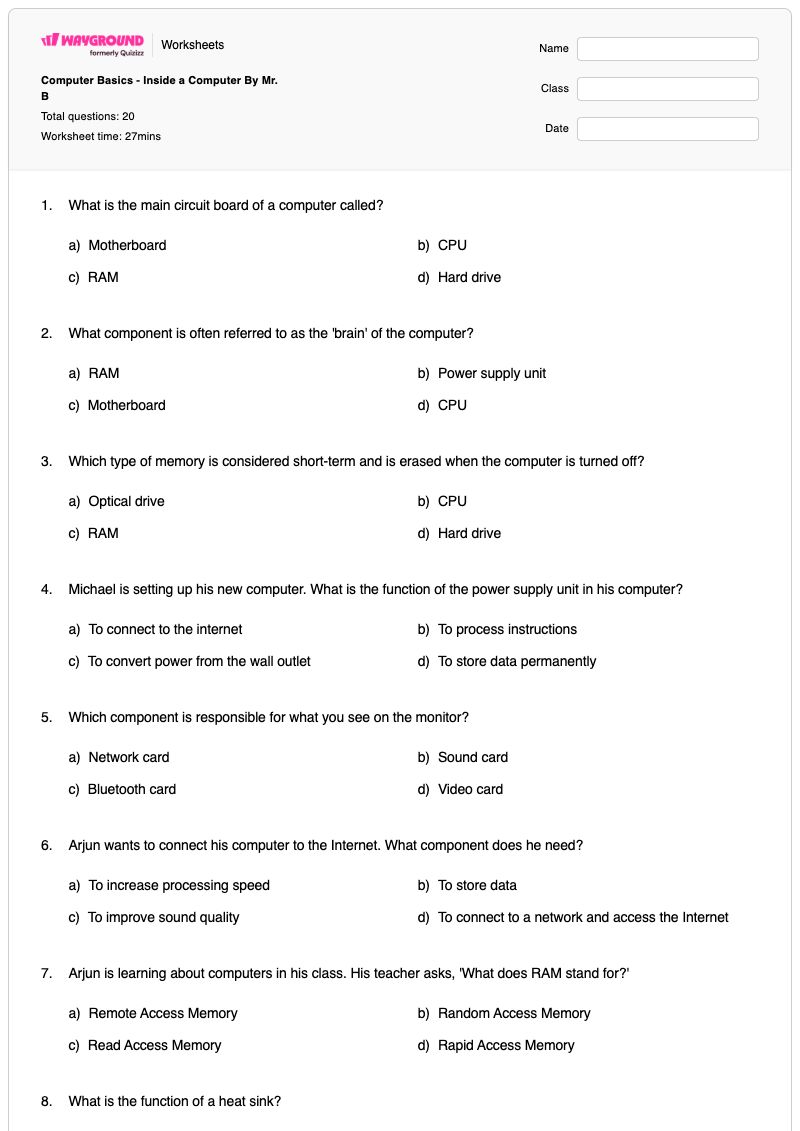
Computer Basics - Inside a Computer By Mr. B

คำถามทั้งหมด: 20

ชื่อ
ระดับ
วันที่
1.

What is the main circuit board of a computer called?

a)

Motherboard

b)

CPU

c)

RAM

d)

Hard drive

2.

What component is often referred to as the 'brain' of the computer?

a)

RAM

b)

Power supply unit

c)

Motherboard

d)

CPU

3.

Which type of memory is considered short-term and is erased when the computer is turned off?

a)

Optical drive

b)

CPU

c)

RAM

d)

Hard drive

4.

Michael is setting up his new computer. What is the function of the power supply unit in his computer?

a)

To connect to the internet

b)

To process instructions

c)

To convert power from the wall outlet

d)

To store data permanently

5.

Which component is responsible for what you see on the monitor?

a)

Network card

b)

Sound card

c)

Bluetooth card

d)

Video card

6.

Arjun wants to connect his computer to the Internet. What component does he need?

a)

To increase processing speed

b)

To store data

c)

To improve sound quality

d)

To connect to a network and access the Internet

7.

Arjun is learning about computers in his class. His teacher asks, 'What does RAM stand for?'

a)

Remote Access Memory

b)

Random Access Memory

c)

Read Access Memory

d)

Rapid Access Memory

8.

What is the function of a heat sink?

a)

To store data

b)

To connect to the internet

c)

To improve video quality

d)

To absorb heat from the CPU

9.

Michael is setting up a new home office and wants to connect his wireless headphones to his computer. Which component should he use for wireless communication over short distances?

a)

Network card

b)

Sound card

c)

Video card

d)

Bluetooth card

10.

Aria is building a custom gaming computer. What is the role of expansion cards in her computer?

a)

To provide additional storage

b)

To enhance or add new capabilities

c)

To cool the CPU

d)

To power the computer

11.
The is the computer's main circuit board. It's a thin plate that holds the , , connectors for the hard drive and optical…

The (a)   is the computer's main circuit board. It's a thin plate that holds the (b)   , (c)   , connectors for the hard drive and optical drives, expansion cards to control the video and audio, and connections to your computer's ports (such as USB ports). The motherboard connects directly or indirectly to every part of the (d)   .

เลือกจากคำด้านล่าง

motherboard

CPU

memory

computer

keyboard

monitor

printer

iPhone 15

mouse

scanner

12.
The (CPU), also called a , is located inside the computer case on the . It is sometimes called the of the computer, and its…

The (a)   (CPU), also called a (b)   , is located inside the computer case on the (c)   . It is sometimes called the (d)   of the computer, and its job is to carry out (e)   . Whenever you press a key, click the mouse, or start an application, you're sending instructions to the CPU.

เลือกจากคำด้านล่าง

central processing unit

processor

motherboard

brain

commands

graphics processing unit

hard drive

power supply

gps

tmobile chip

13.
RAM is your system's memory. Whenever your computer performs , it temporarily stores the in the RAM until it is needed.

RAM is your system's (a)   memory. Whenever your computer performs (b)   , it temporarily stores the (c)   in the RAM until it is needed.

เลือกจากคำด้านล่าง

short-term

calculations

data

long-term

graphics

files

video card

memory card

14.

Label the parts of the computer.

15.

Identify which image is a Hard Drive and a Solid-State Drive

16.
A computer uses a combination of :

A computer uses a combination of :

a)

hardware and software

b)

line paper and white paper

c)

monitor and digital pixels

d)

keyboard and mouse

17.

The CPU is the internal operating unit or brains of your computer.

a)

False

b)

True

18.

Match the following

Match the following

Central Processing Unit (CPU)

Match the following

Computer Case

Match the following

Monitor

Match the following

Hard Drive

Match the following

Keyboard

19.
The CPU fits into the motherboard's CPU socket, which is covered by the ____, an object that absorbs heat from the CPU.

The CPU fits into the motherboard's CPU socket, which is covered by the ____, an object that absorbs heat from the CPU.

a)

Sink

b)

Heat Sink

c)

Fan

d)

Ice

20.

What does CPU stand for?

a)

Central Processing Unit

b)

Control Processing Unit

c)

Computer Power Unit

d)

Core Processing Unit

e)

Central Processing Unit

Waygroundแป้นคำตอบ

Computer Basics - Inside a Computer By Mr. B

คำถามทั้งหมด: 20

1.
a)

Motherboard

2.
d)

CPU

3.
c)

RAM

4.
c)

To convert power from the wall outlet

5.
d)

Video card

6.
d)

To connect to a network and access the Internet

7.
b)

Random Access Memory

8.
d)

To absorb heat from the CPU

9.
d)

Bluetooth card

10.
b)

To enhance or add new capabilities

11.

motherboard

,

CPU

,

memory

,

computer

12.

central processing unit

,

processor

,

motherboard

,

brain

,

commands

13.

short-term

,

calculations

,

data

14.
15.
16.
a)

hardware and software

17.
b)

True

18.
 - 

Central Processing Unit (CPU)

,  - 

Computer Case

,  - 

Monitor

,  - 

Hard Drive

,  - 

Keyboard

19.
b)

Heat Sink

20.
a)

Central Processing Unit

, e)

Central Processing Unit

คำถามที่พบบ่อย

แบบฝึกหัด "พื้นฐานคอมพิวเตอร์ – ภายในคอมพิวเตอร์" ครอบคลุมเนื้อหาอะไรบ้าง?

แบบฝึกหัดคอมพิวเตอร์สำหรับนักเรียนชั้นมัธยมศึกษาปีที่ 6 นี้ ครอบคลุมวิธีการทำงานของส่วนประกอบคอมพิวเตอร์หลักๆ รวมถึงเมนบอร์ด ซีพียู แรม หน่วยจ่ายไฟ การ์ดแสดงผล แผ่นระบายความร้อน การ์ดบลูทูธ และการ์ดขยาย แบบฝึกหัด 20 ข้อนี้ประกอบด้วยคำถามแบบเลือกตอบ การเติมคำในช่องว่าง การลากและวาง การติดป้ายภาพ การจับคู่ และการเลือกหลายรายการ เพื่อให้นักเรียนได้ฝึกฝนทั้งคำศัพท์เกี่ยวกับส่วนประกอบและหน้าที่การทำงานของแต่ละส่วน

ฉันจะใช้แบบฝึกหัดนี้ในการสอนเกี่ยวกับหน้าที่ของส่วนประกอบต่างๆ ในคอมพิวเตอร์ได้อย่างไร?

แนะนำเมนบอร์ด ซีพียู แรม หน่วยจ่ายไฟ และส่วนประกอบอื่นๆ ด้วยแผนภาพคอมพิวเตอร์ที่มีป้ายกำกับ จากนั้นขอให้นักเรียนคาดเดาหน้าที่ของแต่ละส่วนก่อนมอบแบบฝึกหัด ใช้ตัวเลือกแบบปรนัยและแบบดรอปดาวน์เพื่อตรวจสอบคำอธิบาย เช่น บทบาทของแรมในการจัดเก็บข้อมูลระยะสั้น และบทบาทของซีพียูในการประมวลผลคำสั่ง จบด้วยการอภิปรายเกี่ยวกับงานติดป้ายกำกับภาพ และการระบุความแตกต่างระหว่างฮาร์ดไดรฟ์กับโซลิดสเตทไดรฟ์ เพื่อเป็นการทบทวนฮาร์ดแวร์ด้วยภาพ

ฉันควรระวังข้อผิดพลาดอะไรบ้างเมื่อนักเรียนทำแบบฝึกหัดเกี่ยวกับส่วนประกอบของคอมพิวเตอร์นี้?

นักเรียนอาจสับสนระหว่างเมนบอร์ด ซึ่งเป็นส่วนที่เชื่อมต่อชิ้นส่วนคอมพิวเตอร์ กับซีพียู ซึ่งเป็นส่วนที่ประมวลผลคำสั่ง หรือเข้าใจผิดว่าแรมเป็นหน่วยเก็บข้อมูลถาวร ทั้งๆ ที่จริงแล้วมันเก็บข้อมูลชั่วคราว นอกจากนี้ พวกเขายังอาจสับสนระหว่างหน้าที่แปลงพลังงานของหน่วยจ่ายไฟกับการจัดเก็บข้อมูล และบทบาทการระบายความร้อนของฮีทซิงค์กับบทบาทการประมวลผลของซีพียู ในกิจกรรมแบบดรอปดาวน์และรูปภาพ ให้ตรวจสอบว่านักเรียนใช้คำศัพท์ที่ถูกต้องและแยกแยะชิ้นส่วนที่มองเห็นได้ เช่น จอภาพ คีย์บอร์ด เคส และเว็บแคม ออกจากส่วนประกอบภายในและไดรฟ์จัดเก็บข้อมูลได้อย่างถูกต้อง

ฉันจะมอบหมายและให้คะแนนแบบฝึกหัดเกี่ยวกับฮาร์ดแวร์คอมพิวเตอร์นี้ได้อย่างไร?

คุณสามารถมอบหมายงานพื้นฐานคอมพิวเตอร์ – ภายในคอมพิวเตอร์ ในรูปแบบไฟล์ PDF ที่พิมพ์ได้ หรือเป็นแบบทดสอบดิจิทัลบน Wayground แบบฝึกหัดนี้มีเฉลยคำตอบครบถ้วนสำหรับตรวจสอบคำตอบแบบเลือกตอบหลายตัวเลือก แบบดรอปดาวน์ แบบลากและวาง การติดป้ายภาพ การจับคู่ และการเลือกหลายรายการ สำหรับการส่งงานแบบพิมพ์ได้ ให้สแกนงานของนักเรียนด้วยแอป Wayground for Teachers เพื่อช่วยในการตรวจงานที่รวดเร็วยิ่งขึ้น

ฉันจะปรับแบบฝึกหัดส่วนประกอบคอมพิวเตอร์นี้ให้เหมาะสมกับนักเรียนของฉันได้อย่างไร?

ในส่วนการตั้งค่าขั้นสูงของเวิร์กชีต คุณสามารถปรับระยะห่างระหว่างตัวอักษรหรือขนาดตัวอักษรเพื่อให้คำอธิบายส่วนประกอบ ประโยคในเมนูแบบดรอปดาวน์ และข้อความแจ้งการติดป้ายรูปภาพอ่านง่ายขึ้น นอกจากนี้ คุณยังสามารถเปิดใช้งานแบบอักษรที่เป็นมิตรต่อผู้ที่มีภาวะดิสเล็กเซีย หรือแปลเวิร์กชีตเป็นภาษาอื่นโดยคงรูปแบบการระบุฮาร์ดแวร์เอาไว้ได้

ฉันจะหาแบบฝึกหัดแบบนี้เพิ่มเติมได้ที่ไหนบน Wayground?

Wayground นำเสนอชุดแบบฝึกหัดและโจทย์ฝึกหัดฟรีที่ครอบคลุมทุกวิชา พร้อมไฟล์ PDF และเฉลยคำตอบ เพื่อช่วยให้นักเรียนเชี่ยวชาญทักษะและแนวคิดที่สำคัญ ดูแหล่งข้อมูลเพิ่มเติมได้ที่ https://wayground.com/en-us/worksheets