
Photoshop Tools and adjustment layers

Flashcard
•
Other
•
9th - 12th Grade
•
Practice Problem
•
Easy

Wayground Content
Used 1+ times
FREE Resource
Student preview

16 questions
Show all answers
1.
FLASHCARD QUESTION
Front
What is this tool? What does it allow you to do?

Back
Lasso tool; allows you to choose what you want to select on the layer.
2.
FLASHCARD QUESTION
Front
Using Adjustment layers is _____
Back
Non-Destructive
3.
FLASHCARD QUESTION
Front
This adjustment layer converts a color image to grayscale while controlling how individual colors are converted and applies color tones such as a sepia effect. What is it?
Back
Black and White
4.
FLASHCARD QUESTION
Front
What is this tool called?

Back
Lasso Tool
5.
FLASHCARD QUESTION
Front
What tool creates paths? Options: Pen, Brush, Text, Direct Selection
Back
Pen
6.
FLASHCARD QUESTION
Front
What can I paint with on a layer mask if I want to cover up part of the image?
Back
Black
7.
FLASHCARD QUESTION
Front
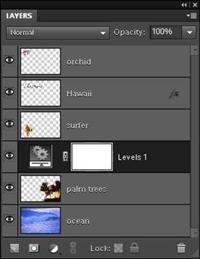
If your layers palette does not show, how do you put it on your screen?
Back
Window - Layers


Access all questions and much more by creating a free account
Create resources
Host any resource
Get auto-graded reports

Continue with Google

Continue with Email

Continue with Classlink

Continue with Clever
or continue with

Microsoft
%20(1).png)
Apple

Others
Already have an account?



