

Parts of a Desktop Computer (4th grade)

Flashcard
•
Other
•
4th Grade
•
Hard

Wayground Content
Used 2+ times
FREE Resource
Student preview

18 questions
Show all answers
1.
FLASHCARD QUESTION
Front
Fill in the blank: The "__" is considered the brain of the computer.

Back
CPU
2.
FLASHCARD QUESTION
Front
What is the name of the computer part shown in the image? Options: Keyboard, Mouse, Monitor, Printer

Back
Mouse
3.
FLASHCARD QUESTION
Front
What is the name of the object shown in the image? Options: Ear muffs, Earbuds, Airpods, Headphones

Back
Headphones
4.
FLASHCARD QUESTION
Front
What is the name of the object shown in the image? Options: Earbuds, Headphones, Airpods, Ear muffs

Back
Earbuds
5.
FLASHCARD QUESTION
Front
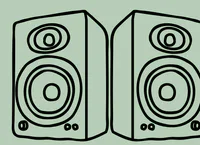
Look at the image. What is the name of the object shown?
Back
Speakers
6.
FLASHCARD QUESTION
Front
What is the name of the object shown in the image?

Back
USB Drive
7.
FLASHCARD QUESTION
Front
What does the symbol shown in the image represent? Options: Ethernet, Bluetooth, USB, WiFi

Back
WiFi


Access all questions and much more by creating a free account
Create resources
Host any resource
Get auto-graded reports

Continue with Google

Continue with Email

Continue with Classlink

Continue with Clever
or continue with

Microsoft
%20(1).png)
Apple

Others
Already have an account?


