Search Header Logo
Data structure - data frame 2

Data structure - data frame 2

Assessment

Presentation

Computers

10th Grade

Medium

Created by

M S

Used 1+ times

FREE Resource

10 Slides • 9 Questions

1

chapter 3

Data and analysis

Data structure

2

Let's start with

quick Revision

>>>>>>

3

Multiple Choice

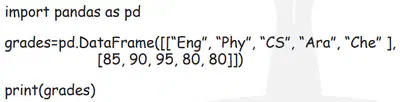
in Python to create a DataFrame we need first to ------------

1

import pandas Library

2

create a list for the data

4

Multiple Choice

Pandas used to create----

1

Data

2

DataFrame

3

DataFiles

4

Array

5

Multiple Choice

Question image

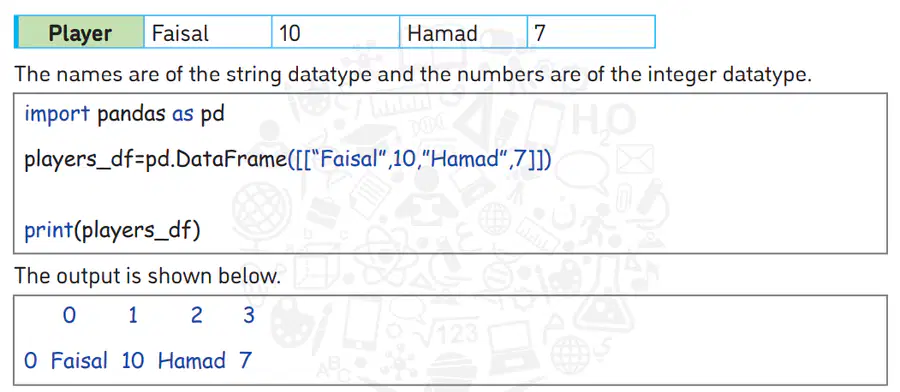
This code is a ---------- dimentional data structure

1

one

2

Two

6

Multiple Choice

Question image

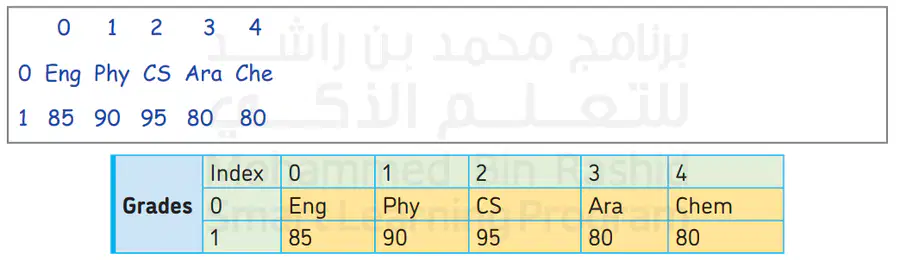
This code is a ---------- dimentional data structure

1

one

2

Two

7

Multiple Choice

--------------is used to access a single element in dataframe by specifying the row and column names.

1

index() function

2

column() function

3

loc( ) function

4

type() function

8

we are done with:

Creating a pandas data structure

9

one -Dimensional data structure

media

10

two-Dimensional data structure

media

11

Our Objectives:

1- Accessing elements in a data structure.

2- Updating elements in a DataFrame.

3- Sub-setting a DataFrame.

12

media
media

13

Multiple Choice

Question image

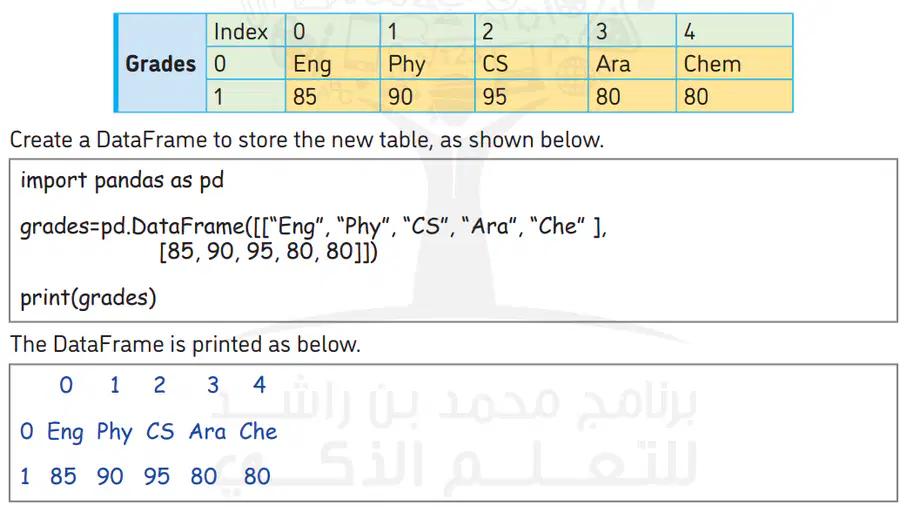
What is the index for the element " Eng"

1

0

2

0,1

3

0,0

4

1

14

Multiple Choice

Question image

What is the index for the element " CS"

1

0,2

2

0.2

3

2,0

4

2.0

15

Multiple Choice

Question image

What is the index for the element " 95 "

1

2,1

2

2.1

3

1,2

4

1.2

16

The loc( ) function name stands for location. To locate or access an element in a DataFrame, the location should be known. The location of an element in a DataFrame is the index values of the row and column.

17

media

​for example if you want to print the grades of Aesha in CS you will write >>

print ( grades.loc[1,2])

media

18

Draw

use the drawing tool to write the answers

19

chapter 3

Data and analysis

Data structure

Show answer

Auto Play

Slide 1 / 19

SLIDE