

One-dimensional and Two-dimensional arrays

Presentation
•
Computers
•
6th - 8th Grade
•
Practice Problem
•
Hard

Mihai Diaconu
Used 58+ times
FREE Resource
15 Slides • 0 Questions
1
What are they and how do they work?
2

A 1D array, also known as a one-dimensional array, is a list of elements that are arranged in a single row. It's like a line of boxes, where each box holds a value. You can access individual elements in a 1D array by referring to their index position.
One-dimensional array
2D array, or a two-dimensional array, is like a grid or a table with rows and columns. It consists of multiple rows and columns, forming a matrix-like structure. Each element in a 2D array has two indices: one for the row and one for the column. You can access specific elements in a 2D array by specifying both the row and column indices.
Two-dimensional array

3
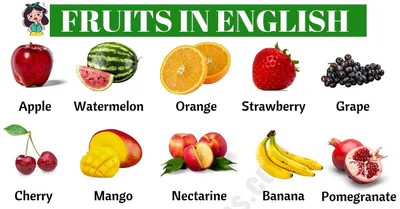
Imagine that you want to keep a list with all the names of your classmates, for that we can use 1D arrays. (even fruits, objects etc.)
If I want to know the ages of all your classmates i can use 1D arrays.
If I want to keep a list with all the hobbies of my friends i can use 1D arrays.
4
Imagine that as a teacher I want to place in a classroom my students in a specific order for that I will need to use 2D arrays.
If I want to make a grid with the position of every building in GCB for that I will have to use 2D arrays.
Imagine that you are playing or have played a board game that uses tiles such as chess, each tile representing a specific location.

5
# Creating a 1D array
numbers = [1, 2, 3, 4, 5]
(the number 1 is located in the index 0, number 2 is located in the index 1 etc.)
# Accessing elements in a 1D array
print(numbers[0]) # Output result will be number : 1
print(numbers[2]) # Output result will be number : 3
6
// Declaring a 1D array
DECLARE Numbers : ARRAY[1, 2, 3, 4, 5] OF INTEGER
(the number 1 is located in the index 0, number 2 is located in the index 1 etc.)
// Accessing elements in a 1D array and display them
OUTPUT Numbers[0] // this will display the number 1
OUTPUT Numbers[4] // Output result will be number : 5
7
# Creating a 2D array
matrix = [[1, 2, 3],[4, 5, 6],[7, 8, 9]]
# Accessing elements in a 2D array
print(matrix[0][1]) # Output: 2 (row index: 0, column index: 1)
print(matrix[2][0]) # Output: 7 (row index: 2, column index: 0)
matrix = [[1, 2, 3],
[4, 5, 6],
[7, 8, 9]]
8
1D arrays
Create a 1D array with the name MyList and populate it using a FOR loop in PYTHON
Enter these 10 values in order 27, 19, 36, 42, 16, 89, 21, 16, 55, 72
Write your python programming code on a piece of paper with your name and grade.
Use the example PSEUDOCODE to translate to Python
9
//declaring a 1D array in Pseudocode with 10 elements
DECLARE MyList : ARRAY[0,9] OF INTEGER
OUTPUT "Enter these 10 values in order 27, 19, 36, 42, 16, 89, 21, 16, 55, 72"
//using a for loop to ask the user to insert 10 different values
FOR Counter ← 0 TO 9
OUTPUT "Enter next value "
INPUT MyList[Counter]
NEXT Counter
OUTPUT MyList[]
PSEUDOCODE
10
#DECLARING AN EMPTY 1d ARRAY
Array = []
print("Enter these 10 values in order 27, 19, 36, 42, 16, 89, 21, 16, 55, 72")
#USING A FOR LOOP TO ASK THE USER TO INSERT 4 VALUES
for counter in range(1,10):
number = int(input("Enter your value: "))
Array.append(number)
#DISPLAYING THE NUMBERS OF THE ARRAY
print("My array values are", Array)
print("Index 0 value is: ", Array[0])
PYTHON PROGRAMMING
11
2D arrays
Create a 2D array with the name MyTable to store exactly the numbers you can see to the right for each column and row.
Write your python programming code in your notebooks.

12
//declaring a 2D array named MyTable
DECLARE MyTable : ARRAY[0:9,0:2] OF INTEGER
//displaying to the user what he/she has to insert
OUTPUT "Enter these values in order 27, 19, 36, 42, 16, 89, 21, 16, 55, 34"
OUTPUT "Enter these values in order 31, 67, 98, 22, 35, 46, 71, 23, 11, 76"
OUTPUT "Enter these values in order 17, 48, 29, 95, 61, 47, 28, 13, 77, 21"
FOR ColumnCounter ← 0 TO 2
FOR RowCounter ← 0 TO 9
OUTPUT "Enter next value "
INPUT MyTable[RowCounter, ColumnCounter]
NEXT RowCounter
NEXT ColumnCounter
//displaying the element at the index [2,1]
OUTPUT MyList[2,1]
13
WRITING THE DATA BY COLUMN
#declaring a 2D array named MyTable
MyTable = [[],[],[]]
#displaying to the user what he/she has to insert
print("Enter these values in order: 27, 19, 36, 42, 16, 89, 21, 16, 55, 34")
print("Enter these values in order: 31, 67, 98, 22, 35, 46, 71, 23, 11, 76")
print("Enter these values in order: 17, 48, 29, 95, 61, 47, 28, 13, 77, 21")
for RowCounter in range (3):
for ColumnCounter in range (3):
Number = int(input("Enter next value: "))
MyTable[ColumnCounter].append(Number)
print("NEXT COLUMN")
print("NEXT ROW")
print("The value at [2,1] is", MyTable[2][1])
print("The whole array is: ", MyTable)
14
Writing the data by row
#declaring a 2D array named MyTable
MyTable = [[],[],[]]
#displaying to the user what he/she has to insert
print("Enter these values in order: 27, 19, 36, 42, 16, 89, 21, 16, 55, 34")
print("Enter these values in order: 31, 67, 98, 22, 35, 46, 71, 23, 11, 76")
print("Enter these values in order: 17, 48, 29, 95, 61, 47, 28, 13, 77, 21")
for RowCounter in range (3):
for ColumnCounter in range (3):
Number = int(input("Enter next value: "))
MyTable[ColumnCounter].append(Number)
print("NEXT COLUMN")
print("NEXT ROW")
print("The value at [2,1] is", MyTable[2][1])
print("The whole array is: ", MyTable)
15
What are they and how do they work?
Show answer
Auto Play
Slide 1 / 15
SLIDE
Similar Resources on Wayground

22 questions
ICT Lesson
Presentation
•
6th Grade
9 questions
Introduction to Matrices
Presentation
•
10th Grade
12 questions
Урок без названия
Presentation
•
KG
14 questions
Music 7 docs
Presentation
•
7th Grade
14 questions
HMH M3W2 Day 2: Alaska Earthquake
Presentation
•
5th Grade
11 questions
FID WORK March 20th 2024- Preconditions and Postconditions
Presentation
•
9th Grade
16 questions
3d 8 kl
Presentation
•
8th Grade
19 questions
Python - Introduction to While Loops
Presentation
•
8th - 11th Grade
Popular Resources on Wayground
10 questions
Safety Day 2026 – Student Review

Quiz
•
9th Grade
21 questions
Continents and Oceans
Quiz
•
6th Grade
20 questions
Parts of Speech
Quiz
•
5th Grade
16 questions
Subject & Predicate
Quiz
•
5th Grade
25 questions
Multiplication Facts
Quiz
•
5th Grade
12 questions
Map Skills
Quiz
•
3rd Grade
22 questions
Continents and Oceans
Quiz
•
5th Grade
15 questions
Rounding Decimals
Quiz
•
5th Grade