

Quizizz Presentation with Ms.White

Presentation
•
Professional Development
•
5th Grade
•
Practice Problem
•
Hard

Karen White
Used 1+ times
FREE Resource
37 Slides • 0 Questions
1


We have a school Quizizz account with all
of the bells and whistles. You received an email
from Quizizz in August to activate your
account. Use your @atlanta.k12.ga.us email to
do this. If you had a previous account, Quizizz
can merge them for you. If you are paying for
Quizizz, you may be eligible for a refund.
2


TARGETED INSTRUCTION
EMERGING
DEVELOPING
ADVANCING
SUSTAINING
GROUPS
Teacher groups
students in
homogeneous or
heterogeneous formats
based on skill-level.
Teacher creates more
purposeful groupings
based on data.
Groups remain the
same for some time.
Teacher creates
student groups
based on multiple
data sources and
groups are changed
with more frequency.
Teacher consistently
groups students in
dynamic, purposeful
ways based on
interest, need, or
skill-level and in
strategic formats
(one-on-one, small
groups, etc.)
DATA
Teachers review one
piece of student data to
identify instructional
needs of students.
Teacher reviews
multiple sources of
student data to
identify instructional
needs of students.
Data is used to
create student
groups based on
student interest,
need, or skill-level;
student groups are
changed with more
frequency.
Data is used as an
integral part of daily
instruction to meet
student needs.
INSTRUCTION
Teacher meets with
small groups of
students, or one on
one.
Teacher modifies
delivery of instruction
for each group of
students based on
student need.
Teacher consistently
modifies delivery of
instruction for each
group of students
based on student
need.
Teacher consistently
delivers targeted
instruction for
multiple purposes
(introduction to new
material, guided
practice, tutoring,
etc.)
Core
Four
Continuum of
Personalized
Learning
3


4


Data
Curriculum &
Instruction
Whole Child &
Intervention
Personalized
Learning
Signature
Programming
Utilize data to drive all instructional decisions and
ensure equitable outcomes for all students
Utilize flexible learning tools, technology integration,
and targeted instruction to personalize learning for
all students
Implement rigorous and culturally relevant curriculum
with fidelity in core content areas and instructional best
practices in Tier 1 instruction
Strengthen the implementation of signature
programming across all schools
Implement a Whole-Child system of supports that
ensures social-emotional learning, behavior, and
wellness for all students
5

●What is Quizizz
●Quizizz AI
●Question Types
●Lessons
●Options and Modes
●Reports
●Take a Quizizz
●Make a Quizizz
Agenda
6


Quizizz is assessment,
instruction, and practice
that motivate every student
to mastery.
Quizizz has outgrown its name. No longer just
the leading quiz program for K-12, it’s a place
where any teacher can create, customize, and
deliver interactive learning materials that
students love. 💜
7


Quizizz AI
Create, Enhance and Analyze
My Favorite Things
8


A deeper look into enhancing questions with
Quizizz AI
9


Interactive
Question Types
It matters how you ask
10


Quizizz Quiz!
11


Lessons
Combine our questions with content
for a fully interactive experience
12


●Import right from Google Drive
●Insert Questions
●Embed your favorite sites
Lessons - The “How”
13


Lessons - Some extras
Spin the wheel for a fun way to
choose random students
Turn any slide into an
interactive whiteboard for
students
14


Options and Modes
Because everyone moves at their own pace
15


Mastery Mode
●Teacher sets a goal
●Student re-attempt incorrect answers to reach the goal
Experience mastery mode yourself!
(Be sure to get a couple of wrong answers)
16


Students are able to retake questions
at the end for a chance to increase
their score
Experience redemption questions
yourself!
(Be sure to get a couple of wrong answers)
Redemption Questions
17


Adaptive Question Bank
Individualized practice so students are only answering question they need
Each round they get a mix of new questions and questions they got incorrect
Experience adaptive learning yourself!
(Be sure to play twice and get a couple of wrong answers)
18


Mastery Peak
A new and exciting live game mode where the entire class races to the top of a mountain.
●Students can compete with peers who are at their competency level.
●Students have more autonomy on choosing power-ups and mini-games throughout
19


Skip Questions
Students can revisit questions they need more time to think about later on in the quiz
20


#youcanwithquizizz
Some of our other favorite things you can do with Quizizz
21

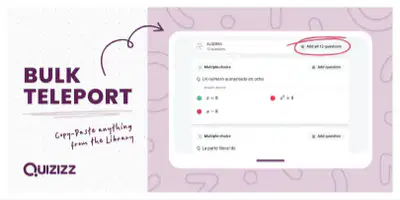

Easily grab questions from the
Quizizz library
Teleport
22


Answer Explanations
After students answer a question, you have the option to explain the correct answer with
text, pics or video.
23


Import all your questions from a
Google form directly into Quizizz
Import from Google Forms
24

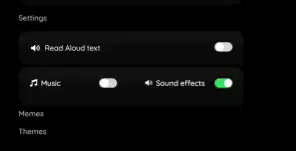
Have questions read aloud to students
Students can choose to turn on a setting that will have questions read aloud to them
25


Images and Gifs as answer choices
Use pics or gifs as answer options.
You can add text underneath any pictures too!
26


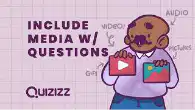
Insert Audio of a teacher reading a
question or other media next to a
question
Insert Audio, Video or Gifs next to questions
27

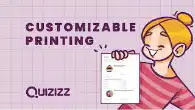
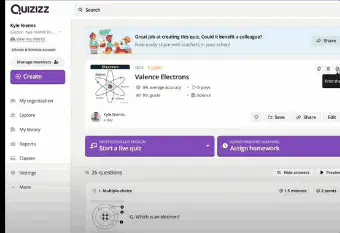
Easily provide paper copies for
student
Different options to print exactly what
you need
Customizable Printing Option
28


Use power-ups to increase the fun
and energy
Power-ups
29

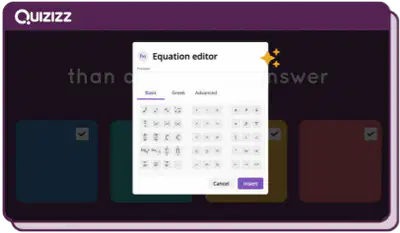
Create questions with mathematical
symbols and expressions
Equation Editor
30

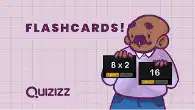

Students can turn a quiz into
Flashcards to practice content
Flashcards
31

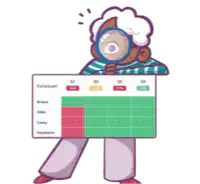
Reports
Everything you need to drive instruction
32


●Clean and easy to use to drive
instruction
●Whole class or individual
●Align with standards
The power of Quizizz Reports
33


The power of Quizizz Reports
A deeper look into reports! (3 min)
34

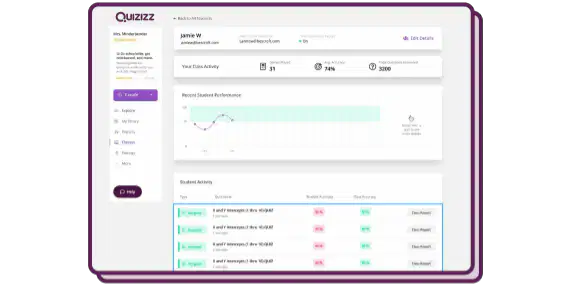
See students’ progress over time with
Longitudinal Growth Graphs
Find these in “Classes”
Longitudinal Growth Graphs
35

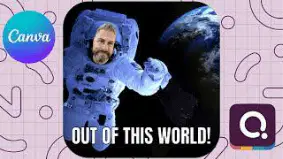


Template to create your own!
We’ve partnered with Canva to create personalized
meme templates!
36


●Create a Quiz (Video)
●Use Quizzes from the Quizizz Library
●Teleport and Combine
●Edit, Save, Share & Delete Quizzes
●Duplicate a Quiz
●Import from Google Forms
●Import from a Spreadsheet
●Host a Live Quiz
●Host a Quiz Asynchronously (Video)
●Host a Quiz in Focus Mode
●Setting up and using Classes
●Assign a quiz using Classes
●Change game Settings
How To…
●Create a lesson
●Host a lesson
●Use Lessons from the Library
●Import presentations from Google Drive to
Quizizz Lessons
●Importing Classes via Google Classroom
●Sort Reports
●Rename, print, and email reports
Quizizz Help Center
Contact support: support@quizizz.com
37

Thank you!
Email Ms.White at khwhite@apsk12.org if you have questions.
Follow @quizizz on Twitter for teacher updates and
opportunities to win swag!
We have a school Quizizz account with all
of the bells and whistles. You received an email
from Quizizz in August to activate your
account. Use your @atlanta.k12.ga.us email to
do this. If you had a previous account, Quizizz
can merge them for you. If you are paying for
Quizizz, you may be eligible for a refund.
Show answer
Auto Play
Slide 1 / 37
SLIDE
Similar Resources on Wayground

32 questions
Multiply Fractions
Presentation
•
5th Grade
33 questions
Adding and Subtracting Fractions with Unlike Denominators
Presentation
•
5th - 6th Grade
32 questions
Coordinate Plane Intro
Presentation
•
5th Grade
36 questions
Unit 1 Week 5 Formation of Landforms
Presentation
•
5th Grade
32 questions
Geography of Canada
Presentation
•
6th Grade
33 questions
Movement of the Earth
Presentation
•
5th Grade
31 questions
Milestone Review 1
Presentation
•
5th Grade
32 questions
Classifying Quadrilaterals
Presentation
•
4th - 5th Grade
Popular Resources on Wayground
10 questions
Safety Day 2026 – Student Review

Quiz
•
9th Grade
21 questions
Continents and Oceans
Quiz
•
6th Grade
20 questions
Parts of Speech
Quiz
•
5th Grade
16 questions
Subject & Predicate
Quiz
•
5th Grade
25 questions
Multiplication Facts
Quiz
•
5th Grade
12 questions
Map Skills
Quiz
•
3rd Grade
22 questions
Continents and Oceans
Quiz
•
5th Grade
15 questions
Rounding Decimals
Quiz
•
5th Grade
Discover more resources for Professional Development
20 questions
Parts of Speech
Quiz
•
5th Grade
16 questions
Subject & Predicate
Quiz
•
5th Grade
25 questions
Multiplication Facts
Quiz
•
5th Grade
22 questions
Continents and Oceans
Quiz
•
5th Grade
15 questions
Rounding Decimals
Quiz
•
5th Grade
10 questions
Columbus Day and Indigenous People's Day

Interactive video
•
5th - 8th Grade
20 questions
Mixtures and Solutions Practice
Quiz
•
5th Grade
15 questions
Mastering Multiplication Facts 1-10
Quiz
•
5th Grade