
Exploring the World of Computers

Presentation
•
Computers
•
4th Grade
•
Practice Problem
•
Hard

peter clement
Used 4+ times
FREE Resource
11 Slides • 5 Questions
1
Discover the vast world of computers and delve into their inner workings, applications, and impact on society. Explore the latest technologies, programming languages, and emerging trends that shape the digital landscape. Join us on this exciting journey of discovery and innovation.
2
Introduction to Computers
3
Multiple Choice
What are the components of a computer?
CPU, memory, storage, input/output devices
Windows, macOS, Linux
Word processors, spreadsheets, web browsers, games
Personal computers, laptops, servers, mainframes, supercomputers
4
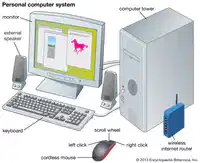
Computer Components
5
Parts of a Computer
6
Multiple Choice
Which component of a computer handles the processing and rendering of visual data?
CPU
RAM
Hard Drive
Graphics Card
7
Graphics Card
A graphics card is responsible for handling the processing and rendering of visual data in a computer. It is essential for tasks like gaming, video editing, and graphic design. Without a powerful graphics card, the computer may struggle to display high-quality graphics and videos.
8
Input and Output Devices
9
Multiple Choice
What are input devices used for?
Entering data into a computer
Displaying data from a computer
Understanding computer usage
Printing data from a computer
10
Input Devices:
Trivia: Did you know that input devices are used to enter data into a computer? They include keyboards, mice, touchscreens, and more. Without input devices, we wouldn't be able to interact with computers as easily. So next time you type on a keyboard or click a mouse, remember that you're using an input device!
11
Operating Systems
12
Multiple Choice
What is the main function of an operating system?
To manage computer hardware and software resources
To provide common services for computer programs
To act as an intermediary between the user and the computer hardware
To allow users to interact with the computer and run applications
13
Main Function:
14
Exploring Computers:
15
Multiple Choice
What is the purpose of software and applications in the world of computers?
To learn about different types of software and applications
To explore popular applications and their uses in various industries
To understand how software is developed and how it interacts with computer hardware
To generate a question based on the given text
16
Software and Applications
Trivia: Did you know that software and applications are essential for various industries? They help businesses streamline processes, improve productivity, and enhance customer experiences. From healthcare to finance, software plays a crucial role in modern society. Explore the world of software and its impact on our daily lives!
Discover the vast world of computers and delve into their inner workings, applications, and impact on society. Explore the latest technologies, programming languages, and emerging trends that shape the digital landscape. Join us on this exciting journey of discovery and innovation.
Show answer
Auto Play
Slide 1 / 16
SLIDE
Similar Resources on Wayground

10 questions
Intro to adverbs and adjectives
Presentation
•
4th Grade
11 questions
Financial Literacy 2 Banks
Presentation
•
4th Grade
11 questions
Folktales
Presentation
•
4th Grade
12 questions
Genres
Presentation
•
4th Grade
12 questions
Math Performance Task
Presentation
•
4th Grade
12 questions
Strip diagrams
Presentation
•
4th Grade
12 questions
Living Things
Presentation
•
KG
12 questions
Summarizing
Presentation
•
4th Grade
Popular Resources on Wayground
10 questions
Safety Day 2026 – Student Review

Quiz
•
9th Grade
21 questions
Continents and Oceans
Quiz
•
6th Grade
20 questions
Parts of Speech
Quiz
•
5th Grade
16 questions
Subject & Predicate
Quiz
•
5th Grade
25 questions
Multiplication Facts
Quiz
•
5th Grade
12 questions
Map Skills
Quiz
•
3rd Grade
22 questions
Continents and Oceans
Quiz
•
5th Grade
15 questions
Rounding Decimals
Quiz
•
5th Grade
Discover more resources for Computers
20 questions
Inferences
Quiz
•
4th Grade
20 questions
Multiplication and Division Facts
Quiz
•
4th Grade
10 questions
3 digit by 1 digit multiplication
Quiz
•
4th Grade
15 questions
Subject/Verb agreement
Quiz
•
4th Grade
21 questions
Multiplication Facts
Quiz
•
4th Grade
10 questions
Subtraction with Regrouping
Quiz
•
4th Grade
8 questions
Context Clues Practice
Quiz
•
4th Grade
10 questions
Multiplication Facts
Quiz
•
4th Grade