

04- Mastering the Chromebook: Navigating the Web

Presentation
•
Computers
•
5th Grade
•
Practice Problem
•
Hard

Aaron Taylor
Used 3+ times
FREE Resource
9 Slides • 3 Questions
1
Learn how to navigate the web efficiently on your Chromebook
2
Mastering Chromebook: Internet Connectivity
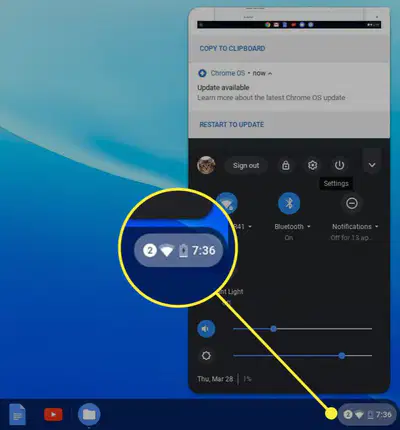
Connect to Wi-Fi: Go to Settings > Wi-Fi and select a network.
Using the bottom right option you can check your wireless connection.
3
Checking Internet Connection
4
Multiple Choice
What is the first step to connect to a Wi-Fi network on a Chromebook?
Step 1: Click on the network icon in the bottom-right corner of the screen.
Step 2: Select your Wi-Fi network from the list.
Step 3: If connected, a checkmark will appear next to the network name.
Step 4: If not connected, click on the network name and enter the password to connect.
5
Mastering Chromebook: Back Button
6
Multiple Select
How can you navigate to the previous webpage in Chrome?
Click the Back button in the top-left corner of the browser
Use the keyboard shortcut Alt + Left Arrow
Refresh the page using Ctrl + R
7
Chrome Navigation
Trivia: Did you know that you can navigate to the previous webpage in Chrome by using the keyboard shortcut Alt + Left Arrow? This handy shortcut allows you to quickly go back to the previous page without having to click any buttons. Give it a try next time you're browsing in Chrome!
8
Mastering Chromebook: Navigating
9
Multiple Choice
What action should you take to navigate to the next page you visited in Chromebook?
Click the forward arrow button
Click the refresh button
Close the browser and reopen it
Use the back arrow button
10
Chromebook Navigation
Trivia: Did you know that if a webpage isn't loading, you can try refreshing the page by clicking the refresh button? It's also the stop button which stops a page from loading.


11
Exploring Browsing History
12
Internet and WebBrowsing - Quiz
You can open this webpage in a new tab.
Learn how to navigate the web efficiently on your Chromebook
Show answer
Auto Play
Slide 1 / 12
SLIDE
Similar Resources on Wayground

9 questions
Han Dynasty
Presentation
•
6th Grade
9 questions
Determining the Theme
Presentation
•
5th Grade
11 questions
Computer Hardware
Presentation
•
3rd - 5th Grade
13 questions
Cyber Security
Presentation
•
4th - 6th Grade
10 questions
Science 5 / 3.6 Effects of the Biosphere
Presentation
•
5th Grade
8 questions
02 - Unravelling the Wonders of the Internet
Presentation
•
5th Grade
10 questions
Review: My Life with the Chimpanzees
Presentation
•
5th - 6th Grade
9 questions
THE PRONOUNS
Presentation
•
4th - 6th Grade
Popular Resources on Wayground
10 questions
Safety Day 2026 – Student Review

Quiz
•
9th Grade
21 questions
Continents and Oceans
Quiz
•
6th Grade
20 questions
Parts of Speech
Quiz
•
5th Grade
16 questions
Subject & Predicate
Quiz
•
5th Grade
25 questions
Multiplication Facts
Quiz
•
5th Grade
12 questions
Map Skills
Quiz
•
3rd Grade
22 questions
Continents and Oceans
Quiz
•
5th Grade
15 questions
Rounding Decimals
Quiz
•
5th Grade
Discover more resources for Computers
20 questions
Parts of Speech
Quiz
•
5th Grade
16 questions
Subject & Predicate
Quiz
•
5th Grade
25 questions
Multiplication Facts
Quiz
•
5th Grade
22 questions
Continents and Oceans
Quiz
•
5th Grade
15 questions
Rounding Decimals
Quiz
•
5th Grade
10 questions
Columbus Day and Indigenous People's Day

Interactive video
•
5th - 8th Grade
20 questions
Mixtures and Solutions Practice
Quiz
•
5th Grade
15 questions
Mastering Multiplication Facts 1-10
Quiz
•
5th Grade