

G1. RAISING A CASE

Presentation
•
Business
•
Professional Development
•
Practice Problem
•
Easy

Stephanie Castellanos
Used 49+ times
FREE Resource
20 Slides • 5 Questions
1

Raising a Case
2
Customer calls and the issue did not get resolved during the first call. We proceed to raise a case.

3
Multiple Choice
It necessary to raise a case when the issue is resolved on the call
TRUE
FALSE
4

5
Dropdown
6

7


8
When you are going to send a Collar Tag to a different address than the billing account, do the following steps:
First click Billing Accounts

9

On the billing account page, you will click on the customers name:
10
Confirm the billing address on this page, if the shipping address is different, create a ¨Collar Tag¨ Case.


11
Status:
• New
• Information received
• In Progress
• Back Office
• On Hold/Awaiting information
• On Hold – With Customer
• On Hold – Internal
• Closed
• Cancelled
• Escalated


12
Case Origin:
• Phone
• Social Media
• Email-HA General
• Web-HomeAgain
• HA US-Voicemail
• Web-HomeAgain UK
• Voicemail-Spanish
• Voicemail - Lost&Found
• Voicemail-Pet Parent Support
• Voicemail-NLHP


13
Type:
Transfer
Lost
Found
Urgent Transfer
Collar Tag
Enrollment
Misc
Mobile

Renewal
Sure Petcare
TechSupport
Update
Physical Good
Spam
Database Transfer
Voicemail
14
Description = Details of the call/updates made. Click Save

This field is responsive to the Type selected.

15
The new Case will appear in the ‘Cases Related List’ on the right side of the record page.

16
The Case Number is a unique reference that will be stored against the customer record indefinitely and can be viewed at any time for reference.

17
Once a Case is marked Closed any subsequent unrelated queries will need to be raised as a NEW case. If the customer Calls back regarding a Case that has already been closed but feels the issue is unresolved you need to Re-open the Existing Case adding relevant Call Notes/Comments/Emails.

18
If a Case is Open at any Status, it can be used to record further updates relating to the same query. Once the issue is resolved the case can be marked Closed.

19
• In this screen, you can send an email to the Pet Owner, cc’ing in any other contacts as required
• The subject line of the email will default to the contents of the subject field in the case, but this can be overwritten if needed
• Compose your email, formatting as required, attach Images, link documents, etc

20
You can use Templates by clicking the button shown and selecting from the templates folder.
Emails carry a reference code when the customer replies to an email that will link back to the case and update the Case Status to Information Received and the case will appear back in the queue to be actioned.

21
Multiple Choice
We have email templates.
TRUE
FALSE
22
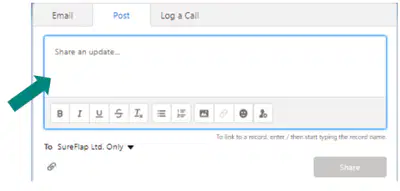
• In this screen, you can post a comment to the case with details of the actions taken
• You can format the text, attach Images, link documents and Tag other Salesforce users if required
• The Post will appear in the Activity Feed attached to the Case available for all to see
23
Multiple Select
What can you do in POST? Select ALL that apply.
Attach images
Link Documents
Tag other SalesForce users
Format the text
24
This is to be used when you are doing an Outbound call.
In this screen, the subject will default to Call, this can be edited if required.
In the Comments enter the actions taken, which phone numbers have been attempted etc..
The call log will appear in the Activity Feed attached to the Case available For all to see.

25
Multiple Choice
You have to leave notes if you are doing an outbound call
TRUE
FALSE
Raising a Case
Show answer
Auto Play
Slide 1 / 25
SLIDE
Similar Resources on Wayground

19 questions
Modals of obligation
Presentation
•
Professional Development
19 questions
TWK (Bela Negara) MODUL 2
Presentation
•
Professional Development
22 questions
MAC2 | Vocabulary | L05
Presentation
•
Professional Development
19 questions
Present Continuous
Presentation
•
Professional Development
19 questions
Was/were
Presentation
•
Professional Development
20 questions
Present Perfect
Presentation
•
University
20 questions
Forces Mastery Lesson 8.9A
Presentation
•
KG - University
Popular Resources on Wayground
10 questions
How much do you know about our Portrait of an Eagle?

Quiz
•
10th Grade
10 questions
Fast Food Slogans
Quiz
•
6th - 8th Grade
21 questions
Continents and Oceans
Quiz
•
6th Grade
20 questions
Parts of Speech
Quiz
•
5th Grade
16 questions
Subject & Predicate
Quiz
•
5th Grade
25 questions
Multiplication Facts
Quiz
•
5th Grade
12 questions
Map Skills
Quiz
•
3rd Grade
22 questions
Continents and Oceans
Quiz
•
5th Grade
Discover more resources for Business
10 questions
How to Email your Teacher
Quiz
•
Professional Development
11 questions
NFL Football logos
Quiz
•
KG - Professional Dev...
14 questions
Fall Trivia
Quiz
•
11th Grade - Professi...
20 questions
Sports trivia
Quiz
•
Professional Development
20 questions
90s Cartoons
Quiz
•
Professional Development
20 questions
Block Buster Movies
Quiz
•
10th Grade - Professi...