

Dive into Linux

Presentation
•
Computers
•
8th Grade
•
Practice Problem
•
Medium

Kimberly Lewis
Used 12+ times
FREE Resource
19 Slides • 8 Questions
1
2

Open source is software where the code is available to anyone to modify, enhance, and use.
What is Open Source?
3
Security
Warranties
Operational issues
Copyright
Cons
Quick solves for problems
Can scale up to larger systems
Cheap (or free!)
Community involvement
Pros
4
For many users, the lower cost and higher degree of functionality is worth the risks!
5

Linux is the largest open source project to date, and has created hundreds of effective operating systems for all sorts of uses!
Linux is Open Source
6
Multiple Choice
Choose the CON to Open Source
free
security
quick solves
community involvment
7
Multiple Choice
Choose the PRO to open source
Copyright
Security
Free
Warrantee
8

9
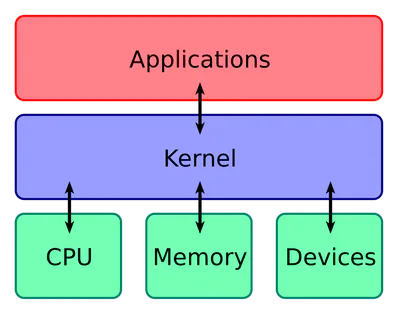
A Kernel is the part of the operating system that helps the software interact with the hardware. If we think about the OS layers from last class, it sits in between the OS and the hardware.
Kernel
10
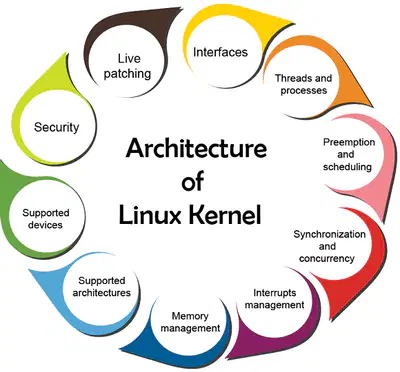
If it's a Linux operating system, it's based on the Linux Kernel.
The Linux Kernel is the basis of Linux
11
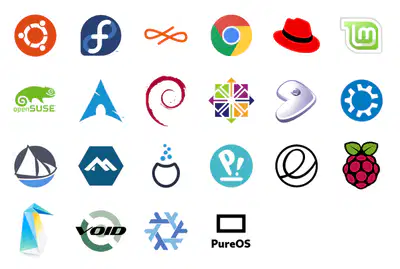
Any operating system based on the Linux Kernel. Any of those look familiar?
Distribution/
Distro
12
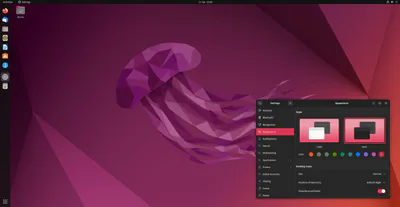
The user interface. What lets you click on a screen instead of typing in commands.
Desktop Environment
13
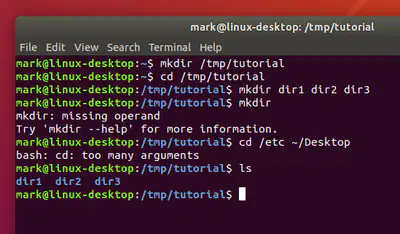
Text commands. The terminal is the stuff "under the hood" of any Linux distro. The language is called "command line." It's less scary than you think!
Terminal
14
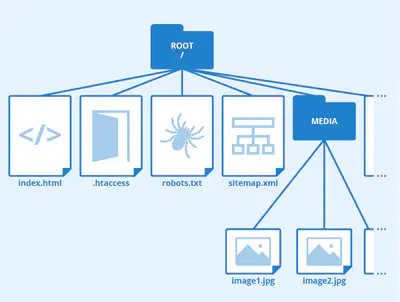

The very very bottom of your files. Where absolutely everything sits. Think of it like the base folder where you go to get everything.
Root Directory
Also called the Superuser. The user that has all the administrative privileges. On the ThinkLab computers, you will not have root user privileges.
Root User
15
Drag and Drop
16
Drag and Drop
17
Dropdown
18
Fill in the Blanks
Any operating system based on the Linux Kernel is called a
Type answer...
19

Good for new users
Similar to OSs you know
What we'll be using!
Ubuntu
20

Good for science distros
Less user friendly than Ubuntu
Fewer bugs
More software options
Debian
21

Not free!
Run by a larger company
You don't have to figure it out!
Best for businesses
Red Hat
22

Linux mobile platform
Android
23
Cloud based
Lightweight
No installation
ChromeOS
24
Microcontroller
Used for making small items
RaspberryPi
25

Made by science groups
Specifically for tracking specialty data
Scientific Linux
26
Multiple Choice
True or False: You have used at least one Linux distro!
True
False
27
Fill in the Blanks
The distro we will use in class is called
Show answer
Auto Play
Slide 1 / 27
SLIDE
Similar Resources on Wayground

20 questions
Mixed Numbers
Presentation
•
4th - 5th Grade
20 questions
Atoms
Presentation
•
8th Grade
20 questions
Dilations & Similar & Congruent
Presentation
•
8th Grade
20 questions
Box Plots
Presentation
•
8th Grade
21 questions
Slope-intercept form
Presentation
•
8th Grade
21 questions
Under the Hood of Computer
Presentation
•
7th Grade
20 questions
La musica latina
Presentation
•
8th Grade
20 questions
electricity
Presentation
•
8th Grade
Popular Resources on Wayground
10 questions
Safety Day 2026 – Student Review

Quiz
•
9th Grade
21 questions
Continents and Oceans
Quiz
•
6th Grade
20 questions
Parts of Speech
Quiz
•
5th Grade
16 questions
Subject & Predicate
Quiz
•
5th Grade
25 questions
Multiplication Facts
Quiz
•
5th Grade
12 questions
Map Skills
Quiz
•
3rd Grade
22 questions
Continents and Oceans
Quiz
•
5th Grade
15 questions
Rounding Decimals
Quiz
•
5th Grade