

OSSA 14/3/2024

Presentation
•
Computers
•
4th Grade
•
Practice Problem
•
Medium

Norshahidayu Othman
Used 1+ times
FREE Resource
61 Slides • 6 Questions
1

+
Campus Area Network
Server Configuration
DFN50303 OPEN SOURCE SERVER ADMINISTRATION
2

+2.3 FILE SHARING SERVICES IN LINUX
SERVER
Objectives:
Identify the two most common file sharing services
in Linux (NFS and SMB protocol).
Explain Common Internet File System (CIFS)
protocol suite.
Identify the four basic CIFS services
Identify various open source services solution for
File Server.
DFN50303 OPEN SOURCE SERVER ADMINISTRATION
3

+FILE SHARING SERVICES IN LINUX
SERVER
� A file server dedicated to store the files in a
centralized location - Users can save work and have
access to files without having to carry around a
disk.
� File Server permitting access to networked
computers to access files, databases and for
server-based applications.
DFN50303 OPEN SOURCE SERVER ADMINISTRATION
4

+
� Linux-dedicated file servers permit networked
computers to carefully share files. (implement
security)
� Thus it also allows users to save different types of
data and give them access to files through
a software client.
� Individuals can also allot different permit rights to
stored information/access information.
FILE SHARING SERVICES IN LINUX
SERVER
DFN50303 OPEN SOURCE SERVER ADMINISTRATION
5

+BENEFIT OF FILE SERVER
✔ Centralized file storing location – which can
provide regular basis centralized backup strategies
and security implementation.
✔ Files on the server are available to access whether
you are at your personal office PC or using a
coworker's PC or mobile devices.
DFN50303 OPEN SOURCE SERVER ADMINISTRATION
6

+ADVANTAGES OF THE LINUX FILE
SERVER
✔ Strong performance
Linux was made and designed to be a very
strong operating system. Hardware resources
that center on processing users recommend
these.
✔ Reliability
The Linux File Server can last for a long time.
✔ Easy to use
Rebooting process and management found to be very
easy for users.
DFN50303 OPEN SOURCE SERVER ADMINISTRATION
7

+Most Common File Sharing Services
In Linux
Network File System (NFS) vs Samba (SMB Protocol)
✔In a typical scenario, a client-based application or
system makes a request of a server for access to a file or
to pass a message to a program that runs in the server.
✔The file server takes the requested action and returns a
response, a user is then able to view, store and update
files on a remote computing or storage device as though
they were on their own computer.
DFN50303 OPEN SOURCE SERVER ADMINISTRATION
8

+
✔ Originally developed by Sun Microsystems in 1984 and
managed by IETF - with the goal of enabling file
system resources to be shared over a network at a
speed comparable to local file access.
✔ NFS is an open standard, cross-platform file system utility
with implementations available for a wide range of OSs,
architectures, platforms, and appliances, from embedded
systems to mainframes and high-performance clusters.
✔ Nearly all Linux distributions come with the ability to set
up a Network File System (NFS).
NETWORK FILE SYSTEM (NFS)
HISTORY
DFN50303 OPEN SOURCE SERVER ADMINISTRATION
9

+
What is NFS and its purpose?
�NFS stands for Network File System, is a file system
used for sharing of files over a network that
allows the different Linux computers to easily
share files on the network .
�NFS provides file sharing for Unix, Linux,
mainframes, and other file systems, including
Mac OS X.
NETWORK FILE SYSTEM (NFS)
DFN50303 OPEN SOURCE SERVER ADMINISTRATION
10

+
� By using NFS, files can be accessed (sharing of files)
remotely, where a client/server system that allows
users to access files across a network and treat as if
they resided in a local file directory.
� It also reduced of the number of removable media
drives throughout the network since they can be
shared.
� NFS is only suitable for networks comprised
entirely of Linux computers and servers
NETWORK FILE SYSTEM (NFS)
DFN50303 OPEN SOURCE SERVER ADMINISTRATION
11

+
� This is accomplished through the processes of
exporting (the process of an NFS server provides
remote clients with access to its files) andmounting
(the process of file systems are made available to the
operating system and the user).
� Export in NFS implementation refer to 🡪process
making the directories available by the server for use
by other machines. 🡪Server makes the directory
available (to export) for use by other machines.
NETWORK FILE SYSTEM (NFS)
DFN50303 OPEN SOURCE SERVER ADMINISTRATION
12

+
� How NFS works? - when sharing files with NFS, there
are two side: the server and the clients. NFS will need
to be configured on both the server and any client
that wants to connect. It uses Remote Procedure
Calls (RPC) to route requests between clients and
servers.
� The server is the computer that is actually storing the
files, while the clients are the computers that are
accessing the shared folder by mounting the shared
folder as a virtual drive.
NETWORK FILE SYSTEM (NFS)
DFN50303 OPEN SOURCE SERVER ADMINISTRATION
13

+
� The NFS protocol is designed to be independent of
the
computer,
operating
system,
network
architecture, and transport protocol.
� This means that systems using the NFS service may
be manufactured by different vendors, use different
operating systems, and be connected to networks
with different architectures.
� These differences are transparent to the NFS
application, and thus, the user.
NETWORK FILE SYSTEM (NFS)
DFN50303 OPEN SOURCE SERVER ADMINISTRATION
14

+
■ Currently, there are three versions of NFS.
� NFS version 2 (NFSv2)
■ older , released in 1985
■ widely supported.
� NFS version 3 (NFSv3)
■ more features, including variable size file handling and better error
reporting, released in 1995
■ not fully compatible with NFSv2 clients.
� NFS version 4 (NFSv4)
■ Released in 2003 for Sun and NetApp
■ includes Kerberos security,
■ works through firewalls and on the Internet.
■ no longer requires portmapper.
■ supports ACLs.
■ utilizes stateful operations.
NETWORK FILE SYSTEM (NFS)
DFN50303 OPEN SOURCE SERVER ADMINISTRATION
15

+
What is SAMBA and its purpose?
� Samba is the standard Windows interoperability suite of
programs for Linux and Unix, specifically used at
allowing Windows and Linux servers to access the same
file systems.
� It is most commonly used with Microsoft operating
systems - used by Windows systems for file sharing.
� Samba will run on nearly any Unix-like system and can
be found in the repositories in every Linux distribution.
� This service allowed Windows systems to map shared
drives and act as a local drive on the computer.
DFN50303 OPEN SOURCE SERVER ADMINISTRATION
SAMBA /SMB
16

+
� Samba seamlessly integrate Linux/Unix Servers and
Desktops into Active Directory environments.
� It can function both as a domain controller or as a
regular domain member.
� This is what allows Samba to communicate with
(newer) MS Windows systems. Typically you will see
it referred to SMB/CIFS.
� The configuration file is commonly found at.
/etc/samba/smb.conf
or
/usr/local/samba/lib/smb.confNote that you will need
to be root to edit these, or use sudo.
DFN50303 OPEN SOURCE
SERVER ADMINISTRATION
SAMBA
17

+
� Linux
� Solaris 2.x
� SunOS 4.x
� HP HP-UX
� FreeBSD
� NetBSD
� OpenBSD
� IRIX
� Ultrix
� AIX
� Mach BSD
� Macintosh OSX
� SCO Unix
SAMBA SUPPORTED PLATFORM
DFN50303 OPEN SOURCE SERVER ADMINISTRATION
18

+
In the real world, which protocol would you use?
�Windows shares support both SMB and NFS, or both
at the same time. It is just a matter of configuring
which one you need or configuring both if you need
to utilize both.
� Ideally, you’ll want to use a native protocol (NFS for
Linux/Unix users) when possible, without any
additional overhead or conversion, which make it
much more efficient and more reliable.
WHEN TO USE NFS AND WHEN TO USE SAMBA
DFN50303 OPEN SOURCE SERVER ADMINISTRATION
19

+
� For example, if you are connecting two Unix
systems, it will be best to utilize NFS.
� If you are connecting two Windows systems, SMB
would be the obvious choice.
� Even though both achieve the goal of file sharing,
there are differences in the way Windows and Unix
based systems handle file systems and the users
that will be using the systems
NFS vs SAMBA
DFN50303 OPEN SOURCE SERVER ADMINISTRATION
20

+
NFS vs SAMBA
DFN50303 OPEN SOURCE SERVER ADMINISTRATION
SMB
NFS
User-space servers and processess
Kernel server with threads
Per-user server processess
Same server (one process) for all
clients
Uses underlying OS for access
control
Has it own access control system
Mounters: usually individual users
Mounters: usually systems
Pretty good performance compared
to NFS
Best performance
21

+WHEN TO USE NFS AND WHEN TO USE
SAMBA
Server O/S
Client O/S
Use Samba or NFS?
Linux
Linux
NFS
Windows
Linux
Samba
Linux
Windows
Sambak
Windows
Windows
Samba
Here are some examples of when to use Samba and when
to use NFS:
In a various network (-i.e. containing more than one O/S), you'd
use NFS to connect the Linux members and Samba only when one
O/S is talking to a different O/S.
DFN50303 OPEN SOURCE SERVER ADMINISTRATION
22

+ COMMON INTERNET FILE SYSTEM
(CIFS) PROTOCOL SUITE
� CIFS (Common Internet File System) is a protocol that
gained popularity around the year 2000, as vendors
worked
to
establish
an
Internet
Protocol-based
file-sharing protocol.
� The CIFS is based on the enhanced version of
Microsoft’s Server Message Block (SMB) protocol for
Internet and intranet file sharing.
� It is standard file-sharing protocol that provides an open
and cross-platform mechanism for requesting network
server files and services.
DFN50303 OPEN SOURCE SERVER ADMINISTRATION
23

+
CIFS
� With CIFS, changes made to a file are simultaneously
saved on both the client and server side and users with
different platforms and computers can share files without
having to install new software.
� It operates as an application-layer network protocol.
� CIFS was designed to not only provide clients with
managed, concurrent access to files and directories
hosted on server systems, but to facilitate access to print
queues and interproses communication services over a
network.
DFN50303 OPEN SOURCE SERVER ADMINISTRATION
24

+
✔ Samba consists of two key programs, smbd and
nmbd.
✔ Their job is to implement the four basic CIFS
services:
■ File and print services (smbd)
■ Authentication and Authorization (smbd)
■ Name resolution (nmbd)
■ Service announcement (browsing) (nmbd)
BASIC CIFS SERVICES
DFN50303 OPEN SOURCE SERVER ADMINISTRATION
25

+
■ File and print services
✵ Allows clients to access shared data and printers.
These shares can be mapped as a local disk drive and
shared printers can be used as if they were local
printers.
✵ This services provided by key program smbd, which
handles "share mode" and "user mode" authentication
and authorization. That is, you can protect shared file and
print services by requiring passwords.
BASIC CIFS SERVICES
DFN50303 OPEN SOURCE SERVER ADMINISTRATION
26

+
■ File and print services
✵ Share mode - a password can be assigned to a shared
directory or printer (simply called a "share"). This single
password is then given to everyone who is allowed to use
the share.
✵ User mode authentication - each user has their own
username and password and the System Administrator
can grant or deny access on an
✵ Provide for highly available data in a highly protected
environment.
BASIC CIFS SERVICES
DFN50303 OPEN SOURCE SERVER ADMINISTRATION
27

+
■ Authentication & Authorization
⧜
Authentication is the process where user’s
credentials are used to verify the user’s identity.
⧜
It is a process of determining the identity of request
entity.
⧜
Authorization is the process in which the
authenticated user is allowed (authorized) access to
resources.
⧜
The basic idea is that a user should only have to log
in once to have access to all of the authorized
services on the network.
BASIC CIFS SERVICES
DFN50303 OPEN SOURCE SERVER ADMINISTRATION
28

+
■ Name Resolution
⧜
The clients send their NetBIOS names & IP
addresses to the NBNS (NetBIOS Name Service)
server, which keeps the information in a simple
database.
⧜
When a client wants to talk to another client, it sends
the other client's name to the NBNS server.
⧜
If the name is on the list, the NBNS hands back an IP
address. You've got the name, look up the number.
BASIC CIFS SERVICES
DFN50303 OPEN SOURCE SERVER ADMINISTRATION
29


+
■ Service announcement (browsing)
⧜
a browsable list of services (file and print shares)
offered by the computers on a network.
BASIC CIFS SERVICES
DFN50303 OPEN SOURCE SERVER ADMINISTRATION
30

+Open Source Solution for File
Server
▪ Samba Server
▪ NFS Server (Network File System Server)
▪ SSHFS Server (Secure SHell FileSystem)
DFN50303 OPEN SOURCE SERVER ADMINISTRATION
31

+Open Source Software Web
Resource for File Server
■ http://www.samba.org
■ https://nfs.sourceforge.net
■ http://fuse.sourceforge.net/sshfs.html
DFN50303 OPEN SOURCE SERVER ADMINISTRATION
32


+
Samba Server Configuration
DFN50303 OPEN SOURCE SERVER ADMINISTRATION
33

+Step by Step
Before to start we need to install samba, you can do that from Ubuntu
software center or by co.mmand line.
After samba is installed we need to install the graphical interface
System-config sambausing the command:
Now we will try for example to share the directory /home/____ /______
to do that,
sudo apt-get install samba samba-common
sudo apt-get install system-config-samba
DFN50303 OPEN SOURCE SERVER ADMINISTRATION
34


+
■ First open GUI samba server configuration tool by going
to System--> Administration-->Samba
DFN50303 OPEN SOURCE SERVER ADMINISTRATION
35


+
■ Edit existing shares
DFN50303 OPEN SOURCE SERVER ADMINISTRATION
36


+
■ Add new share
DFN50303 OPEN SOURCE SERVER ADMINISTRATION
37

+Installation and configuration using
SWAT. Web Samba Adminisration tooll
■ SWAT is a tool that allows Web-based configuration of Samba. It has a
wizard that may help to get Samba configured quickly, it has
context-sensitive help on each smb.confparameter, it provides for
monitoring of current state of connection information, and it allows
networkwide MS Windows network password management.
■ SWAT uses integral Samba components to locate parameters supported
by the particular version of Samba. Unlike tools and utilities that are
external to Samba, SWAT is always up to date as known Samba parameters
change. SWAT provides context-sensitive help for each configuration
parameter, directly from man page entries.
■ Note : Before using SWAT, please be warned SWAT will completely
replace your smb.conf with a fully optimized file that has been stripped of
all comments you might have placed there and only non default settings
will be written to the file.
DFN50303 OPEN SOURCE SERVER ADMINISTRATION
38

+
■ To install SWAT open terminal and type the command:
■ This will install SWAT also samba and dependencies.
■ Now to access SWAT, open your browser and type :
■ Then use your root login and password
sudo apt-get install swat
http://your- ip:901 or http://localhost:901
DFN50303 OPEN SOURCE SERVER ADMINISTRATION
39


+Getting Started with SWAT
■ To get started, go to Applications –> Ubuntu Software
Center.
DFN50303 OPEN SOURCE SERVER ADMINISTRATION
40

+
■ Then type the line below in the search box and install SWAT:
Samba Web Administration Tool
DFN50303 OPEN SOURCE SERVER ADMINISTRATION
41

+
■ Next, search and install xinetd:
xinetd
DFN50303 OPEN SOURCE SERVER ADMINISTRATION
42

+
■ After installing both programs, press Alt-F2 on your
keyboard and type the line below, then clickRun:
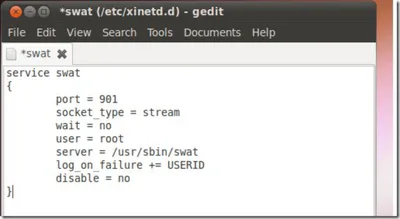
gksu gedit /etc/xinetd.d/swat
DFN50303 OPEN SOURCE SERVER ADMINISTRATION
43

+
■ Then edit the file to look line the one below, then save and
close out.
DFN50303 OPEN SOURCE SERVER ADMINISTRATION
44

+
■ After that, go to Applications –> Accessories –>
Terminal and type the line below and press Enter
sudo /etc/init.d/xinetd restart
DFN50303 OPEN SOURCE SERVER ADMINISTRATION
45

+
■ Also create a password for the root user by typing the line
below:
sudo passwd root
DFN50303 OPEN SOURCE SERVER ADMINISTRATION
46

+
■ When done, press Alt-F2 on your keyboard, then type the
line below and click Run:
http://localhost:901
DFN50303 OPEN SOURCE SERVER ADMINISTRATION
47


+
■ Enter the username and password for the root user.
DFN50303 OPEN SOURCE SERVER ADMINISTRATION
48


+
■ Login admin page:
DFN50303 OPEN SOURCE SERVER ADMINISTRATION
49


+
■ Global informations
DFN50303 OPEN SOURCE SERVER ADMINISTRATION
50


+
■ Wizard to edit the samba config
DFN50303 OPEN SOURCE SERVER ADMINISTRATION
51


+
■ Server Status:
DFN50303 OPEN SOURCE SERVER ADMINISTRATION
52


+
■ View of the actual samba config:
DFN50303 OPEN SOURCE SERVER ADMINISTRATION
53


+
■ Changes admin password page
DFN50303 OPEN SOURCE SERVER ADMINISTRATION
54

+Note
■ if you have problems with opening the files you placed in
your shared folder from another location… here’s how you fix
it!
■ Open a Terminal window and copy+paste the following line:
� sudo chmod o+w YOURSHAREDFOLDER/filename
■ replace YOURSHAREDFOLDER for the location of our shared
folder and replace filename for the file you need to take the
permissions from
■ Another way to fix this is to replace some lines in your
smb.conf.
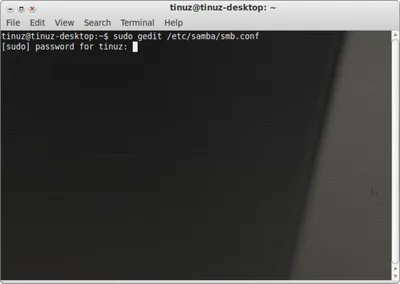
■ Open a Terminal window and copy+paste the following line:
sudo gedit /etc/samba/smb.conf
DFN50303 OPEN SOURCE SERVER ADMINISTRATION
55

+
■ Open a Terminal window and copy+paste the following line:
sudo gedit /etc/samba/smb.conf
DFN50303 OPEN SOURCE SERVER ADMINISTRATION
56


+■ Now your Samba config file is opened, scroll down to the part
that begins with: [yoursharedfolder] (in my case
[Shared-10.10])
DFN50303 OPEN SOURCE SERVER ADMINISTRATION
57

+
■ Now copy the text below (change the
[YourShared-FolderName], comment, path, user and group
name to the ones you use) and replace it for the text in your
smb.conf file
■ [YourShared-FolderName]
comment = your comment here
path = your/shared/folder
force user = yourusername
force group = yourgroupname
writeable = yes
browseable = yes
guest ok = yes
DFN50303 OPEN SOURCE SERVER ADMINISTRATION
58


+■ In the screenshot below you see how my smb.conf file looks
after the changes
DFN50303 OPEN SOURCE SERVER ADMINISTRATION
59

+Getting a Webmin
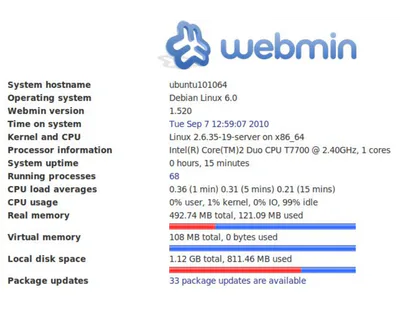
■ WebminWebmin is a
web-based interface for
system administration for
Unix/. Using any modern web
browser, you can setup user
accounts, Apache, DNS, file
sharing and much more.
Webmin removes the need to
manually edit Unix
configuration files like
/etc/passwd, and lets you
manage a system from the
console or remotely you can
also create backups for the
system and restore.
DFN50303 OPEN SOURCE SERVER ADMINISTRATION
60

+
■ Download webmin from http:www.webmin.com .
Currently 1.520
■ Execute webmin package. It will fail but it’s easier for us,
since we’ll just force installing dependencies, rather than
installing them one by one
■ Install missing dependencies and it will automatically
recompile webmin
■ Now restart webmin
wget http://www.webmin.com/download/deb/webmin-current.deb
sudo dpkg -i webmin-current.deb
sudo apt-get -f install
sudo /etc/init.d/webmin restart
DFN50303 OPEN SOURCE SERVER ADMINISTRATION
61

+
■ To access webmin, open your browser and type :
https://localhost:10000 or https://your-ip:10000
DFN50303 OPEN SOURCE SERVER ADMINISTRATION
62
Word Cloud
What have we learn today?
63
Fill in the Blanks
NFS is a file system used for sharing of files over a network that allows the different Linux computers to easily share files on the network. NFS stands for
Type answer...
64
Multiple Choice
A Standard UNIX client-server file sharing protocol
Client-Server
CIFS
NFS
NIS
65
Multiple Choice
All of these are linux server type EXCEPT
data server
application server
file server
phone server
66
Multiple Choice
This server is used to transfer files from one computer to other computer through internet and uses port 21.
FTP server
NTP server
Proxy server
DHCP server
Remote server
67
Multiple Choice
The correct parameter to install SAMBA is...
apt-get instal samba
apt get install samba
apt-get install samba
apt-get-install samba
+
Campus Area Network
Server Configuration
DFN50303 OPEN SOURCE SERVER ADMINISTRATION
Show answer
Auto Play
Slide 1 / 67
SLIDE
Similar Resources on Wayground

56 questions
Year 5 Book Questions
Presentation
•
5th Grade
54 questions
Word Processing Program
Presentation
•
5th Grade
61 questions
bahan ajar
Presentation
•
KG
59 questions
Writing Equations and Inequalities
Presentation
•
KG
64 questions
Serena's Simple Shoes
Presentation
•
2nd Grade
61 questions
Jan.08 Lesson
Presentation
•
3rd Grade
57 questions
Fiction STAAR Review
Presentation
•
4th Grade
64 questions
Ôn tập Tin học lớp 4
Presentation
•
4th Grade
Popular Resources on Wayground
6 questions
PRIDE Always and Everywhere
Presentation
•
12th Grade
20 questions
Lab Safety Quiz

Quiz
•
6th Grade
26 questions
KOR Review Kahoot Questions
Quiz
•
8th Grade
21 questions
Continents and Oceans
Quiz
•
6th Grade
12 questions
Unit Zero lesson 2 cafeteria
Presentation
•
9th - 12th Grade
20 questions
Parts of Speech
Quiz
•
5th Grade
10 questions
Riddles Riddles fun Riddles
Quiz
•
6th - 12th Grade
16 questions
Subject & Predicate
Quiz
•
5th Grade