

AZ900 - Day Two

Presentation
•
Computers
•
University
•
Practice Problem
•
Hard

Stephanie Allen
Used 1+ times
FREE Resource
61 Slides • 0 Questions
1

© Copyright Microsoft Corporation. All rights reserved.
AZ-900T00
Learning Path 02:
Azure Architecture
and Services
2

© Copyright Microsoft Corporation. All rights reserved.
Learning Path Outline
3


© Copyright Microsoft Corporation. All rights reserved.
Learning Path 02 – Outline
You will learn the following concepts:
▪Azure Architectural Components
•Regions and Availability Zones
•Subscriptions and Resource Groups
▪Compute and Networking
•Compute types
•Application hosting
•Virtual networking
▪Storage
•Storage services
•Redundancy options
•File management and migration
▪Identity, Access, and Security
•Directory services
•Authentication methods
•Security models
4


© Copyright Microsoft Corporation. All rights reserved.
Azure Accounts
•
Azure account
•
Azure free account
•
Azure free student account
•
Microsoft Learn sandbox
5

© Copyright Microsoft Corporation. All rights reserved.
Walkthrough – Create an Azure Account
Create an Azure free account
1.
Create an Azure free account
6

© Copyright Microsoft Corporation. All rights reserved.
Exercise – Explore the Learn sandbox
Explore the Learn sandbox
1.
Activate the sandbox
2.
Use PowerShell
3.
Shift to BASH
4.
Shift to Azure Interactive mode
5.
Navigate the portal
7

© Copyright Microsoft Corporation. All rights reserved.
Azure architectural components
8

© Copyright Microsoft Corporation. All rights reserved.
Core Azure architectural components – Objective Domain
•Describe Azure regions, region pairs, and sovereign regions.
•Describe Availability Zones.
•Describe Azure datacenters.
•Describe Azure resources and Resource Groups.
•Describe subscriptions.
•Describe management groups.
•Describe the hierarchy of resource groups, subscriptions, and management
groups.
9


Regions
Azure offers more global
regions than any other cloud
provider with 60+ regions
representing over 140 countries
•Regions are made up of one or more datacenters in close proximity.
•Provide flexibility and scale to reduce customer latency.
•Preserve data residency with a comprehensive compliance offering.
© Copyright Microsoft Corporation. All rights reserved.
10



Availability zones
•Provide protection against downtime due to
datacenter failure.
•Physically separate datacenters within the
same region.
•Each datacenter is equipped with
independent power, cooling, and
networking.
•Connected through private fiber-optic
networks.
Availability Zone 1
Availability Zone 3
Availability Zone 2
Azure Region
© Copyright Microsoft Corporation. All rights reserved.
11

Region Pairs
• At least 300 miles of separation between
region pairs.
• Automatic replication for some services.
• Prioritized region recovery in the event of
outage.
• Updates are rollout sequentially to
minimize downtime.
Web Link: https://aka.ms/PairedRegions
Region
North Central US
East US
West US 2
US East 2
Canada Central
North Europe
UK West
Germany Central
South East Asia
East China
Japan East
Australia Southeast
India South
Brazil South
(Primary)
Region
South Central US
West US
West Central US
Central US
Canada East
West Europe
UK South
Germany
Northeast
East Asia
North China
Japan West
Australia East
India Central
South Central US
© Copyright Microsoft Corporation. All rights reserved.
12

© Copyright Microsoft Corporation. All rights reserved.
Azure Sovereign Regions (US Government services)
Meets the security and compliance needs of US federal agencies, state and local
governments, and their solution providers.
13

© Copyright Microsoft Corporation. All rights reserved.
Azure Sovereign Regions (Azure China)
Microsoft is China’s first foreign public cloud service provider, in compliance with
government regulations.
14

© Copyright Microsoft Corporation. All rights reserved.
Walkthrough – Explore the Azure Global infrastructure
Explore the Azure global
infrastructure
1.
Select Explore the Globe (after
intro).
2.
Notice the different icons
(geography, regions, points of
presence (PoP), and so on).
3.
Find your location on the globe,
then find the nearest PoP and
region to your location.
15

© Copyright Microsoft Corporation. All rights reserved.
Azure Resources
Azure resources are components like storage, virtual machines, and networks that are available to build cloud solutions.
16


Resource groups
A resource group is a container to manage
and aggregate resources in a single unit.
•Resources can exist in only one resource
group.
•Resources can exist in different regions.
•Resources can be moved to different
resource groups.
•Applications can utilize multiple resource
groups.
OR
Resource groups
(web + DB, VM, Storage) in one group
Storage
resource
group
Virtual
machine
resource
group
Web and
DB
resource
group
© Copyright Microsoft Corporation. All rights reserved.
17

© Copyright Microsoft Corporation. All rights reserved.
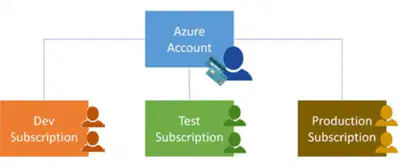
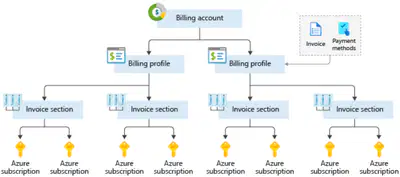
Azure Subscriptions
An Azure subscription provides you with
authenticated and authorized access to Azure
accounts.
•Billing boundary: generate separate billing
reports and invoices for each subscription.
•Access control boundary: manage and
control access to the resources that users can
provision with specific subscriptions.
18

© Copyright Microsoft Corporation. All rights reserved.
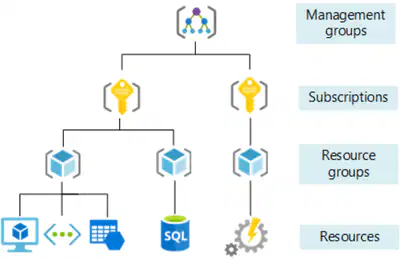
Management Groups
•Management groups can include
multiple Azure subscriptions.
•Subscriptions inherit conditions applied
to the management group.
•10,000 management groups can be
supported in a single directory.
•A management group tree can support
up to six levels of depth.
19

© Copyright Microsoft Corporation. All rights reserved.
Exercise – Create an Azure resource
Create an Azure resource, monitor
the resource group for needed
resources being created in the same
group
1.
Create a virtual machine.
2.
Monitor the resource group.
20

© Copyright Microsoft Corporation. All rights reserved.
Compute and Networking
21

© Copyright Microsoft Corporation. All rights reserved.
Compute and Networking- Objective Domain
Describe the benefits and usage of:
•Compare compute types, including container instances, virtual machines,
and functions.
•Describe virtual machine options, including virtual machines (VMs), virtual machine
scale sets, virtual machine availability sets, and Azure Virtual Desktop.
•Describe resources required for virtual machines.
•Describe application hosting options, including Azure Web Apps, containers, and
virtual machines.
•Describe virtual networking, including the purpose of Azure Virtual Networks, Azure
virtual subnets, peering, Azure DNS, VPN Gateway, and ExpressRoute.
•Define public and private endpoints.
22

© Copyright Microsoft Corporation. All rights reserved.
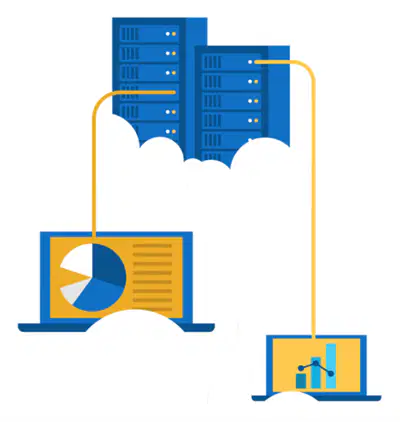
Azure compute services
Azure compute is an on-demand computing service that provides computing
resources such as disks, processors, memory, networking, and operating systems.
23

Azure virtual machines
Azure Virtual Machines (VM) are software emulations
of physical computers.
•Includes virtual processor, memory, storage, and
networking.
•IaaS offering that provides total control and
customization.
© Copyright Microsoft Corporation. All rights reserved.
24

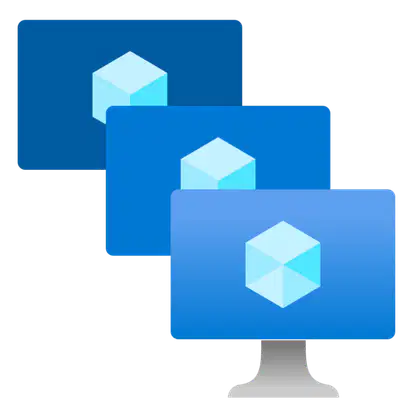
VM scale sets
Scale sets provide a load-balanced opportunity to
automatically scale resources.
•Scale out when resource needs increase.
•Scale in when resource needs are lower.
© Copyright Microsoft Corporation. All rights reserved.
25


VM availability sets
© Copyright Microsoft Corporation. All rights reserved.
26

© Copyright Microsoft Corporation. All rights reserved.
Exercise – Create a Virtual Machine
Create a virtual machine in the Azure
Portal, connect to the virtual
machine, install the web server role,
and test.
1.
Create the virtual machine.
2.
Install the web server package.
27

Azure Virtual Desktop
Azure Virtual Desktop is a desktop and app virtualization
that runs in the cloud.
•Create a full desktop virtualization environment without
having to run additional gateway servers.
•Reduce risk of resource being left behind.
•True multi-session deployments.
© Copyright Microsoft Corporation. All rights reserved.
28

Azure Container Services
Azure Containers are a light-weight, virtualized environment that does not require
operating system management, and can respond to changes on demand.
© Copyright Microsoft Corporation. All rights reserved.
29

© Copyright Microsoft Corporation. All rights reserved.
Azure Functions
30

© Copyright Microsoft Corporation. All rights reserved.
Virtual machines
Cloud based server that supports either
Windows or Linux environments.
Virtual Desktop
Provides a cloud based personal computer
Windows desktop experience.
Lightweight, miniature environment well
suited for running microservices.
Containers
Useful for lift-and-shift migrations to the
cloud.
Dedicated applications to connect and use, or
accessible from any modern browser.
Designed for scalability and resiliency
through orchestration.
Complete operating system package,
including the host operating system.
Multi-client login allows multiple users to log
into the same machine at the same time.
Applications and services are packaged in a
container that sits on-top of the host
operating system. Multiple containers can sit
on one host OS.
Comparing Azure compute options
31


Azure App Services
Azure App Services is a fully managed platform to build,
deploy, and scale web apps and APIs quickly.
•Works with .NET, .NET Core, Node.js, Java, Python, or php.
•PaaS offering with enterprise-grade performance, security,
and compliance requirements.
© Copyright Microsoft Corporation. All rights reserved.
32

© Copyright Microsoft Corporation. All rights reserved.
Azure networking services
)
33

© Copyright Microsoft Corporation. All rights reserved.
Walkthrough – Configure network access
Configure public access to the virtual
machine created earlier.
1.
Verify currently open ports.
2.
Create a network security group
3.
Configure HTTP access (port 80)
4.
Test the connection.
34

© Copyright Microsoft Corporation. All rights reserved.
Azure networking services
35

© Copyright Microsoft Corporation. All rights reserved.
-
Azure networking services
36


© Copyright Microsoft Corporation. All rights reserved.
Azure DNS
•Reliability and performance by
leveraging a global network of DNS
name servers using Anycast
networking.
•Azure DNS security is based on Azure
resource manager, enabling role-
based access control and monitoring
and logging.
•Ease of use for managing your Azure
and external resources with a single
DNS service.
•Customizable virtual networks allow
you to use private, fully customized
domain names in you private virtual
networks.
•Alias records supports alias record
sets to point directly to an Azure
resource.
37

© Copyright Microsoft Corporation. All rights reserved.
Storage
38

© Copyright Microsoft Corporation. All rights reserved.
Storage - Objective Domain
Describe the benefits and usage of:
•Compare Azure storage services.
•Describe storage tiers.
•Describe redundancy options.
•Describe storage account options and storage types.
•Identify options for moving files, including AzCopy, Azure Storage Explorer,
and Azure File Sync.
•Describe migration options, including Azure Migrate and Azure Data Box.
39


© Copyright Microsoft Corporation. All rights reserved.
Storage accounts
•
Must have a globally unique name
•
Provide over-the-internet access
worldwide
•
Determine storage services and
redundancy options
40

© Copyright Microsoft Corporation. All rights reserved.
Storage redundancy
Redundancy configuration
Deployment
Durability
Locally redundant storage (LRS)
Single datacenter in the primary region
11 nines
Zone-redundant storage (ZRS)
Three availability zones in the primary region
12 nines
Geo-redundant storage (GRS)
Single datacenter in the primary and secondary region
16 nines
Geo-zone-redundant-storage
(GZRS)
Three availability zones in the primary region and a
single datacenter in secondary region
16 nines
41


© Copyright Microsoft Corporation. All rights reserved.
Azure storage services
Container storage (blob) is optimized for storing massive
amounts of unstructured data, such as text or binary data.
Disk storage provides disks for virtual machines, applications,
and other services to access and use.
Azure Files sets up a highly available network file shares that
can be accessed by using the standard Server Message Block
(SMB) protocol.
42

© Copyright Microsoft Corporation. All rights reserved.
Storage service public endpoints
Storage service
Public endpoint
Blob Storage
https://<storage-account-name>.blob.core.windows.net
Data Lake Storage Gen2
https://<storage-account-name>.dfs.core.windows.net
Azure Files
https://<storage-account-name>.file.core.windows.net
Queue Storage
https://<storage-account-name>.queue.core.windows.net
Table Storage
https://<storage-account-name>.table.core.windows.net
43

© Copyright Microsoft Corporation. All rights reserved.
Azure storage access tiers
You can switch between these access tiers at any time.
Hot
Cool
Archive
Optimized for storing
data that is accessed
frequently.
Optimized for storing
data that is infrequently
accessed and stored for
at least 30 days.
Optimized for storing
data that is rarely
accessed and stored for
at least 180 days with
flexible latency
requirements.
44

© Copyright Microsoft Corporation. All rights reserved.
Exercise - Create a storage blob
Create a storage account with a blob
storage container. Work with blob
files.
1.
Create a storage account.
2.
Create a blob container.
3.
Upload and access a blob.
45


© Copyright Microsoft Corporation. All rights reserved.
Azure Migrate
• Unified migration platform
• Range of integrated and standalone
tools
• Assessment and migration
46

© Copyright Microsoft Corporation. All rights reserved.
• Store up to 80 terabytes of data.
• Move your disaster recovery backups
to Azure.
• Protect your data in a rugged case
during transit.
• Migrate data out of Azure for
compliance or regulatory needs.
• Migrate data to Azure from remote
locations with limited or no
connectivity.
Azure Data Box
47

© Copyright Microsoft Corporation. All rights reserved.
AzCopy
Command line utility
Azure Storage Explorer
Graphical user interface
(similar to Windows Explorer)
Synchronizes Azure and on premises files in a
bidirectional manner
Azure File Sync
Compatible with Windows, MacOS, and Linux
One-direction synchronization
Uses AzCopy to handle file operations
File management options
Copy blobs or files to or from your storage account
Cloud tiering keeps frequently accessed files local, while freeing up space
Rapid reprovisioning of failed local server
(install and resync)
48

© Copyright Microsoft Corporation. All rights reserved.
Identity, Access, and Security
49

© Copyright Microsoft Corporation. All rights reserved.
Identity, Access, and Security - Objective Domain
Describe the benefits and usage of:
•Describe directory services in Azure, including Azure Active Directory (AD)
and Azure AD DS, part of Microsoft Entra.
•Describe authentication methods in Azure, including single sign-on (SSO),
multifactor authentication (MFA), and passwordless.
•Describe external identities and guest access in Azure.
•Describe Azure AD Conditional Access.
•Describe Azure Role Based Access Control (RBAC).
•Describe the concept of Zero Trust.
•Describe the purpose of the defense in depth model.
•Describe the purpose of Microsoft Defender for Cloud.
50


© Copyright Microsoft Corporation. All rights reserved.
Azure Active Directory (AAD)
Azure Active Directory (AAD) is Microsoft Azure’s cloud-based identity and access
management service.
• Authentication (employees sign-in to access resources).
• Single sign-on (SSO).
• Application management.
• Business to Business (B2B).
• Business to Customer (B2C) identity services.
• Device management.
51

© Copyright Microsoft Corporation. All rights reserved.
Azure Active Directory Domain Services (Azure AD DS)
• Gain the benefit of cloud-based domain services without managing domain controllers
• Run legacy applications (that can’t use modern auth standards) in the cloud
•Automatically sync from Azure AD
52

© Copyright Microsoft Corporation. All rights reserved.
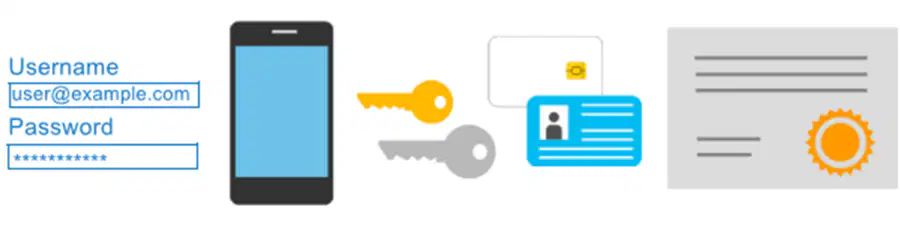
Compare Authentication and Authorization
53

© Copyright Microsoft Corporation. All rights reserved.
Azure Multi-Factor Authentication
Provides additional security for your identities by requiring two or more elements for
full authentication.
• Something you know → Something you possess → Something you are
54


© Copyright Microsoft Corporation. All rights reserved.
External Identities B2B
55


© Copyright Microsoft Corporation. All rights reserved.
External Identities B2C
56

© Copyright Microsoft Corporation. All rights reserved.
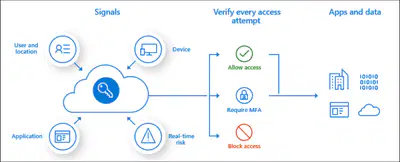
Conditional Access
Conditional Accessis used by Azure Active Directory to bring signals together, to make decisions, and enforce organizational policies.
• User or Group Membership
• IP Location
•Device
•Application
•Risk Detection
57


© Copyright Microsoft Corporation. All rights reserved.
Azure role-based access control (Azure RBAC)
Azure
Active Directory
Resource group
Resource group
User
Apps
User groups
Azure
subscription
• Fine-grained access management.
• Segregate duties within the team and
grant only the amount of access to users
that they need to perform their jobs.
• Enables access to the Azure portal and
controlling access to resources.
58


© Copyright Microsoft Corporation. All rights reserved.
Zero Trust
59

© Copyright Microsoft Corporation. All rights reserved.
Defense in depth
•A layered approach to securing computer
systems.
•Provides multiple levels of protection.
•Attacks against one layer are isolated from
subsequent layers.
Physical Security
Identity & Access
Perimeter
Network
Compute
Application
Data
60

© Copyright Microsoft Corporation. All rights reserved.
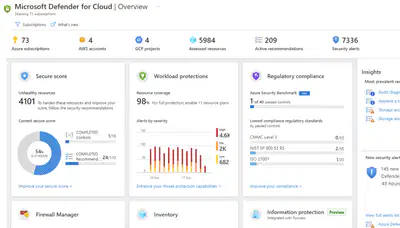
Microsoft Defender for Cloud
Microsoft Defender for Cloud is a monitoring service that provides threat protection
across both Azure and on-premises datacenters.
• Provides security recommendations
• Detect and block malware
• Analyze and identify potential attacks
• Just-in-time access control for ports
61

© Copyright Microsoft Corporation. All rights reserved.
Learning Path 02 Review
Microsoft Learn Modules
(docs.microsoft.com/Learn)
•
Physical and management infrastructure of
Microsoft Azure
•
Compute and networking services
•
Storage services
•
Identity, access, and security
© Copyright Microsoft Corporation. All rights reserved.
AZ-900T00
Learning Path 02:
Azure Architecture
and Services
Show answer
Auto Play
Slide 1 / 61
SLIDE
Similar Resources on Wayground

54 questions
Political Philosophy Test Review
Presentation
•
12th Grade
51 questions
Nouns
Presentation
•
University
51 questions
CPAS 3
Presentation
•
University
53 questions
refugees-business English
Presentation
•
Professional Development
60 questions
MSK
Presentation
•
Professional Development
56 questions
module 6
Presentation
•
University
54 questions
Activity 1.2 (Data Privacy Act of 2012)
Presentation
•
University
57 questions
TEAS Prep Session 5
Presentation
•
University
Popular Resources on Wayground
10 questions
Safety Day 2026 – Student Review

Quiz
•
9th Grade
21 questions
Continents and Oceans
Quiz
•
6th Grade
20 questions
Parts of Speech
Quiz
•
5th Grade
16 questions
Subject & Predicate
Quiz
•
5th Grade
25 questions
Multiplication Facts
Quiz
•
5th Grade
12 questions
Map Skills
Quiz
•
3rd Grade
22 questions
Continents and Oceans
Quiz
•
5th Grade
15 questions
Rounding Decimals
Quiz
•
5th Grade
Discover more resources for Computers
20 questions
Disney Trivia
Quiz
•
University
10 questions
Spanish Greetings and Goodbyes!
Presentation
•
6th Grade - University
20 questions
Physical or Chemical Change/Phases
Quiz
•
8th Grade - University
39 questions
Unit 7 Key Terms
Quiz
•
11th Grade - University
25 questions
SER and Subject Pronouns
Quiz
•
8th Grade - University
38 questions
Unit 6 Key Terms
Quiz
•
11th Grade - University
19 questions
Key Concepts in Buddhism
Quiz
•
University
0 questions
Cell Domain Basic Review (Biology)
Quiz
•
University