

Lossless Compression

Presentation
•
Computers
•
12th Grade
•
Practice Problem
•
Easy

Katherine Valenti
Used 6+ times
FREE Resource
19 Slides • 8 Questions
1


Unit 1 - Lesson 9
Lossless Compression
Computer Science Principles
2

3
Open Ended

This list represents several common abbreviations used in text messages. What other abbreviations could you add to this list?
4
Open Ended
Why might we use abbreviations when sending messages? What are the advantages?
5
Warm Up
Talk in code, hide information, be clever
Abbreviations save time and space when communicating
Both the sender and receiver need to understand what the abbreviation stands for in order for it to make sense
6

7

Text Compression
Unit 1 Lesson 9 - Activity
Pitter_patter_pitter_patter_listen_to_the_rain_pitter_patter_pitter_patter_on_the_window_pane
8


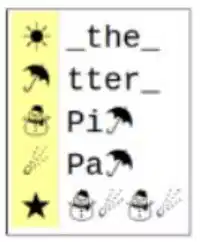
Text Compression
Unit 1 Lesson 9 - Activity
9
Open Ended
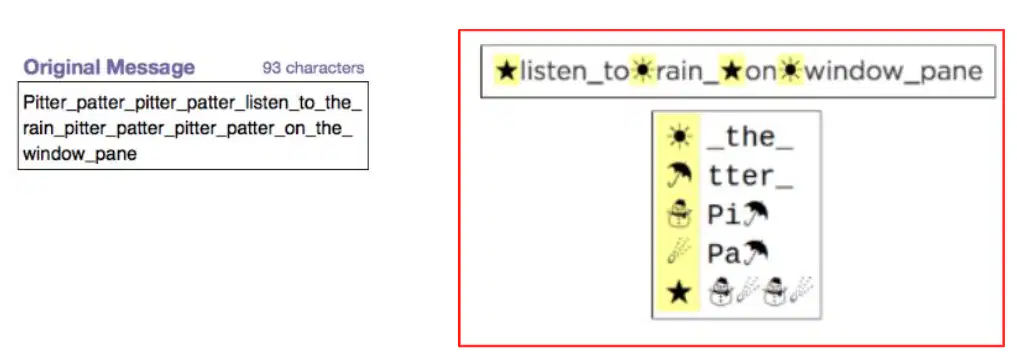
How is this message the same as the first? What actually gets sent to my friend?
10
Introduction to Compression
Each symbol represents other snippets of text
By substituting each symbol for the text it represents, we can re-create the original message
The entire sent message is actually two parts
The text with symbols
The key that shows what each symbol represents
If only one part is sent without the other, the receiver won't be able to recreate the message
11
Introduction to Compression
Using abbreviations and symbols is a form of compression
Represent the same information with fewer characters
The original message had 93 characters, but the new message and key (aka dictionary) have a total of 56 characters
We're sending the same information, but with fewer characters
12

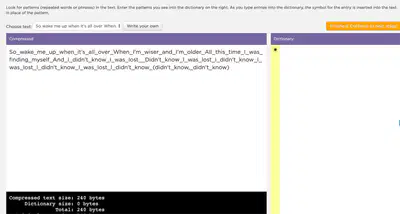
Text Compression Widget
Unit 1 Lesson 9 - Activity
Do This:
Navigate to Code Studio Lesson 9
Go to Level 1
Try to compress the text
13


Make Note of your Compression Rating
Compression Rating
Unit 1 Lesson 9 - Activity
14
Open Ended
What was your best compression rate?
15
Open Ended
What strategies are you using to compress your sample text? Which ones seem most successful?
16
Text Compression
Look for repeated words, sentences, or even parts of words (like -ing or -th)
The widget lets you copy/paste to embed symbols within symbols
The order of the dictionary matters
Rearranging once it's made can lead to problems
17

Unit 1 Lesson 9 - Activity
18
Text Compression
The widget we are using is an example of lossless compression
The compression percentage at the bottom of the screen is calculated by comparing the number of bytes in the original message and the number of bytes in the compressed message
19


Type In Here
Do this: Continue to try and compress
this text, using some of the strategies we discussed
Unit 1 Lesson 9 - Activity
20

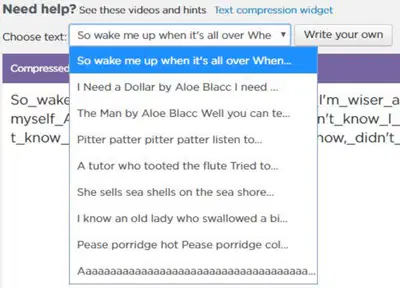
Click the Drop-Down
Menu to explore other texts to compress
Be looking for texts
you predict will be easy to compress and texts you predict will be difficult
Unit 1 Lesson 9 - Activity
21

22
Open Ended
What made some messages "easier" to compress than others? What made some messages more "difficult" to compress than others?
23
Wrap Up
Easier texts had lots of repetition
Difficult texts have less repetition
Some strategies may actually make compression worse
Compression rate will vary depending on the strategy we use and patterns in the text
Even though the number of bytes is getting smaller, we're never actually losing information
We can always perfectly recreate the original message using our dictionary key
24
Multiple Choice
What is the most important quality of lossless compression?
The data is transformed to usually make it smaller. It can always be re-constructed back to the original.
The data is transformed to always make it smaller. It can always be re-constructed back to the original.
The data is transformed to usually make it smaller. It cannot always be re-constructed back to the original.
The data is transformed to always make it smaller. It cannot always be re-constructed back to the original.
25
Open Ended
An author is preparing to send their book to a publisher as an email attachment. The file on their computer is 1000 bytes. When they attach the file to their email, it shows as 750 bytes. The author gets very upset because they are concerned that part of their book has been deleted by the email provider. If you could talk to this author, how would you explain what is happening to their book?
26
Wrap Up
Just because the file is smaller does NOT mean that information is lost
It just means the email automatically compressed the data
File compression occurs anytime you send an email or text message
The information is still there, it just gets smaller to be transmitted
27

Unit 1 Lesson 9 - Wrap Up
Lossless Compression: A process for reducing the number of bits needed to represent something without losing any information. This
process is reversible.
01101100 01101111
01110011 01110011
01101100 01100101
01110011 01110011
01101100 01101111
01110011 01110011
01101100 01100101
01110011 01110011
Unit 1 - Lesson 9
Lossless Compression
Computer Science Principles
Show answer
Auto Play
Slide 1 / 27
SLIDE
Similar Resources on Wayground

21 questions
INput / OUTput Devices
Presentation
•
12th Grade
21 questions
KISI-KISI BAHASA JEPANG KLS XII (SMK)
Presentation
•
12th Grade
21 questions
Caption
Presentation
•
12th Grade
20 questions
Literasi Digital (Konsep)
Presentation
•
12th Grade
22 questions
快餐、中餐、早午晚餐、飲品
Presentation
•
12th Grade
20 questions
MIL lesson Types of Media Part2
Presentation
•
12th Grade
22 questions
3.1 Checking Accounts
Presentation
•
12th Grade
19 questions
Keberkaitan Turunan Fungsi Trigonometri dengan kurvanya 2
Presentation
•
12th Grade
Popular Resources on Wayground
10 questions
HCS SCI 03 Summer School Review 4

Quiz
•
3rd Grade
11 questions
HSMS - Standard Response Protocol
Quiz
•
6th - 8th Grade
16 questions
1.1-1.2 Quiz Review
Quiz
•
9th - 12th Grade
12 questions
Exponent Expressions
Quiz
•
6th Grade
20 questions
Adding and Subtracting Integers
Quiz
•
6th - 7th Grade
11 questions
Northeast States
Quiz
•
3rd - 4th Grade
10 questions
Characterization
Quiz
•
3rd - 7th Grade
10 questions
Common Denominators
Quiz
•
5th Grade