

NETWORKING SECURITY PLAN-NETWORK PERIMETER

Presentation
•
English
•
8th Grade
•
Practice Problem
•
Easy

Ruty Doris Copacondori Muña
Used 1+ times
FREE Resource
44 Slides • 7 Questions
1

www.senati.edu.pe
INFORMATION TECHNOLOGY
Network Security Plan
2

www.senati.edu.pe
Objective:
❑Explain how to develop and implement a Network Security Plan.
3

www.senati.edu.pe
INTRODUCTION
Protecting your business and
its data from today’s threats
and
adversaries
is
a
challenging endeavor requiring
expertise
and
professionally
managed resources.
So,
you
need
astrategic
security plan that outlines how
to protect your network from
cyber attacks.
4

www.senati.edu.pe
What is a Network Security Plan?
A network security plan is a strategy that defines the approach and
techniques used to protect the network from unauthorized users and
guards against events that can jeopardize or compromise a
system’s security.
The approach and techniques used by an
organization may consist of creating security
policies
and
procedures
which
describe
how an organization intends to meet the
security requirements for its systems.
5
Multiple Choice

It is a strategy that defines the approach and
techniques used to protect the network from unauthorized users.
Security
Security Plan
Network Security Plan
6

www.senati.edu.pe
The security plan is a living document, it requires reviews or
maintenance at specified intervals to ensure it is current and up to
date with regulatory requirements or major changes in the topology
of the network.
7

www.senati.edu.pe
Challenges of developing a Network Security
Plan
Each
security
layer
you
add
to
your
network
impacts
user
experience. It increases operating and capital expenditure costs.
Real-time network traffic scans also use a huge chunk of your
computing resources.
An ideal plan is one that secures your
network at a manageable budget without
compromising on the UX.
8

www.senati.edu.pe
Essential Steps to Follow a Secure Plan
The most important steps
in
developing
and
implementing
a
solid
network
security
plan
include:
Assessing
your Network
Planning
Installation
Constant
Monitoring
9

www.senati.edu.pe
This involves evaluating all hardware and software components of
your network. You should also monitor both incoming and outgoing
traffic so as to identify potential access points. Setting strict network
access permissions makes it easier to identify breaches.
1. Assessing your Network
10

www.senati.edu.pe
Once the assessment is complete, you’ll have a clearer picture of
your exact security needs. You can also figure out which experts you
need to design, implement, and maintain a better network security
solution.
2. Planning
✓ Planning involves deciding on whether to replace or upgrade
vulnerable components, integrating new software, and improving
network access permissions.
✓ You can also research on the latest encryption methods, secure
remote access methods, and how to respond to specific threats.
11

www.senati.edu.pe
Smooth deployment depends on how detailed the planning phase
was. Since your network runs 24/7, this critical task should ideally be
performed when traffic is at its lowest.
3. Installation
If deploying the security plan in one instance is likely to cause
network interference, you may do it in phases. Address the most
critical vulnerabilities first. Holding trials before going live makes
it easier to identify and solve previously unforeseen issues.
12

www.senati.edu.pe
4. Constant Monitoring
✓ Malicious attackers are constantly probing your network for weak
points.
✓ Reviewing your audit logs gives you relevant information on
potential threats.
✓ It also allows you to tweak your security settings to prevent similar
attacks in the future.
✓ You should also have a team of IT experts specifically tasked with
responding to breaches.
13
Multiple Choice
Constant monitoring include...
using internet anywhere
resetting passwords
14

www.senati.edu.pe
How to keep your Network Secure
As part of your overall cybersecurity blueprint, a top-notch network
security
solution
should
follow
a
well-defined
strategy.
This
includes:
Isolating and Segmenting Networks
Creating a Security-Focused Culture
Secure Wireless Networks
Hiring a Managed Service Provider (MSP)
15

www.senati.edu.pe
Isolating and Segmenting Networks
❖ Instead of treating your network as a single entity, segment it according to the
types of traffic flowing through it. Creating sub-networks allows you to lock out
some users from sensitive parts.
❖ It’s easier to contain a breach by isolating the relevant sub-network and
neutralizing the threat before opening it again. During this period, operations in
other networks can carry on undisturbed.
16

www.senati.edu.pe
Creating a Security-Focused Culture
❖ As sophisticated as your security system might be, you can’t ignore the human
factor. Ensure your employees are updated on basic cybersecurity measures,
even if they’re not in the IT department.
❖ This includes identifying and reporting suspected phishing attempts and social
engineering attacks.
Hold regular
training sessions on common network
vulnerabilities and how to prevent them. Some companies create fake network
attacks to gauge their employees’ level of preparedness.
17

www.senati.edu.pe
Secure Wireless Networks
❖ Wireless networks have become a vital part of every organization’s cyber
system. Although they improve service delivery, they also make it easier for
bad actors to gain access to your network.
Your network security plan must
include your Wi-Fi network. You
can upgrade it by changing or
masking
your
SSID,
encrypting
wireless
access
points,
adding
two-factor
authentication,
and
changing passwords.
18

www.senati.edu.pe
Hiring a Managed Service Provider (MSP)
❖ An in-house IT team helps you manage your day-to-day tech challenges, but a
managed services provider takes it to the next level. Such firms are highly
specialized in solving the most complex cybersecurity problems.
❖ Their services include performing security audits, implementing new security
updates and testing your network for vulnerabilities.
While they charge premium rates,
the
superior
services
offered
by
MSPs result in several long term
benefits for your company.
19
Multiple Choice

What does mean MSP ?
Managed Service
Service Provider
Managed Service Provider
20

www.senati.edu.pe
Conclusion
A
Network
Security
Plan
provides
the
roadmap for your organization to operate
safely and securely.
The plan should be deliberate, enforceable,
understandable, educating all employers to
want to do the right thing for security.
21

www.senati.edu.pe
Information Technology
Network Perimeter
22

www.senati.edu.pe
Recognize what the Perimeter Network Security is.
Objective
Content:
- Introduction.
- Network Perimeter Definition.
- Network Perimeter Components.
- Network Perimeter Requirements.
- Network Perimeter Guidelines.
- Network Perimeter Importance.
- Conclusions.
23

www.senati.edu.pe
Introduction
A network perimeter defines where your
internal
network
stops
and
where
the
connection to the internet starts.
For traditional private networks, knowing
this boundary was easy, as the gateway
was often the router, not to mention that in
the past, everything was all hardwired.
24

www.senati.edu.pe
Network Perimeter Definition
A
network
perimeter
is
the
secured
boundary between the private and locally
managed side of a network, often a
company’s intranet, and the public facing
side of a network, often the Internet.
25
Multiple Choice
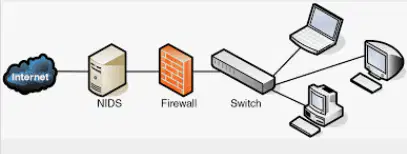
What is a Network Perimeter ?
It's the secured boundary between the private and locally managed side of a _______.
network
work
computer
26

www.senati.edu.pe
Network Perimeter Components
1.- Border Routers
2.- Firewalls
3.- Intrusion Detection System (IDS)
4.- Intrusion Prevention System (IPS)
5.- De-Militarized Zones / Screened Subnets
27

www.senati.edu.pe
Network Perimeter Components
1.- Border Routers :
Routers serve as the traffic signs of
networks. They direct traffic into, out of,
and
throughout
networks.
The
border
router is the final router under the control
of an organization before traffic appears
on an untrusted network, such as the
Internet.
28

www.senati.edu.pe
Network Perimeter Components
2.- Firewalls :
A firewall is a device that has a set of
rules specifying what traffic it will allow or
deny to pass through it.
A firewall typically picks up where the
border router leaves off and makes a
much more thorough pass at filtering
traffic.
29

www.senati.edu.pe
Network Perimeter Components
2.- Firewalls :
Some types of firewalls include:
-Proxy Firewall
-Stateful Inspection Firewall
-Unified Threat Management Firewall
-Virtual Firewall
30

www.senati.edu.pe
Network Perimeter Components
3.- Intrusion Detection System (IDS) :
This functions as an alarm system for
your network that is used to detect and
alert on suspicious activity. This system
can be built from a single device or a
collection of sensors placed at strategic
points in a network.
31

www.senati.edu.pe
Network Perimeter Components
3.- Intrusion Detection System (IDS) :
An IDS can be host-based or network-
based depending on its environment.
32
Multiple Choice
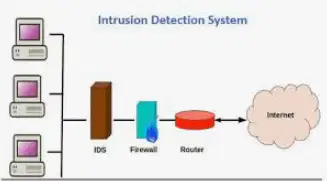
What does IDS mean?
Intrusion System
Intrusion Detection System
Detection System
33

www.senati.edu.pe
Network Perimeter Components
3.- Intrusion Detection System (IDS) :
Host-Based IDS :
Designed for specific endpoint and protect it against internal and external
threats.
A host-based IDS is limited only to its host machine, but it allows deep
visibility to monitor traffic to and from the machine.
34

www.senati.edu.pe
Network Perimeter Components
3.- Intrusion Detection System (IDS) :
Network-Based IDS :
Designed for monitoring an entire network. It provides wider visibility into
the traffic flowing through the network and has the ability to uncover
extensive threats.
However, this system doesn’t have deep visibility into the endpoints they
protect.
35

www.senati.edu.pe
Network Perimeter Components
4.- Intrusion Prevention System (IPS) :
Compared
to
a
traditional
IDS
which
simply notifies administrators of possible
threats,
an
IPS
can
attempt
to
automatically defend the target without
the administrator's direct intervention.
36

www.senati.edu.pe
Network Perimeter Components
4.- Intrusion Prevention System (IPS) :
This
system
is
designed
to
monitor
intrusions
and
prevent
threats
from
developing. The system monitors your
network
continuously
and
scans
for
possible risk to gather more information
and administer the proper preventative
actions.
37

www.senati.edu.pe
Network Perimeter Components
4.- Intrusion Prevention System (IPS) :
This system can be used to identify
violations against rules and policies.
38

www.senati.edu.pe
Network Perimeter Components
5.-
De-Militarized
Zones
/Screened
Subnets :
DMZ and screened subnet refer to small
networks
containing
public
services
connected
directly
to
and
offered
protection by the firewall or other filtering
device.
39

www.senati.edu.pe
Network Perimeter Components
5.-
De-Militarized
Zones
/Screened
Subnets :
The purpose of DMZ is to enable access
to resources from the untrusted network
while keeping the system or host on an
internal private network secure.
40

www.senati.edu.pe
Network Perimeter Components
5.-
De-Militarized
Zones
/Screened
Subnets :
Resources
that
are
commonly
placed
within the DMZ are Mail servers, FTP
servers, Web servers, and VoIP servers.
41
Multiple Choice
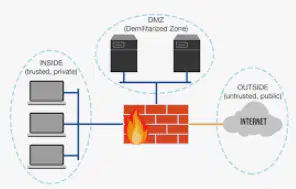
What does DMZ mean?
It's a software.
It's a physical area that separates LAN.
It's a computer.
42

www.senati.edu.pe
Network Perimeter Requirements
For most modern businesses, there is no single defensible boundary
between a company’s internal assets and the outside world.
43

www.senati.edu.pe
Network Perimeter Requirements
Internal users are not simply connecting from inside an organization’s
building, network, or inner circle. They are connecting from external
networks and using mobile devices to access internal resources.
Data and applications are no longer housed on servers that businesses
physically own, maintain, and protect. Data warehouses, cloud computing,
and software as a service
present immediate access and security
challenges for both internal and external users.
44

www.senati.edu.pe
Network Perimeter Requirements
Web services have opened a wide door to interactions outside of normal
trust boundaries. To serve multiple clients, or simply to communicate with
other services, both internal and external, insecure interactions on
external platforms occur all the time.
Also, individually protecting each software application, service, or asset
can be quite challenging. While the concept of a “network perimeter” has
meaning for certain network configurations, in today’s environment it
should be treated abstractly, rather than as a specific setup.
45

www.senati.edu.pe
Network Perimeter Guidelines
With
this
in
mind,
there
are
a
few
guidelines that can help to deliver a
secure
and
modular
network
environment:
46

www.senati.edu.pe
Network Perimeter Guidelines
1.-
Strong authentication to allow controlled
access to information assets.
Two factor authentication acts as an extra
layer of security for logins, ensuring that
attempted intrusions are halted before
any damage is done.
47

www.senati.edu.pe
Network Perimeter Guidelines
2.-
Hardening of mobile and IoT devices that
connect to the network.
Access control policies define high-level
requirements that determine who may
access
information,
and
under
what
circumstances that information can be
accessed.
48

www.senati.edu.pe
Network Perimeter Guidelines
3.-
Embedded
security
services
inside
devices
and
applications.
Embedded
security
solutions
can
help
protect
devices ranging from atm’s to automated
manufacturing
systems.
Features
including application whitelisting, antivirus
protection,
and
encryption
can
be
embedded
to
help
protect
otherwise
exposed IoT devices.
49

www.senati.edu.pe
Network Perimeter Guidelines
4.-
Collecting
security
intelligence
directly
from
applications
and
their
hosts.
Maintaining an open communication line
with cloud service providers like AWS can
greatly increase security protections.
Application
and
service
managers
understand
how
to
integrate
shared
security with their systems better than
anyone else.
50
Multiple Choice
Collecting security intelligence directly from applications and their hosts.
What is a host?
51

www.senati.edu.pe
Conclusions:
The concept of network perimeter will allow
your
organization
to
think
strategically
about how you can protect critical internal
data from external threats.
www.senati.edu.pe
INFORMATION TECHNOLOGY
Network Security Plan
Show answer
Auto Play
Slide 1 / 51
SLIDE
Similar Resources on Wayground

45 questions
_St. Patrick's Day
Presentation
•
8th Grade
44 questions
LAC Session AP Teachers, MTs and LAC leaders
Presentation
•
8th Grade
49 questions
Lesson 5 Review - Social Media Strategist
Presentation
•
8th Grade
50 questions
1_Internet Concept
Presentation
•
8th Grade
47 questions
OE BA LA _ RING THE GOLDEN BELL 2021
Presentation
•
8th Grade
47 questions
Поняття та різновиди мультимедіа
Presentation
•
8th Grade
42 questions
Expressing Permission, Obligation and Prohibition
Presentation
•
9th Grade
46 questions
4.25 - Lesson
Presentation
•
KG
Popular Resources on Wayground
11 questions
Hallway & Bathroom Expectations

Quiz
•
6th - 8th Grade
10 questions
HCS SCI 03 Summer School Assessment 2
Quiz
•
3rd Grade
11 questions
Home Scope
Quiz
•
7th - 8th Grade
12 questions
2026 TAP Technology in the Classroom
Presentation
•
Professional Development
15 questions
HCS SCI 05 Summer School Assessment 2 Review
Quiz
•
5th Grade
15 questions
HCS SCI 04 Summer School Review 2
Quiz
•
4th Grade
59 questions
Geometry Unit 3 Review
Quiz
•
9th - 12th Grade
14 questions
FAST ELA READING SMAPLE TEST MATERIALS

Passage
•
3rd Grade