

AC Warehouse Schedule Engine

Presentation
•
Other
•
Professional Development
•
Practice Problem
•
Hard

Nexa Receptionist
Used 2+ times
FREE Resource
8 Slides • 0 Questions
1
Heating & Cooling HVAC

2

3
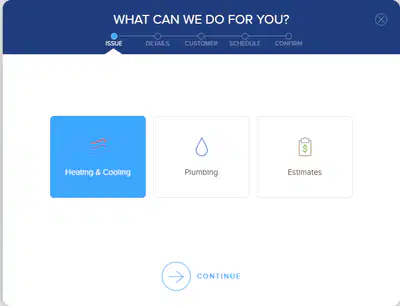
Since our caller's issue is related to their HVAC system, whether heating or AC units, select Heating & Cooling in Schedule Engine and proceed to Step 3 as outlined in SingleComm.
4
Selecting the Issue

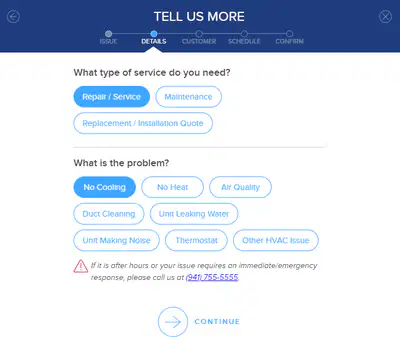
Step 3 is outlined in 4 simple steps. It is important that we follow these steps as instructed.
1. Select 'Repair/Service'
2. Select ' No Cooling'
In this section, we will not make the selections based on the caller issues, but rather on the instructions in Singlecomm. Be sure to make specific notes your message.
5
System Type & Age
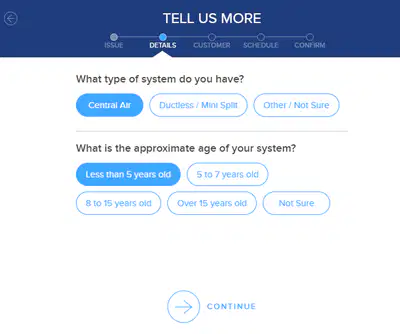
Select the caller's system type based on the information provided. If this was not already provided to you, probe with the caller to identify what type of system they have. However, for system age, select 'Less than 5 years old' and document the actual system age in your message in SingleComm.
6
Describing the Issue
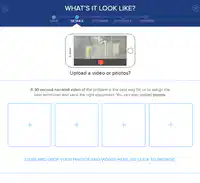
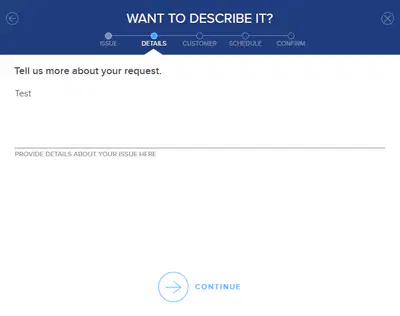
Since we do not have the means to gather images or videos from the caller, skip this step and proceed to documenting the issue.
!PRO TIP! Use your Tense and Grammar checker to ensure your message remains error free.
7
Locating the Customer
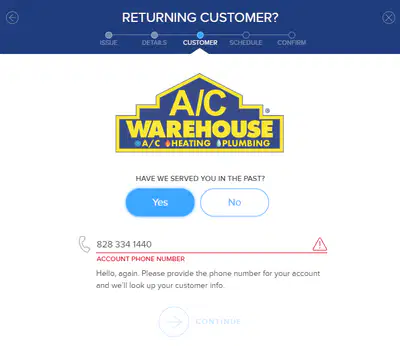
Locate Existing Customers using the phone number they created their accounts with.
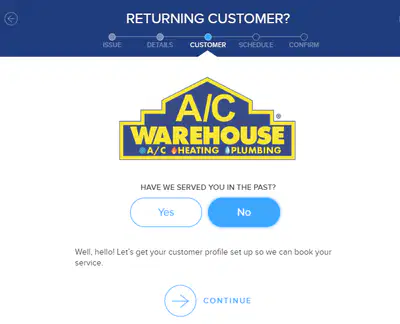
Create a Customer Record if you have a new customer. Remember to confirm addresses!
New
Vs.
Old
8
Booking the Appointment
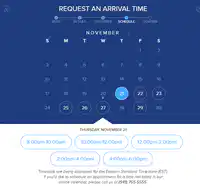
When selecting a scheduled date, be sure to ask the caller their preference, otherwise, start with the first available. If we do not have a time frame that matches the caller's needs, still get them booked in with the first available appointment. Be sure to notate your message in SingleComm that the caller needs an earlier appointment.
Heating & Cooling HVAC
Show answer
Auto Play
Slide 1 / 8
SLIDE
Similar Resources on Wayground

6 questions
Professional Learning Redefined
Presentation
•
Professional Development
6 questions
Singapore 101
Presentation
•
Professional Development
7 questions
wizz qizizz
Presentation
•
Professional Development
7 questions
expo
Presentation
•
Professional Development
7 questions
Getting to Know You Version 2
Presentation
•
Professional Development
9 questions
CHRISTMAS TRIVIA GAME
Presentation
•
Professional Development
6 questions
NCF - Quizizz Intro to students
Presentation
•
Professional Development
6 questions
Q2 BCM Exercise
Presentation
•
Professional Development
Popular Resources on Wayground
10 questions
Safety Day 2026 – Student Review

Quiz
•
9th Grade
21 questions
Continents and Oceans
Quiz
•
6th Grade
20 questions
Parts of Speech
Quiz
•
5th Grade
16 questions
Subject & Predicate
Quiz
•
5th Grade
25 questions
Multiplication Facts
Quiz
•
5th Grade
12 questions
Map Skills
Quiz
•
3rd Grade
22 questions
Continents and Oceans
Quiz
•
5th Grade
15 questions
Rounding Decimals
Quiz
•
5th Grade