
Introduction to the computer

Presentation
•
Information Technology (IT)
•
Vocational training
•
Practice Problem
•
Hard

Christopher Pryce
Used 1+ times
FREE Resource
46 Slides • 0 Questions
1

Introduction to the Computer
2

What is a computer?
A device that accepts data,
processes the data in accordance
with a stored program, generates
results, and usually consists of
input, output, storage, arithmetic,
logic, and control units.
3

Classification of Computers
Computers may be classified as dedicated or
multi-purpose.
•
A dedicated computer is designed to
perform only one function repeatedly, for
example – a computer that weighs
packages on a production line.
•
A multi-purpose computer is designed with
the flexibility to perform a number of
different functions at the same time. An
example of a multi- purpose computer is
the regular computer used in offices or in
homes.
4

Computer Functions
These four basic functions are responsible
for everything computers do:
• Receive input
• Process information
• Produce output
• Store information
5

Computer System
There are three essential ingredients of any computer
system:
•
Hardware - Consists of the microprocessor (the
computer’s brain), the memory and the input or output
connections which get data in and out of the
microprocessor.
•
Peripherals - Are the devices that allow us to
communicate with the computer. . Peripheral devices can
be external -- such as a mouse, keyboard, printer,
external zip drive or scanner -- or internal, such as a CD-
Rom, CD-R or internal modem. Internal peripheral
devices are often referred to as integrated peripherals.
•
Software – Also called computer program, is essential to
make the system work. Without software a computer can
do nothing.
6

Some Uses of the Computer
PowerPoint presentation
Spreadsheet operations
Word Processing such as typing
assignments
Managing databases such as class
records
Entertainment purposes such as movies,
pictures, etc.
7

Parts of the Computer
The computer has many parts that
enables various operations, which
fall into two categories namely:
Peripherals
Internal
8

Peripherals
These are any hardware (physical
devices) that are connected to the
computer and under the control of the
Central Processing Unit (CPU).
These devices may fall into one of
three categories namely:
Input
Output
Storage
9

Peripherals Devices
10

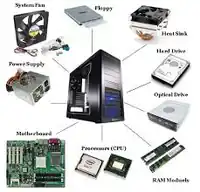
Internal Components
The motherboard is the main component
of computer. It is a large rectangular board
with integrated circuitry that connects the
other parts of the computer including
the CPU, the RAM, the disk drives(CD,
DVD, hard disk, or any others) as well as
any peripherals connected via the ports or
the expansion slots.
11

Diagram of Internal Components
12

Input Devices
An input device is any hardware
device that sends data to the
computer. Without input devices, a
computer would only be a display
device and not allow users to interact
with it
13

Examples of Input Devices
Keyboard
Mouse
Touch screen
Microphone
Joystick
Other examples
Light pen
Optical Mark Reader
Scanner
Digitising tablet
Barcode reader.
Graphic tablet
Magnetic-strip reader
etc.
14

Keyboard
This is one of the main input
devices used on a computer.
It has a number of keys that
contain letters, numbers and
various symbols.
15

The Keyboard
Layout of a typical mobile computer’s keyboard
Layout of a typical keyboard
16

Mouse
A pointing device that is used to control
the mouse pointer on the computer. It
may have an optical sensor or a trackball
that glides along the surface on which its
placed.
17

Touch Screen
This is a monitor or other flat
surface that has a sensitive
panel directly on the screen
that registers the touch of a
finger as input. Instead of being
touch-sensitive, some touch
screens also use beams across
the screen to create a grid that
is interrupted by the presence
of a finger near the screen.
18

Microphone
A microphone is
a hardware
peripheral that
allows computer
users to input
audio into there
computers.
19

Joystick
This is an input device that looks
similar to a control device you would
find on an arcade game at your local
arcades. A joystick allows an
individual to easily move an object in
a game such as navigating a plane in
a flight simulator
20

The Joystick
21

Output Devices
An output device is any device used to
send data from a computer to another
device or user. Most computer data
output that is meant for humans is in the
form of text, audio or video.
22

Examples of Output Devices
Monitor/Display
Speakers
Printer
Projector
Other examples
Plotter
Light Screen
Etc.
23

Monitor/Display
A monitor is a device that is used to
display the output of a computer’s
operation
Types of monitor may include :
Flat Panel Display (Liquid-crystal
display (LCD) technology)
The cathode-ray tube technology
24

Flat Panel Display
25

A hardware
device
connected to a
computer’s
sound card that
outputs sounds
generated by the
computer
26

Printer
This is a device that produces a physical
copy of information presented on the
computer. Such information may be:
Text
Pictures
PowerPoint slides
Etc.
27

Projector
This is an output device that can
take the display of a computer
screen and project a large
version of it onto a flat surface.
28

Storage Devices
A storage device is a hardware device
capable of storing information. There
are two storage devices used in
computers; a primary storage device
such as computer RAM and
a secondary storage device such as a
computer hard disk drive.
29

Primary Storage Devices
Primary storage, also known as main
storage or memory, is the area in a
computer in which data is stored for quick
access by the computer's processor. The
terms random access memory (RAM) and
memory are often as synonyms for primary
or main storage. This memory is volatile
which means it loses content when power
is switched off.
30

Secondary Storage Device
A secondary storage device refers to any
non-volatile storage device that is internal
or external to the computer. It can be any
storage device beyond the primary storage
that enables permanent data storage.
31

Examples of Storage Devices
USB Flash Drive
Hard Drive
Optical Discs
Other examples
Floppy diskettes
Optical Discs
Zip Drives
Magnetic Tape
Etc.,
32

USB Flash Drive
A small, portable flash memory card that
plugs into a computer’s USB port and
functions as a portable hard drive. USB
flash drives are touted as being easy-to-
use as they are small enough to be carried
in a pocket and can plug into any
computer with a USB drive.
33

Hard Drive
The hard drive is the computer’s
main storage device. It stores
the operating system and other
programs the computer uses to
function.
34

The Hard Drive
35

Optical Disc
A storage medium from which data is
read and to which it is written by lasers.
Examples are:
• CD
• DVD
36

Magnetic Tape
This is a magnetically thin coated
piece plastic wrapped around
wheels capable of storing data.
Tape is much less expensive than
other storage mediums but
commonly a much slower solution
that is commonly used for backup.
37

The Magnetic Tape
38

Ergonomics
The science that is concerned with
designing work environments that allow
people and things to interact efficiently,
safely and comfortably.
39

Data
Data is a collection of facts from which
conclusions may be drawn, thus consisting
all numbers, letters and symbols; the
processing of data produces information.
40

Software
Software are written programs or
procedures or rules and associated
documentation pertaining to the operation
of a computer system and that are stored
in read/write memory.
41

Software Cont’d
Computer software provides instructions to
the hardware as to how to manipulate
data. Without the software programs the
computer would be useless, so decisions
made about which software to use are
important ones.
42

Classifications of Software
Software is often divided into two
categories:
• Systems software: Includes the
operating system and all the utilities that
enable the computer to function.
• Applications software: Includes
programs that do real work for users.
For example, word processors,
spreadsheets and database
management systems.
43

Systems software
System software (systems software) is
computer software designed to operate
and control the computer hardware and to
provide a platform for running application
software. System software can be
separated into two different categories,
operating systems and utility software.
44

Applications software
Application software (an application) is a
set of computer programs designed to
permit the user to perform a group of
coordinated functions, tasks, or activities.
Application software cannot run on itself
but is dependent on system software to
execute.
45

Operating System
An operating system (OS) is software
that manages computer hardware and
software resources and provides common
services for computer programs.
The operating system is an essential
component of the system software in a
computer system. Application programs
usually require an operating system to
function.
46

Functions of the Operating System
Operating systems perform basic
tasks, such as:
•
recognizing input from the keyboard
•
keeping track of files and
directories on the disk
•
sending output to the display
screen
•
controlling peripheral devices such
as disk drives and printers.
Introduction to the Computer
Show answer
Auto Play
Slide 1 / 46
SLIDE
Similar Resources on Wayground

40 questions
WELCOME TO DENMARK
Presentation
•
KG
36 questions
Levels of Organization - Cells to Biome
Presentation
•
KG
39 questions
U3 TEST REVIEW
Presentation
•
KG
44 questions
Uppercase & Lowercase: Aa - Jj
Presentation
•
KG
38 questions
U2KINDER - W1-2
Presentation
•
KG
38 questions
Past Time Phrases
Presentation
•
KG
41 questions
Theme(Food) for Reception
Presentation
•
KG
40 questions
Kerala District - Kollam
Presentation
•
KG
Popular Resources on Wayground
10 questions
Safety Day 2026 – Student Review

Quiz
•
9th Grade
21 questions
Continents and Oceans
Quiz
•
6th Grade
20 questions
Parts of Speech
Quiz
•
5th Grade
16 questions
Subject & Predicate
Quiz
•
5th Grade
25 questions
Multiplication Facts
Quiz
•
5th Grade
12 questions
Map Skills
Quiz
•
3rd Grade
22 questions
Continents and Oceans
Quiz
•
5th Grade
15 questions
Rounding Decimals
Quiz
•
5th Grade