

N5 Admin & IT Intro to Databases

Presentation
•
Computers
•
9th - 10th Grade
•
Practice Problem
•
Hard

E Leigh
Used 2+ times
FREE Resource
10 Slides • 0 Questions
1
2
identify the features of databases
create database tables and amend, add, and delete fields and records
you will know that you have begun to use this new learning when you can ...
learn about database systems.
The purpose of this lesson is to...
3
Employee details
Customer details
Orders
There are many different types of database that can be used in a business, such as:
A database is a system for organising, storing and retrieving data.
Microsoft Access is a popular database package but

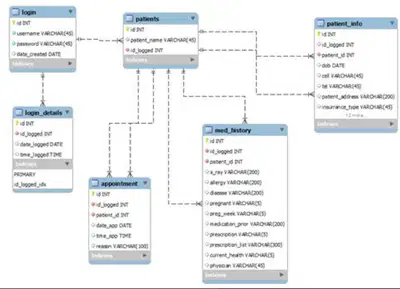
there are alternatives such as OpenOffice Base.
4
Databases are made up of one or more tables
Each table is a col lection of records, and records are made up of fields
Each column in a database represents a field
Each row in a database represents a record
Each record in a database is uniquely identified by a primary key
Databases with linked tables are called relational databases
The primary key is a field that contains data that is UNIQUE for each record.
| | | |
|---|---|---|---|
K0873 | Hannah | McCoy | £8.50 |
K0035 | Piotrek | Gorzynski | £9.90 |
K0194 | Lee | Gray | £12.10 |
Primary Key
Field
Record
5
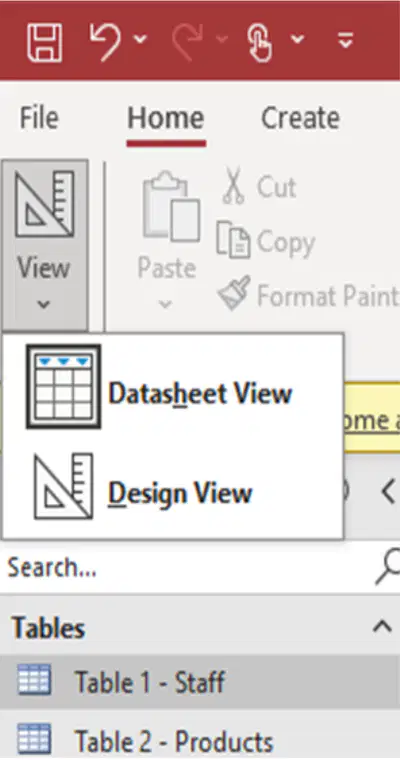
You are going to continually need to switch between Design View and Datasheet View.
6
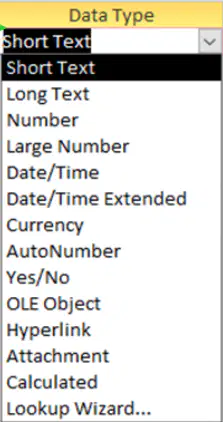
Access will automatically choose a field's data type based on the data entered. For example, if a phone number is entered into a field its data type will be automatically set to 'Number'.
Other data types include:
text - writing
date/time - date or time
currency - euro, pound, dollar, etc
autonumber - number increases by one each time
yes/no - only yes or no can be entered
7
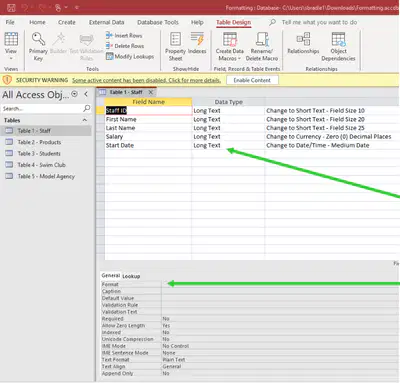
Double click on each table
Click on VIEW and change to DESIGN VIEW
Follow the instructions to change the data type
Change format here (e.g. field size, decimal places etc)
8
To create a table in Microsoft Access, use Design View. Start by writing in the field names and selecting the data type.
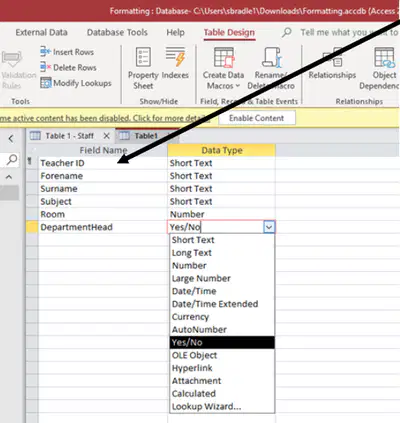
Change to Datasheet View and add in the data.
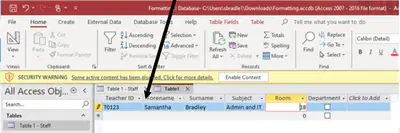
HINT: Use Short Text for a mixture of letters and numbers such as ID (rather than autonumber)
9
Select the Home Tab
Select Datasheet View from the View menu
Click the record selector next to the record to be deleted
Click Delete from the Records section on the ribbon, or hit the delete key on the keyboard
Select the Home Tab
Select Datasheet View from the View menu
A new record can be added at the bottom row of the table
EmployeeID | Forename | Surname | Hourly rate |
|---|---|---|---|
K0873 | Hannah | McCoy | £8.50 |
K0035 | Piotrek | Gorzynski | £9.90 |
K0258 | Alexis | Grant | £8.50 |
Add Record
EmployeeID | Forename | Surname | Hourly rate |
|---|---|---|---|
K0873 | Hannah | McCoy | £8.50 |
Delete Record
EmployeeID | Forename | Surname | Hourly rate |
|---|---|---|---|
K0873 | Hannah | McCoy | £8.50 |
K0035 | Piotrek | Gorzynski | £9.90 |
10
Select the Home Tab
Select Design View from the View menu
Enter the field name in the first blank Field Name box
Select the Data Type of the new field
Select Save from the File menu
Select the Home Tab
Select Design View from the View menu
Select the field to be deleted from the database.
Click Delete Rows from the Tools section oin the ribbon
EmployeeID | Forename | Surname | Hourly rate | Start Date |
|---|---|---|---|---|
K0873 | Hannah | McCoy | £8.50 | |
K0035 | Piotrek | Gorzynski | £9.90 | |
K0258 | Alexis | Grant | £8.50 |
Add Field
EmployeeID | Forename | Surname |
|---|---|---|
K0873 | Hannah | McCoy |
Delete Field
EmployeeID | Forename | Surname | Hourly rate |
|---|---|---|---|
K0873 | Hannah | McCoy | £8.50 |
K0035 | Piotrek | Gorzynski | £9.90 |
Show answer
Auto Play
Slide 1 / 10
SLIDE
Similar Resources on Wayground

7 questions
Tugas 4 Murtini
Presentation
•
10th Grade
6 questions
RIZKY SHANDIKA PRATIWI-SMAN6TJT TUGAS 3
Presentation
•
10th Grade
10 questions
Szkolenie TIK
Presentation
•
KG
9 questions
CYBERSECURITY COUNTER MEASURES
Presentation
•
10th Grade
7 questions
Hierarchy
Presentation
•
5th Grade
9 questions
Padua Fight Song
Presentation
•
10th Grade
7 questions
Romeo and Juliet Pre-Reading
Presentation
•
9th Grade
11 questions
Electromagnet and Magnetism Recap
Presentation
•
8th Grade
Popular Resources on Wayground
10 questions
Safety Day 2026 – Student Review

Quiz
•
9th Grade
21 questions
Continents and Oceans
Quiz
•
6th Grade
20 questions
Parts of Speech
Quiz
•
5th Grade
16 questions
Subject & Predicate
Quiz
•
5th Grade
25 questions
Multiplication Facts
Quiz
•
5th Grade
12 questions
Map Skills
Quiz
•
3rd Grade
22 questions
Continents and Oceans
Quiz
•
5th Grade
15 questions
Rounding Decimals
Quiz
•
5th Grade