
Adobe Premiere Pre-Test
Authored by Room Class
Computers
9th - 12th Grade
Used 18+ times


AI Actions
Add similar questions
Adjust reading levels
Convert to real-world scenario
Translate activity
More...
Content View
Student View
31 questions
Show all answers
1.
MULTIPLE CHOICE QUESTION
30 sec • 1 pt
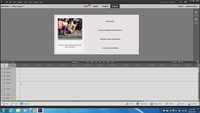
What do I click to add my videos, music, sound effects and images to my project?
File, Open
Add Media
Edit, paste
Tools, Movie menue
2.
MULTIPLE CHOICE QUESTION
30 sec • 1 pt
What is the correct way to split a video?
Edit, cut
Ctrl-x
Click on the scissors icon on the video
Shift-c
3.
MULTIPLE CHOICE QUESTION
30 sec • 1 pt
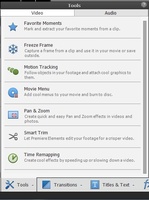
In the tools menu, which tool slows and/or speeds up your video?
Motion tracker
Pan and Zoom
Smart Trim
Time remapping
4.
MULTIPLE CHOICE QUESTION
30 sec • 1 pt
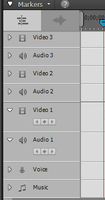
Video Layer 1 is my background layer, video layer 2 will be on top
True
False
5.
MULTIPLE CHOICE QUESTION
30 sec • 1 pt
True or false, once you save and close out for the day you cannot hit the undo button and undo what you did.
False
True
6.
MULTIPLE CHOICE QUESTION
30 sec • 1 pt
To convert your movie to a file that can be watched on any computer you must:
File, save as
Save a copy
Make movie
Export and share
7.
MULTIPLE CHOICE QUESTION
30 sec • 1 pt

What layer should your sound effect or music go on?
Music
Voice
Video 1
Audio 3


Access all questions and much more by creating a free account
Create resources
Host any resource
Get auto-graded reports

Continue with Google

Continue with Email

Continue with Microsoft
or continue with

%20(1).png)
Apple

Others
By signing up, you agree to our Terms of Service & Privacy Policy
Already have an account?

