
Scratch Lesson 1 start
Authored by Christopher Snelling
Computers
5th Grade
Used 7+ times


AI Actions
Add similar questions
Adjust reading levels
Convert to real-world scenario
Translate activity
More...
Content View
Student View
9 questions
Show all answers
1.
MULTIPLE CHOICE QUESTION
30 sec • 1 pt
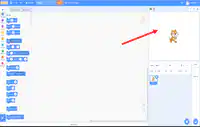
What area of the Scratch screen is the pointer on?
Code / Script area
Stage
Start / Stop buttons
Background
2.
MULTIPLE CHOICE QUESTION
30 sec • 1 pt
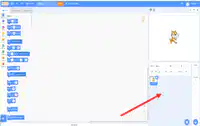
What part of the Scratch screen is the arrow on?
Stage
Sprite and Info pane
Code
Backdrop
3.
MULTIPLE CHOICE QUESTION
30 sec • 1 pt
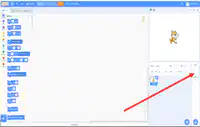
What part of the Scratch screen is the arrow on?
Start / stop buttons
Code / Script area
Backdrop
Stage
4.
MULTIPLE CHOICE QUESTION
30 sec • 1 pt
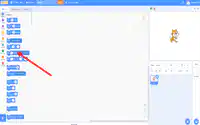
What part of the Scratch screen is the arrow on?
Backdrop
Stage
Code / Script area
Code
5.
MULTIPLE CHOICE QUESTION
30 sec • 1 pt
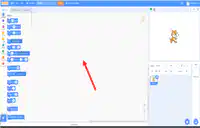
What part of the Scratch screen is the arrow on?
Costumes and sounds tab
Backdrop
Code / Script area
Stage
6.
MULTIPLE CHOICE QUESTION
30 sec • 1 pt
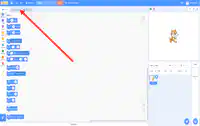
What part of the Scratch screen is the arrow on?
Stage
Costumes and sounds tab
Code
Code / Script area
7.
MULTIPLE CHOICE QUESTION
30 sec • 1 pt
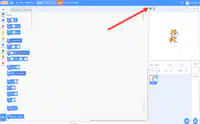
What is the arrow pointing to on the Scratch screen?
Start and stop buttons
Stage
Costumes and sounds tab
Sprite and info pane
Access all questions and much more by creating a free account
Create resources
Host any resource
Get auto-graded reports

Continue with Google

Continue with Email

Continue with Classlink

Continue with Clever
or continue with

Microsoft
%20(1).png)
Apple

Others
Already have an account?


