
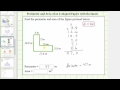
Understanding Perimeter and Area of L-Shaped Polygon

Interactive Video
•
Mathematics
•
5th - 8th Grade
•
Practice Problem
•
Hard
+4
Standards-aligned

Sophia Harris
FREE Resource
Standards-aligned
Read more
10 questions
Show all answers
1.
MULTIPLE CHOICE QUESTION
30 sec • 1 pt
What is the first step in finding the perimeter of an L-shaped polygon?
Calculate the area
Identify the missing side lengths
Multiply the side lengths
Divide the polygon into triangles
Tags
CCSS.4.MD.A.2
2.
MULTIPLE CHOICE QUESTION
30 sec • 1 pt
How do you find a missing side length if you know the total length and one part of it?
Add the known part to the total length
Subtract the known part from the total length
Divide the total length by the known part
Multiply the known part by the total length
Tags
CCSS.3.MD.D.8
3.
MULTIPLE CHOICE QUESTION
30 sec • 1 pt
What is the perimeter of the L-shaped polygon after summing all side lengths?
49.0 M
47.0 M
50.0 M
45.0 M
Tags
CCSS.3.MD.D.8
4.
MULTIPLE CHOICE QUESTION
30 sec • 1 pt
Which of the following is NOT a step in finding the perimeter of the L-shaped polygon?
Summing all side lengths
Identifying missing lengths
Subtracting known lengths from total
Multiplying side lengths
Tags
CCSS.5.NBT.B.7
5.
MULTIPLE CHOICE QUESTION
30 sec • 1 pt
What is the significance of aligning decimal points when adding side lengths?
To ensure accurate addition
To simplify subtraction
To multiply correctly
To divide accurately
Tags
CCSS.3.MD.C.7D
6.
MULTIPLE CHOICE QUESTION
30 sec • 1 pt
Why do we decompose the L-shaped polygon into rectangles for area calculation?
To reduce the number of sides
To change the shape
To find the perimeter
To simplify the calculation
Tags
CCSS.3.MD.C.7B
CCSS.4.MD.A.3
7.
MULTIPLE CHOICE QUESTION
30 sec • 1 pt
What is the formula used to calculate the area of a rectangle?
Length / Width
Length - Width
Length x Width
Length + Width
Tags
CCSS.6.G.A.1
Access all questions and much more by creating a free account
Create resources
Host any resource
Get auto-graded reports

Continue with Google

Continue with Email

Continue with Classlink

Continue with Clever
or continue with

Microsoft
%20(1).png)
Apple

Others
Already have an account?

