
TestOut PC Pro - 12.1 Laptops
Authored by Rossana Mero
Computers
9th Grade


AI Actions
Add similar questions
Adjust reading levels
Convert to real-world scenario
Translate activity
More...
Content View
Student View
11 questions
Show all answers
1.
MULTIPLE CHOICE QUESTION
30 sec • 1 pt
Which component is designed to let you use a notebook system as a desktop system by making it possible to connect a normal-sized external mouse, keyboard, monitor, and speakers?
Built-in Bluetooth
FireWire ports
USB ports
Infrared wireless
Docking station
2.
MULTIPLE CHOICE QUESTION
30 sec • 1 pt
A manufacturing company has customized a computer application that supervisors use to track line worker efficiency. Supervisors will interact with the application while walking within and between work areas and will also use the laptop while sitting at their desks. Which of the following laptop features will BEST minimize the awkward movement of carrying a bulky laptop with a hinged display while providing the flexibility to use the device at a desk?
A laptop docking station
A touchscreen display
Special function keys
A rotating or removable screen
3.
MULTIPLE CHOICE QUESTION
30 sec • 1 pt
A user opens a help desk ticket to replace a laptop keyboard. The user reports that the cursor randomly moves when typing, causing them to make frequent typing corrections. The problem does not occur when the laptop is attached to a docking station and an external keyboard is used. You want to find a more affordable solution than replacing the keyboard. Which of the following actions BEST mitigates this problem?
Increase the screen resolution so that mouse movements are more granular.
Lower the screen resolution so that mouse movements are less granular.
Use the special function key to disable the touchpad when the laptop keyboard is used.
Decrease the operating system's mouse speed setting.
4.
MATCH QUESTION
30 sec • 1 pt
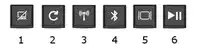
Match each notebook fn key icon label to the corresponding key.
Wireless (on/off)
1
Screen orientation
2
Touchpad (on/off)
3
5.
MATCH QUESTION
30 sec • 1 pt
Match each notebook fn key icon label to the corresponding key.
Play/Pause media
5
Bluetooth (on/off)
4
Dual Displays
6
6.
MULTIPLE CHOICE QUESTION
30 sec • 1 pt
You need to replace the video card in a laptop. Which of the following is the first step?
Remove the display wires if the video card is integrated into the motherboard.
Find a service manual with correct disassembly procedures.
Remove the keyboard.
Remove the access panel at the bottom of the laptop.
Remove the bezel.
7.
MULTIPLE SELECT QUESTION
30 sec • 1 pt
You are troubleshooting a malfunctioning notebook computer system. The user has indicated that the LCD screen suddenly became dark and difficult to read while they were downloading a large file through the wireless network while the system was plugged in at their desk. You have checked the system and determined that the backlight has stopped working. Which of the following are the MOST likely causes? (Select two.)
The wireless network card is emitting radio signals that interfere with the backlight, causing it to stop functioning.
The extended download placed high demands on the system DC power, causing the BIOS to shut off the backlight.
Malware was installed as part of the download that targeted the backlight circuitry.
The inverter in the LCD assembly has malfunctioned.
The cold cathode fluorescent lamp (CCFL) has burned out and needs to be replaced.
Access all questions and much more by creating a free account
Create resources
Host any resource
Get auto-graded reports

Continue with Google

Continue with Email

Continue with Classlink

Continue with Clever
or continue with

Microsoft
%20(1).png)
Apple

Others
Already have an account?


