
Microsoft MakeCode Arcade - Target Practice and Angry Snowman
Authored by Carrie Casey
Computers
7th Grade
Used 8+ times


AI Actions
Add similar questions
Adjust reading levels
Convert to real-world scenario
Translate activity
More...
Content View
Student View
19 questions
Show all answers
1.
MULTIPLE CHOICE QUESTION
30 sec • 1 pt
What is the first step you need to complete before starting to create a game in MakeCode Arcade?
Name your game.
Save your game.
Sign into MakeCode Arcade.
Open the Dart drawer.
2.
MULTIPLE CHOICE QUESTION
30 sec • 1 pt
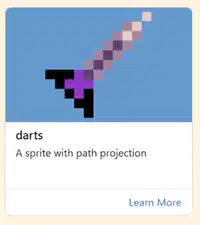
Where can you find the Darts Extension in MakeCode Arcade?
In the Sprite Drawer.
In the Extensions section.
In the Save Game section.
In the Coding section.
3.
MULTIPLE CHOICE QUESTION
30 sec • 1 pt
What appears above the Sprite Drawer after selecting the Darts Extension?
The Save Game option.
The Dart Drawer.
The Coding section.
The Extensions menu.
4.
MULTIPLE CHOICE QUESTION
30 sec • 1 pt
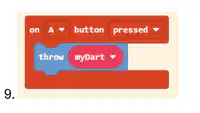
What block do you need to use from the Dart drawer in the first set of code?
Save Game block.
throw myDart block.
Sprite block.
Coding block.
5.
MULTIPLE CHOICE QUESTION
30 sec • 1 pt
What is the purpose of naming your game in MakeCode Arcade?
To save your game.
To start coding.
To open the Dart drawer.
To access the Extensions section.
6.
MULTIPLE CHOICE QUESTION
30 sec • 1 pt
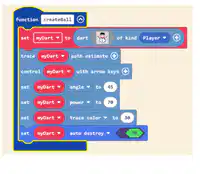
What is the angle set for "myDart" in the code block?
30
45
70
90
7.
MULTIPLE CHOICE QUESTION
30 sec • 1 pt
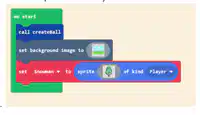
What is the purpose of the code block shown in the image?
To create a Sprite, set a background, and call a Function
To delete a Sprite and remove the background
To change the color of the Sprite
To add sound effects to the Sprite
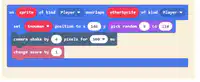
Access all questions and much more by creating a free account
Create resources
Host any resource
Get auto-graded reports

Continue with Google

Continue with Email

Continue with Classlink

Continue with Clever
or continue with

Microsoft
%20(1).png)
Apple

Others
Already have an account?


