
Discover each category and purpose
Authored by ِAmera aboukamr
Other
4th Grade


AI Actions
Add similar questions
Adjust reading levels
Convert to real-world scenario
Translate activity
More...
Content View
Student View
23 questions
Show all answers
1.
MULTIPLE CHOICE QUESTION
30 sec • 1 pt
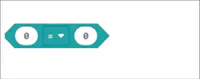
Discover each category and purpose: Block: 0 = 0 Fill in the category and purpose for this block.
Category: Logic Purpose: Compares two values for equality.
Category: Math Purpose: Adds two numbers together.
Category: Control Purpose: Repeats actions multiple times.
Category: Variables Purpose: Stores a value for later use.
2.
MULTIPLE CHOICE QUESTION
30 sec • 1 pt
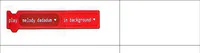
Discover each category and purpose: Fill in the category and purpose for this block.
Category: Music Purpose: Plays a melody in the background.
Category: Animation Purpose: Changes the sprite's costume.
Category: Control Purpose: Starts a loop.
Category: Sound Purpose: Plays a sound effect.
3.
MULTIPLE CHOICE QUESTION
30 sec • 1 pt

Discover each category and purpose: Block: light level Fill in the category and purpose for this block.
Category: Input/Sensor Purpose: Measures the light level.
Category: Output/Actuator Purpose: Emits light.
Category: Storage Purpose: Stores light data.
Category: Communication Purpose: Sends light signals.
4.
MULTIPLE CHOICE QUESTION
30 sec • 1 pt
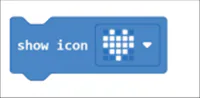
Discover each category and purpose: Block: show icon Fill in the category and purpose for this block.
Category: Display Purpose: Shows an icon on the screen.
Category: Input Purpose: Receives user input.
Category: Control Purpose: Manages program flow.
Category: Sound Purpose: Plays a sound.
5.
MULTIPLE CHOICE QUESTION
30 sec • 1 pt
Write examples of AI that we use in our daily life?
1- ALEXA
MICROWAVE
6.
MULTIPLE CHOICE QUESTION
30 sec • 1 pt
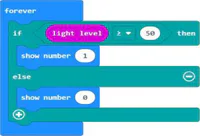
What will be the output of the following program when the light level is 60?
1 (since 60 > 50, the program will show number 1)
0 (since 60 < 50, the program will show number 0)
2 (since 60 > 50, the program will show number 2)
No output (the program does not respond to light level 60)
7.
MULTIPLE CHOICE QUESTION
30 sec • 1 pt
What is the name of the section highlighted at the top left of the interface?
Microsoft micro:bit
Code Editor
Project Explorer
Output Console
Access all questions and much more by creating a free account
Create resources
Host any resource
Get auto-graded reports

Continue with Google

Continue with Email

Continue with Classlink

Continue with Clever
or continue with

Microsoft
%20(1).png)
Apple

Others
Already have an account?

