
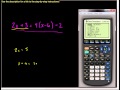
Solving Linear Equations with TI-83/84 Calculators

Interactive Video
•
Mathematics
•
6th - 10th Grade
•
Practice Problem
•
Hard
+1
Standards-aligned

Lucas Foster
FREE Resource
Standards-aligned
10 questions
Show all answers
1.
MULTIPLE CHOICE QUESTION
30 sec • 1 pt
What types of equations can be solved using the TI-83 Plus or TI-84 calculators as mentioned in the video?
Both simple and complex linear equations
Only complex linear equations
Only simple linear equations
Only quadratic equations
2.
MULTIPLE CHOICE QUESTION
30 sec • 1 pt
What is the first step to start solving equations on the calculator?
Press the ON button
Press the GRAPH button
Press the Y= button
Press the MODE button
3.
MULTIPLE CHOICE QUESTION
30 sec • 1 pt
How do you clear an existing equation from the graphing screen?
Press the DELETE button
Press the OFF button
Press the RESET button
Press the CLEAR button
Tags
CCSS.HSA.APR.B.3
4.
MULTIPLE CHOICE QUESTION
30 sec • 1 pt
Which button is used to enter the variable 'X' in the equation?
The ALPHA button
The MODE button
The X T θ n button
The green X button by the store key
5.
MULTIPLE CHOICE QUESTION
30 sec • 1 pt
What should you do if the calculator uses a different letter instead of 'X'?
Change the mode to function (FUNC)
Restart the calculator
Press the CLEAR button
Press the ALPHA button
Tags
CCSS.HSF-IF.C.7E
6.
MULTIPLE CHOICE QUESTION
30 sec • 1 pt
What is the purpose of pressing the ZOOM button and selecting option 6?
To turn off the calculator
To set the graphing window to a standard size
To clear the graphing screen
To enter a new equation
Tags
CCSS.HSF-IF.C.7E
7.
MULTIPLE CHOICE QUESTION
30 sec • 1 pt
What does the blinking dot at the center of the graph represent when zooming out?
The intersection point
The center of the zoom feature
The end of the graph
The origin of the graph
Tags
CCSS.8.EE.C.8B
Access all questions and much more by creating a free account
Create resources
Host any resource
Get auto-graded reports

Continue with Google

Continue with Email

Continue with Classlink

Continue with Clever
or continue with

Microsoft
%20(1).png)
Apple

Others
Already have an account?


