
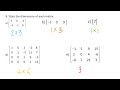
Exploring the Basics of Matrices

Interactive Video
•
Mathematics
•
6th - 10th Grade
•
Practice Problem
•
Hard
Standards-aligned

Mia Campbell
FREE Resource
Standards-aligned
Read more
10 questions
Show all answers
1.
MULTIPLE CHOICE QUESTION
30 sec • 1 pt
What is a matrix?
A random collection of numbers
A circular arrangement of numbers
A rectangular array of numbers
A single number
2.
MULTIPLE CHOICE QUESTION
30 sec • 1 pt
How are rows and columns arranged in a matrix?
Rows go from left to right, columns go from top to bottom
Rows go diagonally, columns go horizontally
Rows go from top to bottom, columns go from left to right
Rows and columns are arranged randomly
3.
MULTIPLE CHOICE QUESTION
30 sec • 1 pt
How do you denote the dimensions of a matrix?
Rows by columns
Entries by columns
Entries by rows
Columns by rows
4.
MULTIPLE CHOICE QUESTION
30 sec • 1 pt
What is the entry at position B32 in Matrix B?
1
0
Negative one
Two
5.
MULTIPLE CHOICE QUESTION
30 sec • 1 pt
What does the address P21 represent in a matrix?
First row, first column
First row, second column
Second row, first column
Second row, second column
6.
MULTIPLE CHOICE QUESTION
30 sec • 1 pt
What are the dimensions of a matrix with 4 rows and 3 columns?
3 by 4
4 by 3
3 by 3
4 by 4
7.
MULTIPLE CHOICE QUESTION
30 sec • 1 pt
How many rows and columns does a 1 by 3 matrix have?
1 row, 1 column
1 row, 3 columns
3 rows, 1 column
3 rows, 3 columns
Access all questions and much more by creating a free account
Create resources
Host any resource
Get auto-graded reports

Continue with Google

Continue with Email

Continue with Classlink

Continue with Clever
or continue with

Microsoft
%20(1).png)
Apple

Others
Already have an account?


