
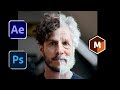
Mesh Tracking and Aging Effects in After Effects

Interactive Video
•
Computers, Design, Arts
•
9th - 12th Grade
•
Practice Problem
•
Hard

Ethan Morris
FREE Resource
Read more
10 questions
Show all answers
1.
MULTIPLE CHOICE QUESTION
30 sec • 1 pt
What is the primary focus of this tutorial?
Color grading techniques
Sound editing in After Effects
Mesh tracking in visual effects
Creating 3D animations
2.
MULTIPLE CHOICE QUESTION
30 sec • 1 pt
What discount code is offered for purchasing Mocha Pro?
FLOW15
MESH20
FLOWMOTION15
TRACKER10
3.
MULTIPLE CHOICE QUESTION
30 sec • 1 pt
What is the first step in setting up a project in After Effects as described in the tutorial?
Applying color correction
Exporting the final video
Adding sound effects
Defining a reference frame
4.
MULTIPLE CHOICE QUESTION
30 sec • 1 pt
What is the benefit of setting the start frame to zero in After Effects?
It improves rendering speed
It helps in organizing the timeline
It enhances color accuracy
It adds special effects
5.
MULTIPLE CHOICE QUESTION
30 sec • 1 pt
Which tool in Mocha Pro is highlighted for tracking warped surfaces?
Planar Tracker
Mesh Tracker
Color Corrector
Roto Brush
6.
MULTIPLE CHOICE QUESTION
30 sec • 1 pt
What is the advantage of using the mesh tracker over traditional planar tracking?
It requires less setup
It can track warped surfaces
It tracks only flat surfaces
It is faster
7.
MULTIPLE CHOICE QUESTION
30 sec • 1 pt
What feature in Photoshop is used to create an aged face effect?
Brush Tool
Layer Styles
Gradient Map
Neural Filters
Access all questions and much more by creating a free account
Create resources
Host any resource
Get auto-graded reports

Continue with Google

Continue with Email

Continue with Classlink

Continue with Clever
or continue with

Microsoft
%20(1).png)
Apple

Others
Already have an account?

