
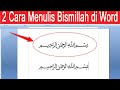
Microsoft Word: Writing Bismillahirrohmanirrohim

Interactive Video
•
Computers, Education, Instructional Technology, Religious Studies
•
5th - 8th Grade
•
Practice Problem
•
Easy

Liam Anderson
Used 1+ times
FREE Resource
Read more
9 questions
Show all answers
1.
MULTIPLE CHOICE QUESTION
30 sec • 1 pt
What is the main focus of the tutorial video?
Writing Bismillahirrohmanirrohim in Microsoft Word
Designing a presentation in PowerPoint
Creating a new document in Microsoft Word
Using Excel for data analysis
2.
MULTIPLE CHOICE QUESTION
30 sec • 1 pt
Which menu in Microsoft Word is used in the first method to insert Bismillahirrohmanirrohim?
View
Insert
Home
File
3.
MULTIPLE CHOICE QUESTION
30 sec • 1 pt
In the first method, which group should you select to find the symbol for Bismillahirrohmanirrohim?
Font
Paragraph
Symbol
Styles
4.
MULTIPLE CHOICE QUESTION
30 sec • 1 pt
What is the final step in the first method after selecting the symbol?
Click 'Delete'
Click 'Insert'
Click 'Open'
Click 'Save'
5.
MULTIPLE CHOICE QUESTION
30 sec • 1 pt
What should you do if the inserted symbol is too small?
Adjust the font size
Use a different font
Change the page layout
Insert a new symbol
6.
MULTIPLE CHOICE QUESTION
30 sec • 1 pt
What is the keyboard shortcut used in the second method to type Bismillahirrohmanirrohim?
Alt + X
Ctrl + V
Ctrl + C
Shift + S
7.
MULTIPLE CHOICE QUESTION
30 sec • 1 pt
Which text should be typed before using the keyboard shortcut in the second method?
Arabic
Symbol
FD
Bismillah
Access all questions and much more by creating a free account
Create resources
Host any resource
Get auto-graded reports

Continue with Google

Continue with Email

Continue with Microsoft
or continue with

%20(1).png)
Apple

Others
Already have an account?


