
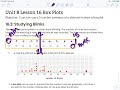
Understanding Box Plots and Data Analysis

Interactive Video
•
Mathematics
•
6th - 8th Grade
•
Practice Problem
•
Hard

Thomas White
FREE Resource
Read more
10 questions
Show all answers
1.
MULTIPLE CHOICE QUESTION
30 sec • 1 pt
What is the main objective of the lesson on box plots?
To learn how to calculate averages
To explore different types of graphs
To use a five-number summary to draw a box plot
To understand the concept of probability
2.
MULTIPLE CHOICE QUESTION
30 sec • 1 pt
What was the study about in the data set used for the box plot?
The number of times people blinked while watching a video game
The number of times people yawned during a lecture
The number of times people smiled during a movie
The number of times people laughed during a comedy show
3.
MULTIPLE CHOICE QUESTION
30 sec • 1 pt
What is the median value in the given data set?
15
51
12
21
4.
MULTIPLE CHOICE QUESTION
30 sec • 1 pt
Which value represents the first quartile (Q1) in the data set?
21
15
12
3
5.
MULTIPLE CHOICE QUESTION
30 sec • 1 pt
What is the maximum value in the five-number summary?
3
12
21
51
6.
MULTIPLE CHOICE QUESTION
30 sec • 1 pt
What does the interquartile range (IQR) represent in a box plot?
The sum of all data points
The average of the data set
The range of the entire data set
The middle 50% of the data
7.
MULTIPLE CHOICE QUESTION
30 sec • 1 pt
What is the purpose of the 'whiskers' in a box plot?
To display the average
To show the median
To indicate the interquartile range
To represent the minimum and maximum values
Access all questions and much more by creating a free account
Create resources
Host any resource
Get auto-graded reports

Continue with Google

Continue with Email

Continue with Microsoft
or continue with

%20(1).png)
Apple

Others
By signing up, you agree to our Terms of Service & Privacy Policy
Already have an account?

