
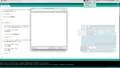
Display Arduino output (e.g. sensor data) on your computer monitor with this simple function: Part 1

Interactive Video
•
Engineering, Information Technology (IT), Architecture
•
University
•
Hard

Wayground Content
FREE Resource
This video tutorial introduces the use of the print function from the Arduino serial library to display information on a computer monitor. It covers the applications of the print function, such as data display and debugging, and explains the serial library's role in facilitating communication between Arduino and other devices. The tutorial provides a practical example of using the print function in the Arduino IDE, including setting up serial communication and formatting output for readability.
Read more
1 questions
Show all answers
1.
OPEN ENDED QUESTION
3 mins • 1 pt
What new insight or understanding did you gain from this video?
Evaluate responses using AI:
OFF
Access all questions and much more by creating a free account
Create resources
Host any resource
Get auto-graded reports

Continue with Google

Continue with Email

Continue with Classlink

Continue with Clever
or continue with

Microsoft
%20(1).png)
Apple

Others
Already have an account?

