This Grade 11 Computers worksheet builds practical Microsoft Word skills through 15 multiple-choice questions. Students identify where to insert and define tables, choose the correct key for moving across table columns, and recognize Word functions such as line spacing, Sort, and Show/Hide Marks. The worksheet also checks their understanding of business-letter components, including the recipient’s address, salutation, complimentary closing, and signature spacing.
Students apply document-formatting and office-communication conventions by identifying MLA report requirements, including double line spacing, a last name in the header, one-inch margins, and the Page Layout tab. They also distinguish a memorandum from other business documents and identify the use of reference initials in a typed memo. Designed for Grade 11 computer applications instruction, this free printable worksheet provides focused review or assessment with a complete answer key.
Worksheet settings
Font size
S
M
L
XL
Worksheets
Microsoft Office Word Specialist 4
Total questions: 15
Name
Class
Date
1.
Where is the command to insert a new table into a Microsoft Word document?
a)
Insert tab, Tables group
b)
Home tab, Paragraph group
c)
Insert tab, Pages group
d)
Home tab, Tables group
2.
Sammy wants to organize the data for her research paper. Which method would bring up the dialog box so Sammie could define the 20 rows and 4 columns that she knows she needs?
a)
Insert Table
b)
Draw Table
c)
Quick Table
d)
Convert Text to Table
3.
Jussie wants ot navigate across columns to the right in her table. Which option should she choose?
a)
Tab
b)
Enter
c)
Shift+Tab
d)
Shift+Enter
4.
Julie Henderson
123 Main Street
Lenexa, KS 66222
is an example of what part of the business letter?
a)
Heading
b)
Signature Line
c)
Recipients Address
d)
Body
5.
Dear Mr. Zuck: is an example of a...
a)
Subject Line
b)
Salutation
c)
Greeting
d)
Complimentary Closing
6.
Why are there 4 enters after the complimentary closing?
a)
To make room for the letterhead
b)
To make room for the body
c)
To make room for your signature
d)
To maker room for your address
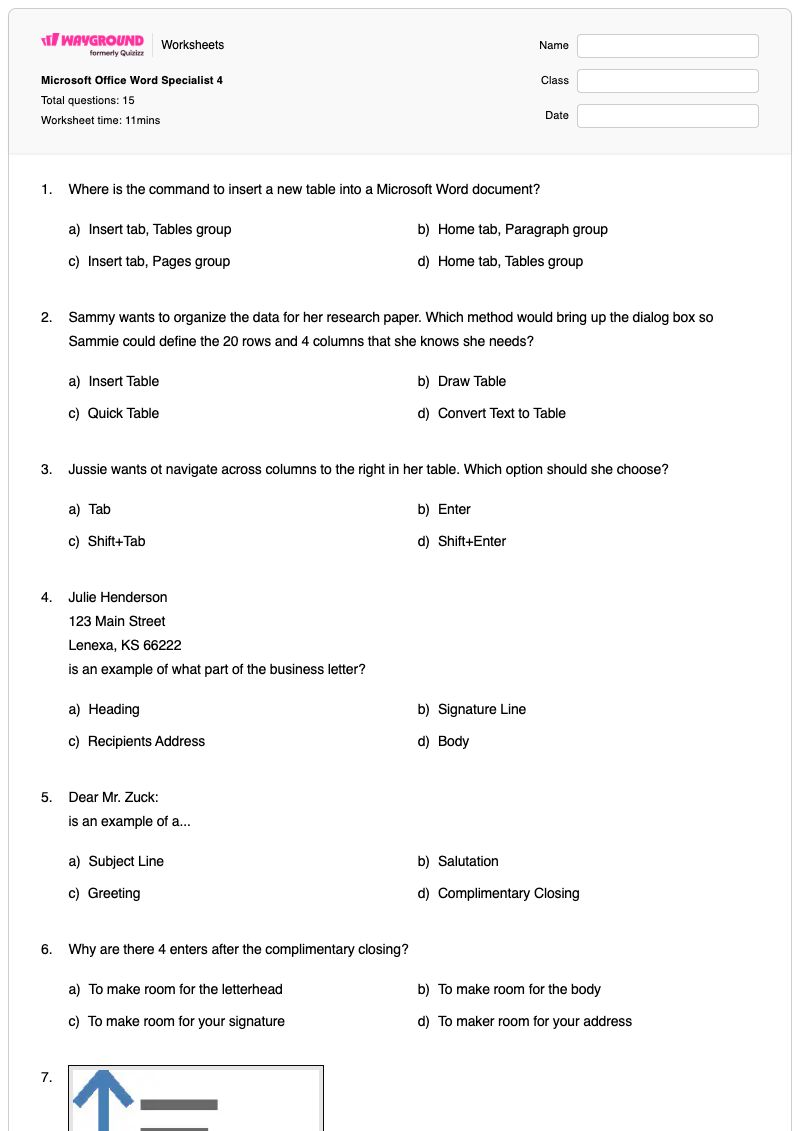
7.
What is the function?
a)
Align text up and down
b)
Change the space between text
c)
Align text to the left
d)
Change the spacing between the lines of text
8.
what is the name of the symbol?
a)
center
b)
bullet
c)
sort
d)
Asian Layout
9.
"Show paragraph marks and other hidden". What the name of this function?
a)
Sort
b)
Shading
c)
Show/Hide Marks
d)
Border
10.
What kind of line spacing should your research report have?
a)
Single
b)
Double
c)
1.5
d)
Multiple
11.
What should be on the first line of your header?
a)
Your last name
b)
Name of the Document
c)
The class
d)
The date
12.
What are the margins in MLA reports?
a)
.5"
b)
1"
c)
1.5"
d)
2"
13.
What tab would I find "margins"?
a)
File
b)
Home
c)
Design
d)
Page Layout
14.
A_______is a short message from one person to another in the same business or organization.
a)
Agenda
b)
Memorandum
c)
Business Letter
d)
Personal business letter
15.
If someone other than the originator types the memo you must include...
a)
Reference initials
b)
Name of typest
c)
Author
d)
None of the above
Answer Key
Microsoft Office Word Specialist 4
Total questions: 15
1.
a) Insert tab, Tables group
2.
a) Insert Table
3.
a) Tab
4.
c)
Recipients Address
5.
b) Salutation
6.
c) To make room for your signature
7.
d) Change the spacing between the lines of text
8.
c) sort
9.
c) Show/Hide Marks
10.
b) Double
11.
a) Your last name
12.
b) 1"
13.
d) Page Layout
14.
b) Memorandum
15.
a) Reference initials
140 %
Browse by subjects
Browse by grades
Browse by format
FAQs
What does the Microsoft Office Word Specialist 4 worksheet cover?
This worksheet uses 15 multiple-choice questions to assess Microsoft Word skills involving table commands and navigation, document-formatting functions, business-letter parts, MLA report conventions, and memo terminology. Students must connect commands such as Insert Table, Tab, Show/Hide Marks, and Page Layout with their correct uses while identifying required elements of formal documents.
How can I use this worksheet to teach Microsoft Word formatting and business documents?
Introduce the worksheet after demonstrating the Word locations and functions it names, such as the Insert tab’s Tables group, the Page Layout tab’s margins command, and Show/Hide Marks. Then have students explain why each answer fits—for example, why a business letter leaves space after the complimentary closing or why an MLA report uses double spacing—before completing the multiple-choice review independently.
What mistakes should I watch for when students complete this Microsoft Word worksheet?
Students may confuse the Insert Table command with Draw Table, Quick Table, or Convert Text to Table, or choose Enter instead of Tab for moving to the next table column. Watch also for confusion among a letter’s recipient address, salutation, and signature space, as well as errors such as selecting Home instead of Page Layout for margins or choosing single spacing instead of double spacing for an MLA report.
How do I assign and grade this Microsoft Word worksheet?
The Microsoft Office Word Specialist 4 worksheet is available as a printable PDF and as a digital quiz on Wayground, and it includes a complete answer key. Grade printed submissions by reviewing the selected responses or by scanning student work with the Wayground for Teachers app.
How can I differentiate this Microsoft Word worksheet for my students?
Use the worksheet’s Advanced Settings to create a more readable version of the multiple-choice questions about Word tables, formatting commands, letters, and memos. You can adjust font spacing or font size, enable a dyslexia-friendly font, or translate the worksheet into another language.
Where can I find more worksheets like this on Wayground?
Wayground offers a comprehensive collection of free printable worksheets and practice problems across subjects, with downloadable PDFs and answer keys to support essential skills and concepts. Browse more resources at https://wayground.com/en-us/worksheets.

 Worksheets
