Telling Time to the Nearest Minute is a Grade 2 mathematics worksheet that helps students read clock displays and identify the matching time to the nearest minute. Across 9 multiple-choice questions, students select the correct digital time from choices that include close alternatives, such as adjacent minutes, neighboring hours, and different time formats.
This free printable worksheet gives students focused practice connecting the hour and minute hands to an exact time, including times with minutes such as 07, 17, 29, 42, and 52. It is useful for independent practice, small-group instruction, or a quick check of students’ time-reading accuracy. A complete answer key is included for efficient review and grading.
Worksheet settings
Font size
S
M
L
XL
Worksheets
Telling Time to the Nearest Minute
Total questions: 9
Name
Class
Date
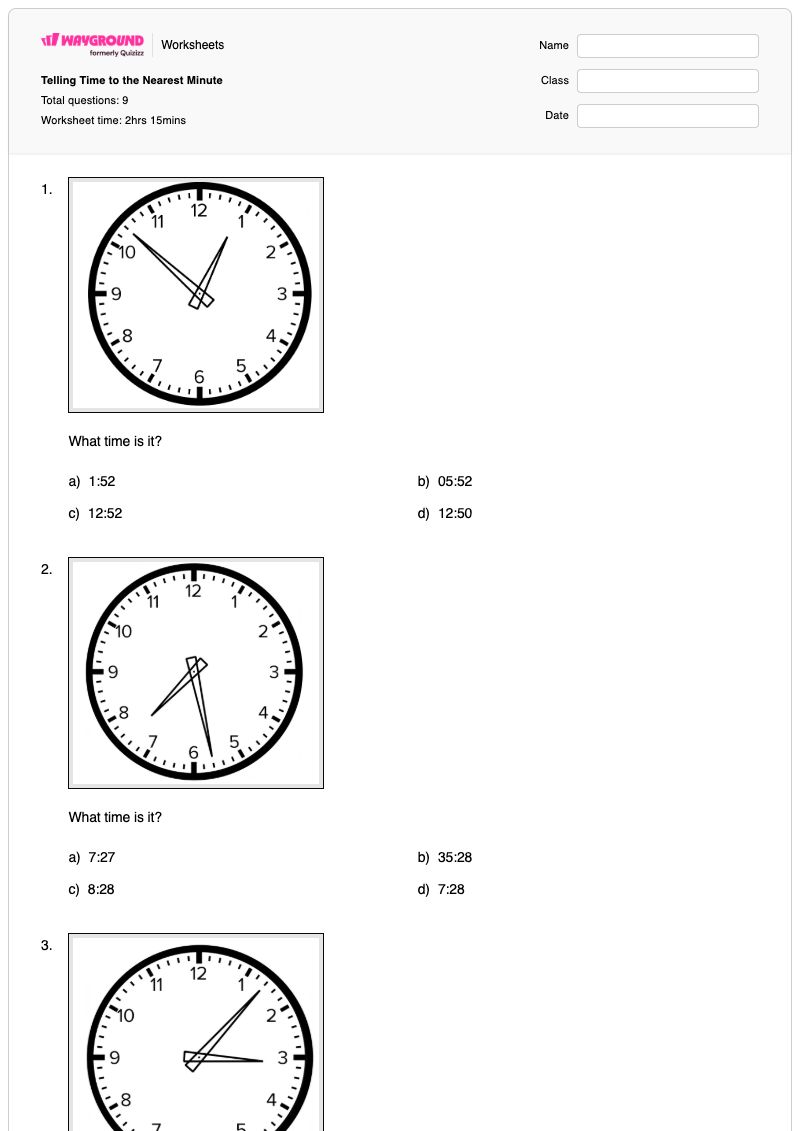
1.
What time is it?
a)
1:52
b)
05:52
c)
12:52
d)
12:50
2.
What time is it?
a)
7:27
b)
35:28
c)
8:28
d)
7:28
3.
What time is it?
a)
3:07
b)
3:05
c)
15:07
d)
4:07
4.
What time is it?
a)
1:29
b)
12:29
c)
12:30
d)
1:30
5.
What time is it?
a)
4:51
b)
3:51
c)
3:50
d)
4:50
6.
What time is it?
a)
11:30
b)
11:30
c)
10:30
d)
10:33
7.
What time is it?
a)
10:17
b)
9:18
c)
9:17
d)
10:18
8.
What time is it?
a)
3:12
b)
4:12
c)
3:13
d)
4:13
9.
What time is it?
a)
3:42
b)
4:43
c)
5:42
d)
4:42
Answer Key
Telling Time to the Nearest Minute
Total questions: 9
1.
c)
12:52
2.
d)
7:28
3.
a)
3:07
4.
b)
12:29
5.
b)
3:51
6.
d)
10:33
7.
c)
9:17
8.
a)
3:12
9.
d)
4:42
140 %
Browse by subjects
Browse by grades
Browse by format
FAQs
What does the Telling Time to the Nearest Minute worksheet cover?
This Grade 2 worksheet focuses on reading clock displays and selecting the matching digital time to the nearest minute. Its 9 multiple-choice questions require students to distinguish precise minute values, including times such as 3:07, 7:28, 12:29, and 4:42, from closely related answer choices.
How can I use this worksheet to teach telling time to the nearest minute?
Before students begin, model how to identify the hour hand and minute hand, then count minute marks to determine the exact minute. Have students explain both parts of each selected answer—for example, why the hour is 3 and the minutes are 07—before using the worksheet’s multiple-choice items for guided or independent practice.
What mistakes should I watch for when students complete this time worksheet?
Watch for students reversing the hour and minute information, choosing a neighboring minute such as 28 instead of 29, or changing the hour incorrectly when the clock is close to the next hour. The answer choices also include formatting and hour-value distractors, so check that students can connect the clock display to one precise time rather than selecting a familiar-looking option.
How do I assign and grade this telling-time worksheet?
On Wayground, assign it as a printable PDF or use it as a digital quiz, and use the complete answer key to check responses. Printable submissions can also be graded by scanning student work with the Wayground for Teachers app.
How can I differentiate this worksheet for my students?
Use the worksheet’s Advanced Settings to adjust font spacing or choose a larger font size so the clock-reading questions and answer choices are easier to follow. You can also enable a dyslexia-friendly font or translate the worksheet into another language when that supports access to these time-telling tasks.
Where can I find more worksheets like this on Wayground?
Wayground offers a comprehensive collection of free printable worksheets and practice problems across subjects, with downloadable PDFs and answer keys to support essential skills and concepts. Browse more resources at https://wayground.com/en-us/worksheets.

 Worksheets


