
 Worksheets
Mock Exam Scratch Complete with all questions
Total questions: 98
Worksheet time: 1hrs 4mins
Name
Class
Date
1.
the objects that perform actions in a project
a)
Sprite
b)
Script
c)
Motion
d)
Scratch
2.
the background of the project
a)
Stage
b)
Script
c)
Scratch
d)
Backdrops
3.
the user selects a virtual object by "grabbing" it and dragging it to a different location or onto another virtual object
a)
Drag & Drop Programming
b)
Motion Block
c)
Control Block
d)
Operator Block
4.
one out of possibly many frames, or backgrounds, of the Stage
a)
Backdrops
b)
Looks Block
c)
Stage
d)
Sprite
5.
are used to control a sprite's movement and they are available only for sprites
a)
Motion Block
b)
Looks Block
c)
Events Block
d)
Control Block
6.
used to control a sprite's appearance
a)
Looks Block
b)
Motion Block
c)
Stage
d)
Scripts
7.
fun, educational, and easy to learn block-based programming
a)
Scratch
b)
Drag & Drop Programming
c)
Sprite
d)
Stage
8.
one out of possibly many "frames" or alternate appearances of a sprite
a)
Costume
b)
Stage
c)
Looks Block
d)
Script
9.
used to control scripts
a)
Control Block
b)
Events Block
c)
Sensing Block
d)
Operator Block
10.
trigger scripts to run and essential for every project
a)
Event Block
b)
Sprite
c)
Stage
d)
Backdrop
11.
detect different factors of a project
a)
Sensing Block
b)
Control Block
c)
Event Block
d)
Operator Block
12.
used to script math equations and string handling
a)
Operator Block
b)
Sensing Block
c)
Looks Block
d)
Events Block
13.
used to control sound and MIDI functions.
a)
Sound Block
b)
Motion Block
c)
Events Block
d)
Sprite
14.
a collection or stack of blocks that all interlock with one another
a)
Scripts
b)
Costumes
c)
Events Block
d)
Drag & Drop Programming
15.
An organized set of rules or steps to perform an action, is also known as...
a)
Scratch
b)
Software
c)
Algorithm
d)
Block
16.
An Algorithm has 4 main characteristics. It should be....
a)
Doable, Creative, finite and precise
b)
Doable, Understandable, finite and precise
c)
Amazing, Understandable, finite and precise
d)
Doable, Understandable, Infinite and precise
17.
Start
Put your hand on the doorknob
Turn the doorknob to the side until it unlocks the door
Push or pull the door to open it
End
..................................................
What would be an appropiate title for this algorithm?
Put your hand on the doorknob
Turn the doorknob to the side until it unlocks the door
Push or pull the door to open it
End
..................................................
What would be an appropiate title for this algorithm?
a)
How to push a door
b)
Steps to stand infront of a door
c)
Steps to touch a doorknob
d)
How to open a door
18.
Any user should be able to perform an Algorithm without any problems, that means it should be....
a)
Doable
b)
Understandable
c)
Infinite
d)
Precise
19.
If an Algorithm is performed correctly should always give same result, that means it should be....
a)
Doable
b)
Understandable
c)
Finite
d)
Precise
20.
An Algorithm, should be easy to follow (clear). That means it should be...
a)
Doable
b)
Understandable
c)
Finite
d)
Precise
21.
An Algorithm, should have a beginning and an end. That means it should be...
a)
Doable
b)
Understandable
c)
Finite
d)
Precise
22.
Choose the option that better completes the statement.
"Algorithms are useful to help us...
"Algorithms are useful to help us...
a)
write a tv show without pen and paper
b)
perform any activity.
c)
understand how to build a rocket in a full moon in mars when you are a unicorn
d)
digest our food
23.
Algorithms have ________ main characteristics.
a)
3
b)
6
c)
4
d)
5
24.
A cooking recipe is a clear example of an Algorithm.
a)
True
b)
False
25.
Scratch is a free programming language where you can create your own interactive stories, games, and animations.
a)
True
b)
False
26.
The Scratch logo contains a....
a)
Koala
b)
Cat
c)
Lion
d)
Dog
27.
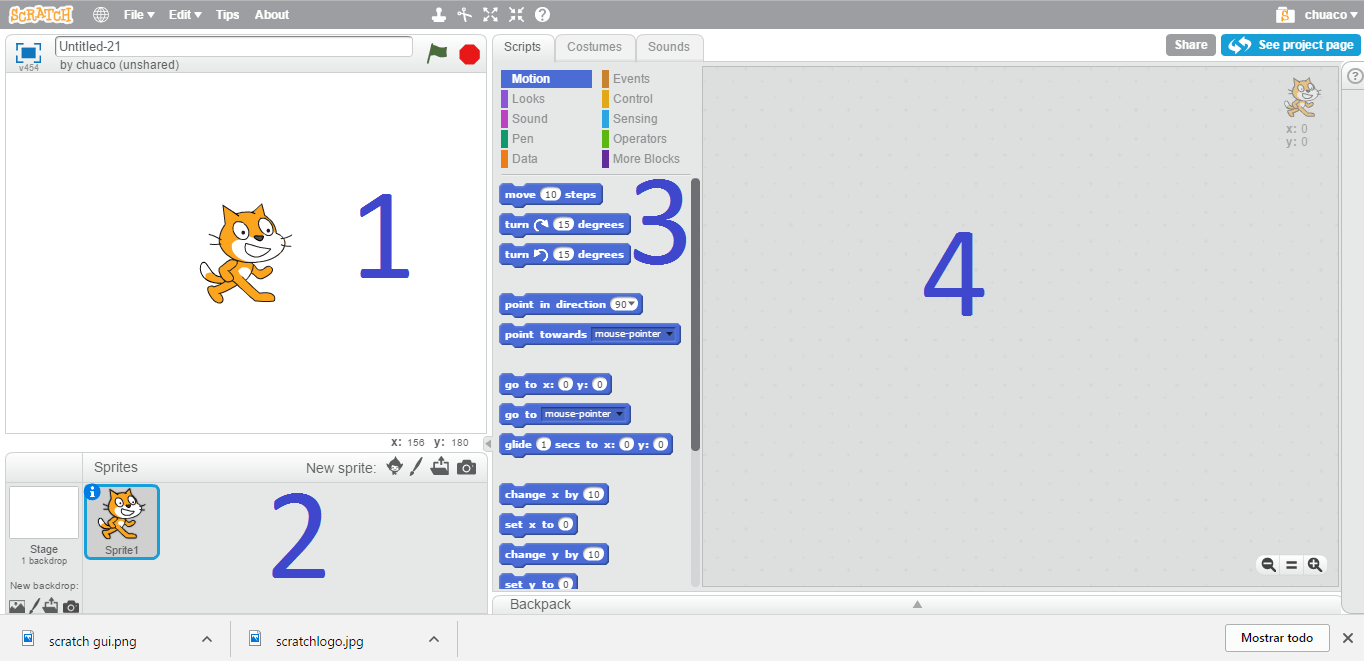
According to the image, the order of the elements in scratch are...
a)
1.Stage 2.Sprites 3.Blocks 4.Scripts
b)
1.Stage 2.Blocks 3.Sprites 4.Scripts
c)
1.Scripts 2.Blocks 3.Sprites 4.Stage
d)
1.Scripts 2.Blocks 3.Stage 4.Sprites
28.
In scratch, this is the place where we program. Where we give orders to our sprites and backdrops.
a)
Stage
b)
Sprites
c)
Blocks
d)
Scripts
29.
In scratch, this is the place where we see all the animation happening. Where we put our backdrops and sprites.
a)
Stage
b)
Sprites
c)
Blocks
d)
Scripts
30.
In scratch, this is the place where we see all the possible commands for our project. Includes movement, control, events and other options.
a)
Stage
b)
Sprites
c)
Blocks
d)
Scripts
31.
In scratch, this where we create our characters or objects. We can import or create a new one that later on will be on the stage.
a)
Stage
b)
Sprites
c)
Blocks
d)
Scripts
32.
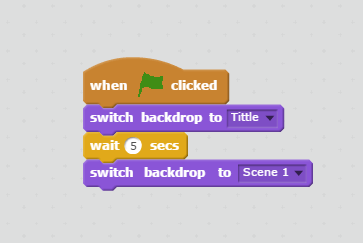
According to the image, when you click on the green flag....
a)
It will show the backdrop called "Tittle" wait 5 seconds and then switch to the backdrop called "scene 1"
b)
It will show the backdrop called "Tittle" wait 3 seconds and then switch to the backdrop called "scene 1"
c)
It will show the backdrop called "Scene 1" wait 5 seconds and then switch to the backdrop called "title"
d)
It will show a Sprite called "Tittle" wait 5 seconds and then switch to the costume called "scene 1"
33.
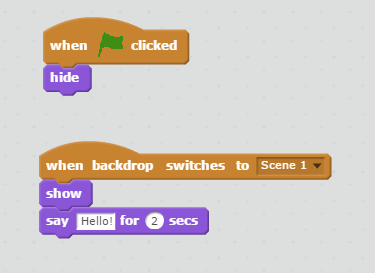
According to the image, when you click on the green flag, this sprite will....
a)
Show and when the backdrop changes, it will hide and say "Hi!"
b)
Hide and when the backdrop changes, it will show and say "Hello!"
c)
Show and when the backdrop changes, it will change the backdrop again
d)
hide and show the Tittle
34.

For an action to perform in scratch , it needs first....
a)
An event block
b)
A control block
c)
A sound block
d)
A data block
35.
Which one from the following indicate scratch file extension ?
a)
scr
b)
sh
c)
scar
d)
sb
36.
Which command let the sprites walk ?
a)
Walk
b)
Run
c)
Move
d)
GO!
37.
" if on edge, bounce " mean ... ?
a)
Jump
b)
Go back
c)
Continue
d)
STOP
38.
What ( Red Flag ) mean in Scratch
a)
Nothing
b)
STOP
c)
Start
d)
Finish
39.
Which from the following is not a command ?
a)
forever until
b)
repeat until
c)
repeat
d)
forever
40.
Can we give sprite specific location to start from ?
a)
No
b)
Yes
41.

Will sprite move from his position after this code ?
a)
Yes
b)
No
42.
Which color indicate " Motion Command " ?
a)
Orange
b)
Green
c)
Blue
d)
Red
43.
Which color indicate " Control Command " ?
a)
Orange
b)
Green
c)
Blue
d)
Red
44.
Which command will shows animation for sprite ?
a)
next costume
b)
next look
c)
next style
d)
next move
45.
When I receive .... ?
a)
Msg
b)
Message
c)
Call
d)
Broadcast
46.
Can we add sound to our scratch project ?
a)
Yes
b)
Yas
47.
We cannot add variables inside scratch ?
a)
False
b)
True
48.
what is the number of questions that have only two answers :) ?
a)
3
b)
4
c)
5
d)
6
49.
Which animals Scratch logo contains ?
a)
Koala
b)
Cat
c)
Lion
d)
Dog
50.
Which command let the sprites walk ?
a)
Walk
b)
Run
c)
Move
d)
GO!
51.
" if on edge, bounce " mean ... ?
a)
Jump
b)
Go back
c)
Continue
d)
STOP
52.
Which from the following is not a command ?
a)
forever until
b)
repeat until
c)
repeat
d)
forever
53.
Can we give sprite specific location to start from ?
a)
No
b)
Yes
54.
Will sprite move from his position after this code ?
a)
Yes
b)
No
55.
Which color indicate " Motion Command " ?
a)
Orange
b)
Green
c)
Blue
d)
Red
56.
Which color indicate " Control Command " ?
a)
Orange
b)
Green
c)
Blue
d)
Red
57.
Can we add sound to our scratch project ?
a)
Yes
b)
Yas
58.
We cannot add variables inside scratch ?
a)
False
b)
True
59.
Which animals Scratch logo contains ?
a)
Koala
b)
Cat
c)
Lion
d)
Dog
60.
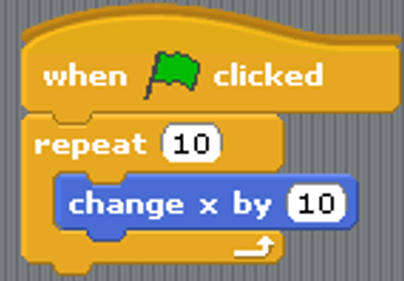
a)
Go Up
b)
Go Down
c)
Go Left
d)
Go Right
61.

a)
Draw random colors
b)
Draw random shapes
c)
Noting, code is broken
d)
Draw random colours in random spots
62.
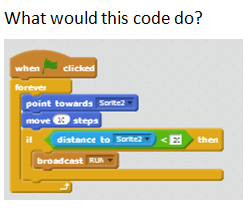
a)
make sprite run when distace is close
b)
broadcast RUN when distance is close
c)
move 10 steps then stop
d)
glitch out
63.
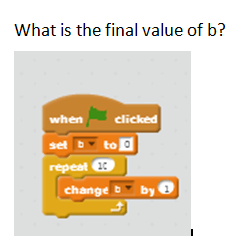
a)
0
b)
9
c)
10
d)
11
64.
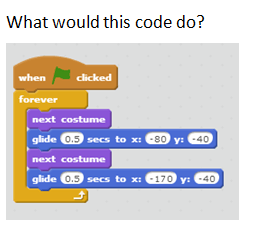
a)
Make a character dance
b)
Make a sound play
c)
rotate a character
d)
chase the mouse
65.

Why won't this code continuously move the sprite when clicking the directional arrows?
a)
The "if" statements need to be inside a "forever" block
b)
The "point in directions" values need to change
c)
The "move 1 steps" commands need to be inside a "forever" block
d)
Need a 2nd "point in direction" block after "move 1 step"
66.

a)
Randomly move a sprint around
b)
play a sound when sprite is clicked
c)
none of the above
d)
both of the above
67.

What block
determines
the correct
answer ?
determines
the correct
answer ?
a)
5
b)
8
c)
4
d)
12
68.

What are the values of Fruit and Citrus after this script is done?
a)
Fruit = 12, Citrus = 17
b)
Fruit = 13, Citrus = 16
c)
Fruit = 12, Citrus = 16
d)
Fruit = 4, Citrus = 12
69.

If you touched Sprite2 seven times what would your score be?
a)
5
b)
0
c)
7
d)
8
70.
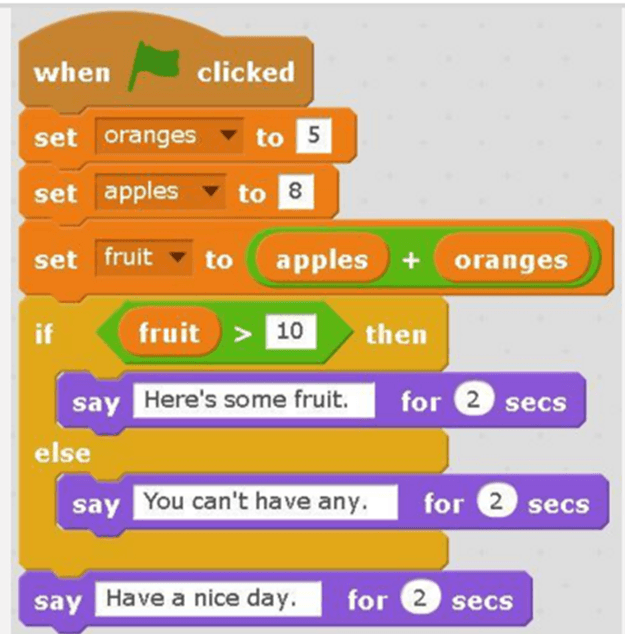
What will the cat say when this script is run?
a)
Have a nice day. (only)
b)
Here's some fruit. (only)
c)
Here's some fruit. Have a nice day.
d)
You can't have any. Have a nice day.
71.

What is the function of the light blue blocks?
a)
Variables
b)
Motion
c)
Operators
d)
Sensing
72.

This stack block will make the sprite:
a)
move
b)
stop
73.

This stack block will make the sprite:
a)
jump
b)
turn
74.

This stack block will change the sprite's:
a)
color
b)
size
75.

This stack block will play a:
a)
game
b)
sound
76.

This hat block will start the script when the _______ is clicked.
a)
sprite
b)
flag
77.
where you see your stories, games, and animations come to life. (right column)
a)
sequence
b)
blocks
c)
stage
d)
costume
78.
to tell a sprite what to do such as move, play music or react, you use these
a)
costume
b)
blocks palette
c)
stage
d)
blocks
79.
to create or edit costumes and backgrounds you use a
a)
interactive
b)
paint editor
c)
scripts area
d)
backgrounds
80.
area that contains the basic blocks for programming your sprites (left column)
a)
backgrounds
b)
blocks palette
c)
scripts area
d)
blocks
81.
letting things know that something is going to happen
a)
scripts
b)
event
c)
sprite
d)
sequence
82.
involving communication between people or reactions between things that work together
a)
paint editor
b)
interactive
c)
scripts area
d)
blocks palette
83.
a user defined object or character
a)
scripts
b)
blocks
c)
sprite
d)
stage
84.
stuff happening at the same time . .
a)
paint editor
b)
horizontal
c)
parallelism
d)
sequence
85.
by changing this you can change the appearance of the stage
a)
backgrounds
b)
paint editor
c)
blocks palette
86.
a series of instructions run from top to bottom
a)
scripts area
b)
sprite
c)
costume
d)
scripts
87.
serial arrangement in which things follow in logical order or a recurrent pattern
a)
costume
b)
interactive
c)
scripts
d)
sequence
88.
With Scratch, you can program your own interactive stories
a)
True
b)
False
89.
To investigate what is going awry and find a solutions is called
a)
double it
b)
debug it
c)
dug it
d)
deliver it
90.

This allows you to
a)
change costumes
b)
add sound
c)
select a sprite
d)
create a background
91.

What are these called?
a)
Script Blocks
b)
Script Groups
c)
Motion Control
d)
Sprite Groups
92.

What does this script do?
a)
Forever follows the mouse around the script area
b)
Forever follows the mouse around the stage
c)
Follows the sprite until it is caught
d)
Forever follows the sprite around the stage
93.

What does this script do?
a)
Turns 15 degrees clockwise when space key pressed
b)
Turns 15 degrees anti clockwise when space key pressed
c)
Turns 15 degrees clockwise and changes colour when space key pressed
d)
Turns 15 degrees anti clockwise and changes colour when space key pressed
94.

What are these?
a)
Script blocks
b)
Motion blocks
c)
Control blocks
d)
Sensing blocks
95.

What are these?
a)
Script blocks
b)
Motion blocks
c)
Control blocks
d)
Sensing blocks
96.

What does this script do?
a)
Forever follows the ball until the sprite touches the ball
b)
Forever follows the mouse until the sprite touches the mouse
c)
Follows the sprite for three steps then stops
d)
Stops the ball from following the sprite
97.

What is this for?
a)
Delete button
b)
Stop scripts running
c)
Start scripts
d)
Start and stop scripts running
98.

What is this for?
a)
Delete button
b)
Stop scripts
c)
Starts scripts
d)
Start and stop scripts running
100 %

