Wayground logo

Free Printable Worksheets

Font size

S
M
L
XL
Worksheets

ICT QUIZ NEW

Total questions: 160

Worksheet time: 1hrs 28mins

Name
Class
Date
1.
Describe RAM
a)
RAM is volatile
b)
RAM never stores data
c)
RAM programs turn off if you close the computer
d)
RAM is the same as ROM
2.
What does GB (in ICT) stand for?
a)
Gegatera
b)
GigaByte
c)
Gegabot
d)
Great Britan
3.
Name a device that can be used to connect to the internet
a)
internet
b)
Microsoft
c)
web processor
d)
Modem
4.

What is the output device shown in the picture?

a)

scanner

b)

printer

c)

CPU box

5.

which is the brain of the computer?

a)

keyboard

b)

mouse

c)

CPU

d)

monitor

6.

What is the output device shown in the picture?

a)

printer

b)

scanner

c)

projector

d)

webcam

7.

Small pictures on the desktop are called?

a)

graphic

b)

icons

c)

options

d)

images

8.

To shut down the computer first click on the

a)
b)
c)
9.

Which mouse click is used to select item?

a)

single left click

b)

drag and drop

c)

right click

10.

These keys have special signs and symbols on them

a)

letter keys

b)

function keys

c)

number keys

11.

It is pressing the left mouse button twice quickly

a)

right click

b)

double click

c)

single click

d)

drag and drop

12.

How should you SHUT DOWN the computer from the Desktop?

a)

Click on Start> Shut Down

b)

Start button> All Programs> Log Off

c)

Internet Explorer

13.

The ________ is the blinking line that lets you know where you are on the screen.

a)

icon

b)

cursor

c)

mouse

14.

ICT means

a)

Informative and Communist Technology

b)

Information and Calibration Technology

c)

Information and Communications Technology

d)

Information and Collaboration Technology

15.

Unwanted email mostly from bots or advertisers and can be used to send malware.

a)

Malware

b)

Phishing

c)

Spam

d)

Virus

16.

An open source OS developed by Google.

a)

iOS

b)

Android

c)

Symbian

d)

BlackBerry

17.

How do we call this?

a)

smartphone

b)

speaker

c)

mouse mat

d)

folder

18.

What do we call this?

a)

Earphone

b)

Headphone

c)

Microphone

d)

Controlphone

19.

MS Office is application software?

a)

True

b)

False

20.

Which leading computer software business created programs like Spread Sheet, Word and Power point?

a)

Google

b)

Microsoft

c)

Dell

d)

Apple

21.

What is the other name for Spreadsheet?

a)

Excel

b)

Powerpoint

c)

Word

d)

Publisher

22.

USB is a device used to store data and it stands for ?

a)

Unlimited Service Band

b)

Unlimited Serial Bus

c)

Universal Serial Bus

d)

Universal Service Bus

23.

What is the short cut to copy?

a)

CTRL A

b)

CTRL B

c)

CTRL C

d)

CTRL P

24.

Which of the following are file extensions for audio files?

a)

.txt

b)

.swf

c)

.jpeg

d)

.mp3

25.

What is the name of this component?

a)

LCD

b)

Speaker

c)

CPU

d)

Monitor

26.

Who created Apple and died October 5th 2011?

a)

Steve Jobs

b)

Steve John

c)

Steve Song

d)

Steve Nash

27.

Who founded "Facebook"?

a)

Mark Gates

b)

Mark Zuckerberg

c)

Steve Zuckerberg

d)

Bill Zuckerberg

28.

What do you call this component

a)

CPU

b)

Monitor

c)

Mouse

d)

Motherboard

29.

He is the "Father of Computer". Who is he?

a)

Charles Gates

b)

Mark Babbage

c)

Charles Babbage

d)

Mark Gates

30.
The physical components of the computer system.  
a)
Hardware
b)
Software
c)
Input Device
d)
Output Device
31.
What does this icon represent?
a)
Antonio
b)
Angela
c)
Android
d)
Anthony
32.
What is this image the icon for?
a)
Microsoft PowerPoint
b)
Microsoft Word
c)
Microsoft Publisher
d)
Microsoft Excel
33.
What is this called?
a)
CPU
b)
Screen
c)
Mouse
d)
Box
34.
 _______ stores all of your files including movies,  word documents, and music files
a)
RAM
b)
CPU
c)
Hard disk 
d)
ROM
35.
Software used to view pages on the WWW?
a)
Web Browser
b)
Search Engine
c)
Web Page Editor
d)
Web App
36.
Computer programs and games are called:
a)
Entertainmentware
b)
Software
c)
Hardware
d)
Flashware
37.
What type of computer is this?
a)
Laptop
b)
Netbook
c)
Desktop PC
d)
Personal Data Assistant (PDA)
38.
The file extension .jpg means that the file contains a/an:
a)
image
b)
Word document
c)
application
d)
PowerPoint document
39.
What type of computer is this?
a)
Laptop
b)
Netbook
c)
Desktop PC
d)
Personal Data Assistant (PDA)
40.
Which one is an example of peripheral device?
a)
Motherboard
b)
Power supply
c)
Microphone
d)
Video card
41.

Content can only be read from this device.

a)

RAM

b)

Hard Disk Drive

c)

ROM

42.

Video card and sound cards are examples of

a)

Internal Hardware

b)

External Hardware

c)

Application Software

d)

System Software

43.

What are the TWO main parts to a computer system?

a)

RAM and ROM

b)

Hardware and Software

c)

Internal and External Hardware

d)

Application and System Software

44.
What is this ?
a)
RAM
b)
ROM
c)
CPU
d)
GUI
45.

What will this icon open?

a)

The internet

b)

Pages

c)

Excel

d)

Emails

46.

Which two are software?

a)

Mouse

b)

Microsoft Word

c)

Microsoft PowerPoint

d)

Printer

e)

Monitor

47.
What is highlighted in red?
a)
Address Bar
b)
Tool Bar
c)
Scroll Bar
d)
Google Bar
48.

WWW means...

a)

World Wizard Web

b)

World Wide Web

c)

Wizard Web Woo

d)

World Worst Web

49.
What does this do?
a)
Maximize
b)
Minimize
c)
Hide
d)
Open a window
50.
What browser is this the icon of?
a)
Internet Exlporer
b)
Google Chrome
c)
Mozilla Firefox
d)
Safari
51.
What browser is this the icon of?
a)
Internet Explorer
b)
Google Chrome
c)
Mozilla Firefox
d)
Safari
52.
Input, Output or Storage?
a)
Input
b)
Output
c)
Storage
53.
Input, Output or Storage?
a)
Input
b)
Output
c)
Storage
54.
Input, Output or Storage?
a)
Input
b)
Output
c)
Storage
55.
Input, Output or Storage?
a)
Input
b)
Output
c)
Storage
56.

What is this image the icon for?

a)

Word

b)

Publisher

c)

Excel

d)

PowerPoint

57.

What are the physical parts of a computer called?

a)

Software

b)

Hardware

c)

Network

d)

Modem

58.
A laptop is considered a portable device.  
a)
True
b)
False
59.
Jamal has some printed photographs.
Describe how he could get them into a format that can be attached to an email
a)
Dont do anthing
b)
Scan the photographs
c)
print the photographs
d)
Use a DVD
60.
Name two storage devices for keeping backup copies of photographs
a)
memory stick and CD ROM
b)
DVD and flash drive
c)
floppy disk and Flash drive
d)
Hotspot and wifi
61.

What type of operating system does the logo represents

a)

Machintosh

b)

Linux

c)

Windows

d)

Android

62.

A digital image (photo, drawing etc.) used as a decorative background on the screen of a computer, smartphone or other electronic devices.

a)

Wallpaper

b)

Picture

c)

Background

d)

Icon

63.

What icon is this

a)

Volume

b)

Bluetooth

c)

WiFi

d)

All of the above

64.

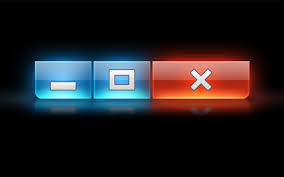
What icon is this?

a)

Minimize, Maximize and Close

b)

Open, Maximize and Close

c)

Close, Minimize and Delete

d)

Minimize, Maximize and Open

65.

What icon is this?

a)

Paper

b)

Folder

c)

File

d)

Drawer

66.

What icon is this?

a)

Basket

b)

Container

c)

Recycle Bin

d)

Trash Can

67.
What do we call the computer's main memory which temporarily stores data when the computer is switched on?
a)
Random Access Memory
b)
Real Actual Memory
c)
Read Access Memory
d)
Random Actual Memory
68.
The ROM stores permanent instructions such as the...
a)
CMOS
b)
BIOS
c)
RAM
d)
CPU
69.
Most backing storage devices are external to the computer except for the...
a)
Hard Drive
b)
CD-ROM
c)
USB Flash Drive
d)
DVD-RW
70.
RAM loses its contents once the computer is switched off, therefore it is...
a)
Non-Volatile
b)
Volatile
c)
Read Only Memory
d)
Read Once Memory
71.
What is this image the icon for?
a)
Microsoft PowerPoint
b)
Microsoft Word
c)
Microsoft Publisher
d)
Microsoft Excel
72.
What browser is this the icon of?
a)
Internet Explorer
b)
Google Chrome
c)
Mozilla Firefox
d)
Safari
73.

Identify the name of the icon shown

a)

Mouse Pointer

b)

Arrow hand

c)

Keyboard Shortcut

d)

All of the above

74.
Computer alows you to ......and ........information 
a)
copy and paste 
b)
store and process
c)
save and play 
75.
An example of super computer is :
a)
MP3 players
b)
Desktop
c)
Cell phones
d)
Mainframe computers
76.
ROM is
a)
random access memory - temporary
b)
random access memory  - permanent
c)
read only memory - temporary
d)
read only memory  - permanent
77.
 examples of software :
a)
keyboard
b)
mouse
c)
power point
d)
printer
78.
Which of these computers is the largest?
a)
PDA
b)
Desktop
c)
Mainframe
d)
Netbook
79.
What is the main difference between a Smartphone and a standard feature phone?
a)
A smartphone has 3G
b)
A smartphone's OS allows you to download apps.
c)
A smartphone is the latest technology.
d)
A smartphone has a higher storage capacity.
80.
What are the two main categories of software?
a)
Systems and Applications
b)
OS and Office
c)
Windows and Applications
d)
Systems and Office
81.
What do we call the computer's main memory which temporarily stores data when the computer is switched on?
a)
Random Access Memory
b)
Real Actual Memory
c)
Read Access Memory
d)
Random Actual Memory
82.
Most backing storage devices are external to the computer except for the...
a)
Hard Drive
b)
CD-ROM
c)
USB Flash Drive
d)
DVD-RW
83.
The ROM stores permanent instructions such as the...
a)
CMOS
b)
BIOS
c)
RAM
d)
CPU
84.
RAM loses its contents once the computer is switched off, therefore it is...
a)
Non-Volatile
b)
Volatile
c)
Read Only Memory
d)
Read Once Memory
85.
What are the 4 features of a Graphical User Interface (GUI)?
a)
Windows, Icons, Menus & Pointer
b)
Screens, Icons, Menus & Pointer
c)
Windows, Buttons, Menus & Pointer
d)
Windows, Icons, Mouse, Pointer
86.
Which user interface are you currently using?
a)
Command Line
b)
Menu Driven
c)
Voice Recognition
d)
GUI
87.
Why is it important to have a basic understanding of how computers work?
a)
Because knowing the history of computers means you also know how to use them
b)
Because knowing that computers come in many sizes will help you sell them
c)
Because knowing how to store computer output enables you to use a keyboard
d)
Because knowing how computers work improves your ability to use them
88.
What kind of computer is best suited for reading books, streaming movies, and communicating with friends?
a)
Desktop computer
b)
Tablet
c)
Supercomputer
d)
Mainframe
89.
Which part of a computer system describes the software?
a)
The information that a computer processes such as text, numbers, sound, video, images and files.
b)
The person who enters the data that is to be processed and views the information.
c)
The programs or instructions that tell the computer what tasks to perform.
d)
The computer and its components inside and external peripherals, such as monitor, keyboard, mouse and printer.
90.

If I wanted to make a poster what would be the best software choice?

a)

Access

b)

Photoshop

c)

Word

d)

Publisher

91.

What does every formula in a spreadsheet start with?

a)

+

b)

A number

c)

=

d)

(

92.

What is Malware short for?

a)

Malignant software

b)

Malicious software

c)

Male only Software

93.

Which software would be used to create a spreadsheet?

a)

Access

b)

Excel

c)

Word

d)

Powerpoint

94.

Which formula is the best (and correct) for adding up a selection of numbers

a)

sum(A1+A10)

b)

=sum(A1+A10)

c)

=sum(A1:A10)

d)

sum(A1:A10)

95.

What software is best for creating a database?

a)

Access

b)

Excel

c)

Powerpoint

d)

Publisher

96.

which is the brain of the computer?

a)

keyboard

b)

mouse

c)

CPU

d)

monitor

97.
What is a Barcode?
a)
Code of lines
b)
A machine-readable code in the form of numbers and a pattern of parallel lines
c)
A machine-unreadable code in the form of numbers and a pattern of parallel lines
d)
A machine-rereadable code in the form of numbers and a pattern of parallel lines
98.
What is a barcode reader?
a)
Electronic Point of Sale
b)
A machine-readable code in the form of numbers and a pattern of parallel lines
c)
Radio Frequency Identification
d)
An electronic device that can read and output printed barcodes to a computer.
99.

1.THE MAIN AND LARGEST DATA STORAGE DEVICE IN COMPUTER.

a)

DIGITAL VIDEO DISC

b)

HARD DRIVE

c)

UNIVERSAL SERIAL BUS

100.

A NON MAGNETIC POLISHED METAL DISK USED TO STORE INFORMATION.

a)

COMPACT DISC

b)

DIGITAL VIDEO DISC

c)

UNIVERSAL SERIAL BUS

101.
Computer instructions written and executed in a specific sequence are called
a)
Computer Program
b)
Computer Language
c)
Generation
d)
Tanslation
102.

Which of these is a valid email address?

a)

john.BT@com

b)

john@BT/com

c)

john@BT.com

d)

BT@john/.com

103.

What does CPU stand for?

a)

Clever Peoples University

b)

Central Puppies Unit

c)

Central Processing Unit

d)

Computer Problems Unite

104.

Identify this social media application

a)

Twitter

b)

Snapchat

c)

Facebook

d)

LinkedIn

105.

What does WWW stand for?

a)

Wonder Woman's Wig

b)

Where World Was

c)

Wicked Wizard Web

d)

World Wide Web

106.

Which leading computer software business created programs like Word, Excel and PowerPoint

a)

Google

b)

Apple

c)

Microsoft

d)

DELL

107.

What social media application allows users to send or leave tweets?

a)

Twitter

b)

Facebook

c)

Instagram

d)

Snapchat

108.

What is this called?

a)

USB

b)

Flash Drive

c)

All of these

d)

Memory stick

109.

Name this social media app

a)

Instagram

b)

Facebook

c)

Twitter

d)

Snapchat

110.

The term email is short for?

a)

Emergency mail

b)

Easy mail

c)

Every mail

d)

Electronic mail

111.

Which of these is the strongest password?

a)

J&jwUth#

b)

password

c)

654321

d)

123456

112.
1.___________ is a picture or a graphic image that can be inserted into a MS Word
a)
Clip Art
b)
Format
c)
Shapes
d)
WordArt
113.
2.This makes something shorter or smaller,especially by cutting
a)
Picture Tool
b)
Callouts
c)
Crop
d)
Insert
114.
The part of the internet that users can access using web browsers such as Google Chrome is called the?
a)
World Wide Web
b)
The Intranet
c)
HTTP
d)
The Deep Web
115.
Software used to view pages on the WWW?
a)
Web Browser
b)
Search Engine
c)
Web Page Editor
d)
Web App
116.
Which of the following is an internet protocol?
a)
HTTP
b)
HTML
c)
CSS
d)
UTP
117.
https://facebook.com is an example of a..?
a)
URL
b)
HTML
c)
Protocol
d)
IP Address
118.
What does ISP stand for?
a)
Internet Service Provider
b)
Internet Switch Protocol
c)
Internet Service Protocol
d)
Internet Switch Provider
119.
Data Transfer Rate is more commonly known as?
a)
Bandwidth
b)
Access Speed
c)
Network Width
d)
Network Velocity
120.
A typical broadband bandwidth might be..? 
a)
20 Mbps
b)
20 Gbps
c)
20 MBps
d)
20 GBps
121.

Which device would you use to store files on?

a)
b)
c)
d)
122.

2.Buying and selling products all over the world is called

a)

Online Shopping

b)

Traditional Shopping

c)

Barter System

d)

Emailing

123.

3. DNS Stands for

a)

Do Not Specify

b)

Domain Name System

c)

Dynamic Network System

d)

Downloading System

124.

4. __________ is a series of graphical web browsers developed by Microsoft.

a)

Internet Explorer

b)

Virus

c)

Anti virus

d)

Web Address

125.

What is Computer Hardware

a)

Something you can touch

b)

Something you cannot touch

c)

Device attached to the computer

d)

Device inside of the computer

126.

Where is the computer CPU located

a)

On the computer motherboard

b)

Inside of the computer hard drive

c)

Inside the computer power supply

d)

On top of the system fan

127.

Which is an out put device

a)

mouse

b)

keyboard

c)

Printer

d)

Biometric System

128.

Which is an input device

a)

Mouse

b)

Printer

c)

Monitor

d)

Projector

129.

What is MS. Power Point do?

a)

Edit the video

b)

Create a presentation

c)

Edit the words

d)

Draw a picture

130.

Projector is a/an__________ device

a)

Output

b)

Process

c)

Input

d)

Storage

131.

Earphone is a/an….device

a)

Input

b)

Ouput

c)

Storage

d)

Process

132.

Which of these not system software?

a)

Macintosh

b)

Microsoft Windows 7

c)

Microsoft Paint

d)

Linux

133.

Which of these not system software?

a)

Macintosh

b)

Microsoft Windows 7

c)

Microsoft Paint

d)

Linux

134.

Which of these not the output devices?

a)

Mouse

b)

Monitor

c)

Projector

d)

Printer

135.

Hard disk is a/an__________ device

a)

Output

b)

Storage

c)

Input

d)

Process

136.

Which of these is 2nd memory?

a)

RAM

b)

ROM

c)

BIOS

d)

USB

137.

What is the computer use to interact between software and the hardware?

a)

CPU

b)

Processor

c)

Cable

d)

Operating System

138.

What Operating System is this called?

a)

Microsoft Windows

b)

Macintosh

c)

Linux

d)

Andoid

139.

Which one of these is application software?

a)
b)
c)
d)
140.

What software do you use to browse in Internet?

a)
b)
c)
d)
141.
What are the two main categories of software?
a)
Applications & Systems
b)
Systems & Utilities
c)
Utilities & Applications
d)
Applications & Operations
142.

Who created Apple and died October 5th 2011?

a)

Steve Jobs

b)

Steve John

c)

Steve Song

d)

Steve Nash

143.

Which of the following are file extensions for audio files?

a)

.txt

b)

.swf

c)

.jpeg

d)

.mp3

144.

What is the short cut to copy?

a)

CTRL A

b)

CTRL B

c)

CTRL C

d)

CTRL P

145.
A _____ is an electronic device that manipulates information, or data.
a)
Smartphone
b)
Computer
c)
IPhone
d)
Tablet
146.
_____ is any set of instructions that tells the hardware what to do and how to do it.
a)
Hardware
b)
Software
c)
Peopleware
d)
Firmware
147.
____ is any part of your computer that has a physical structure, such as the keyboard or mouse
a)
Hardware
b)
Software
c)
Peopleware
d)
Firmware
148.
The most common type of personal computer, & it typically includes the Windows operating system
a)
PC
b)
Mac
c)
IPad
d)
Smartphone
149.
_____ is a general term for a group of devices that are designed to be worn throughout the day
a)
Wearables
b)
Smartphones
c)
Game Consoles
d)
TVs
150.
Computers made by Apple
a)
PC
b)
Mac
c)
IPad
d)
Smartphone
151.
Used to print documents, photos, and anything else that appears on your screen.
a)
Printer
b)
Speakers
c)
Web Camera
d)
Microphone
152.
Use to record sound or talk with someone else over the Internet.
a)
Speakers
b)
Printer
c)
Joysticks
d)
Microphone
153.
Allows you to copy a physical image or document and save it to your computer as a digital image
a)
Printer
b)
Scanner
c)
Headphones
d)
Joysticks
154.
Used to control computer games
a)
Speakers
b)
Joysticks
c)
Mouse
d)
Printer
155.
A type of input device that can record videos and take pictures.
a)
Keyboard
b)
Scanner
c)
Mouse
d)
Web Camera
156.
What is the use of this icon?
a)
To erase
b)
To save
157.
What is this the brain of computer?
a)
USB
b)
CPU
c)
ICT
d)
BUS
158.
In 1976, Steve Jobs built the first ________ computer.  
a)
A. IBM 
b)
B. Dell
c)
C. Microsoft
d)
D. Apple Macintosh
159.
What does CPU stands for?
a)
Central Processing Unit
b)
Central Pressing Unit
c)
Control Processing Unit
d)
Central Pass Unit
160.
What is it?
a)
Hard disk
b)
Power station
c)
Microprocessor
d)
Motherboard