
 Worksheets
Python Turtle Quiz
Total questions: 125
Worksheet time: 3hrs 58mins
Who is credited with devising Python turtle graphics?
Seymour Papert
Steve Jobs
Ben Fry
Casey Rhys
What settings can be applied to Python turtle graphics? Tick all those that apply
Position
Color
Orientation
Sound
What attributes can you set to the turtle pen? Tick all those that apply
On / off
Color
Width
Erase

There is an error on this piece of code, what is the correct statement?
screen.bgcolor("lightblue")
screen.bgcolor="lightblue")
screen.bgcolour("lightblue")
screen.bgcolor=lightblue()

What is wrong with this piece of code
Must use the American spelling of colour - "color"
Remove the prefix "screen." on Line 3
Don't write the name of the colour in quote marks
Don't add a capital letter to "Screen"

There is an error on this piece of code, what is the correct statement?
import turtle
import Turtle
import.Turtle
turtle import

There is an error on this piece of code, what is the correct statement?
turtle.forward(150)
turtle.forward()
turtle.moveforward()
turtle.move.forward(150)

There is an error on this piece of code, what is wrong?
Nothing
No begin_fill() set
No colour set in the end fill e.g. end_fill("blue")
No colour set in the start fill e.g. start_fill("blue")

There is an error on this piece of code, what is wrong?
Nothing
No full stop needed in the pen.down statement e.g. turtle.pendown()
No brackets needed in the pen.down statement e.g. turtle.pen.down
No turtle prefix needed in the pen.down statement e.g. pen.down()

There is an error on this piece of code, how should it be written?
There is no error
screen=turtle.screen()
screen=turtle.Screen()
screen=turtle.screen("blue")

There is an error on this piece of code, how should it be written?
There is no error
screen=turtle.screen()
screen=turtle.Screen()
screen=turtle.screen("blue")

There is an error on this piece of code, how should it be written?
There is no error
turtle.right(90)
turn.right(90)
right(90)

There is an error on this piece of code, how should it be written?
There is no error
turtle.right(90)
turtle.drawcircle(10)
import.turtle
What is the best method of fixing errors in your code?
Running and testing the code
Asking your friends
Reading it through again
All of the above


To start the turtle drawing you need to use which of the following commands?
penup()
pen_down( )
pendown( )
penup( ):
How do you tell that Python that you are going to use the turtle library?
import_turtle
turtle import
import turtle
from turtle import
turtle.penup()
turtle.pendown()
turtle.forward(120)
turtle.penup()
turtle.forward(120)
turtle.pendown()


Which of these commands would successfully create a turtle named Alice
Alice = turtle.turtle()
Alice = Turtle.turtle()
Alice = Turtle.Turtle()
Alice = turtle.Turtle()
What happens if you call your python progam "turtle"
your program crashes because you have spelt it wrong
your program crashes because it stops the import turtle line from working
your program crashes because it should have been saved as turtle.turtle
your program runs fine
Which of these statements will successfully set the colour that the turtle Bob draws in
Bob.fillcolor("red")
Bob.pencolor("Red")
pencolor.bob = "red"
pencolor("red") = Bob
Why are while loops useful?
They mean you don't have to think about the code that you write
They mean that you have to write more code to get the same result
They mean that you don't need to import the turtle library
They mean you can repeat instructions without needing to type them out multiple times
Why might programming a python turtle be a useful skill?
(select 2 answers)
It allows me to improve my problem solving skills
It allows me to solve my maths homework easily
It allows me to practice logical sequences of instructions, which can be useful in life
It allows me to hack, and therefore take shortcuts in life.

What will this draw?
A Brown rectangle with yellow outline
A Brown Square with a Red outline
A Red Square with a Red Outline
A Yellow Rectangle with a purple outline
What is the keyword needed to repeat code (iterate) in Python?
for
if
input
To fill the shape with the colour red (using a different colour outline), which command is best?
color("red")
fillcolor("red")
fill("red")
fillcolour("red")
What does this code do?
sides = int(input("How many sides would you like? "))
Nothing, its witchcraft
Creates an input variable asking the user to input a number
Tells the turtle to move in a direction.
Tells the turtle to turn a number of times.

Look at this code, which of these is a variable?
input
4
int
mylength
What is the best definition of iteration?
Repeating an instruction 5 times
Repeating an instruction an unlimited number of times
Code
Repeating an instruction until a goal is met
What is wrong with this code?
Missing Brackets
Missing Comma
Missing Colon
Incorrect spelling



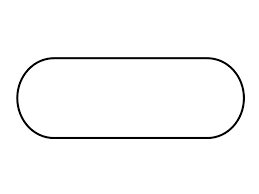
What symbol shows something you need to do?
oval
parallelogram
rectangle
diamond
Which symbol shows input?
oval
parallelogram
rectangle
diamond
Which symbol shows output?
oval
parallelogram
rectangle
diamond

A logical step-by-step process for solving a problem is called
Binary Numbers
Coding
Algorithms
A diagram that represents a set of instructions is called:
Flow Chart
Pseudocode
Shapes
Data sent from a Computer is called
Input
Output
Process


Why do computers use algorithms?
To give computers precise steps to solve a problem.
Because they are easy to use
It is the language that computers understand
To help them predict the future
What does sequence mean?
To create a pattern
To do something in order
To do something randomly
To repeat something over and over again
What does selection mean?
Selection is following instructions in order.
Selection is to repeat something over and over again
Selection is when you have a choice of options
Selection is choosing the best option
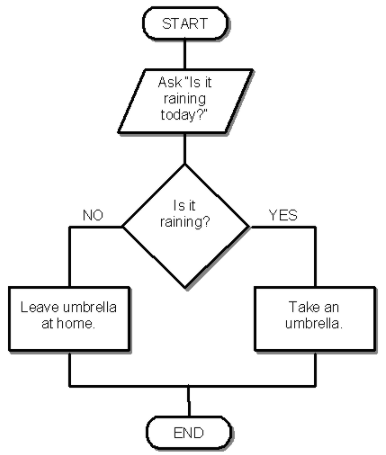
Yes

19

What will happen if the user gets their details wrong?
Checks how many times they have tried
They get another try

What will happen if the user's book return is late?
Sends them an SMS (text)
Does not send them an SMS (text)

Complete the flowchart


complete the flowchart


Complete the flowchart


Complete the flowchart


What is printed at the end if you enter 6?
The answer is : 6
The answer is var-answer
The answer is : 10+6
The answer is : 16
100
TRUE
What is a Constant?
A storage location of memory which does not change
A random area to store things in.
Something that changes
Something that can only store numbers
What will happen if the user gets their details wrong?
Checks how many times they have tried
They get another try
Whats wrong with this program?
t=turtle.Turtle()
t.forward(100)
t.right(90)
t.forward(100)
t.right(90)
t.forward(100)
t.right(90)
t.forward(100)
t.right(90)
Nothing is wrong. The code will work.
Missing import turtle.
t.right(90) is not a valid syntax.
t.forward(100) is not a valid syntax.
What is the error in the code?
import turtle
c=turtle.Turtle()
for step in range(4)
c.forward(100)
c.right(90)
No error.
Missing colon(:)
Cannot name my turtle c.
cannot use the variable name step.
To stop the turtle drawing you need to use which of the following commands?
penup()
penup
pen_up()
pendown()
penup():
What command do you use to move the turtle to a particular position?
forward()
right()
goto(x,y)
backward()
left()
What command do you use to change the speed of the turtle?
shape()
speed()
color()
write()
forward()
What command do you use to write text to the screen?
penup()
pendown()
write()
shape()
color()
In python, what function gives access to use various useful functions?
import turtle
import random
import math
import module
Which function in python generates random numbers?
from random
import randint
turtle.turtle()
import turtle
Which keyword in turtle moves the turtle forward?
right()
left()
forward()
backward()
Which keyword in turtle makes the turtle turn right?
right()
left()
forward()
backward()
What keyword in turtle sets the color of the turtle?
color()
bgcolor()
fillcolor()
begin_fill()
What keyword sets the shape of the turtle?
penup()
pendown()
shape()
write()
speed()
I want to move turtle to the left,top position. What is the position i need to specify?
goto(0,0)
goto(x,y)
goto(-x,y)
goto(-x,-y)
goto(x,-y)
I want to move the turtle to right, top position. What is the right command?
goto(0,0)
goto(x,y)
goto(-x,y)
goto(-x,-y)
goto(x,-y)
I want to move the turtle to right, bottom position. what is the correct syntax?
goto(x,-y)
goto(0,0)
goto(x,y)
goto(-x,y)
goto(-x,-y)
I want to move the turtle to left, bottom position. what is the syntax?
goto(-x,y)
goto(0,0)
goto(-x,-y)
goto(x,y)
goto(x,-y)
What is the keyword to select the graphics screen in turtle?
Screen()
bgcolor()
end_fill()
begin_fill()
What is the keyword in turtle that changes the background color of the graphics screen?
bg_color()
bg.color()
bgcolor()
bgcolor():
What is the keyword in turtle that changes the turtle color to fill the color inside the shape?
color()
fillcolor()
fill.color()
begin_fill()
fillcolor():
What is the keyword in turtle that begins to fill the color inside the shape?
beginfill()
begin_fill()
begin.fill()
begin_fill():
fillcolor()
What is the keyword in turtle that stops color filling?
end_fill()
end.fill()
stop.fill()
stop_fill()
What is the error in this code?
import turtle
for i in range(5):
turtle.forward(150)
turtle.right(144)
There is no error.
Turtle is not named.
import turtle missing ()
The syntax is turtle=forward(150)
What is the error in this code?
import turtle
t=turtle.Turtle()
for i in range(5):
c.forward(100)
c.left(144)
Name error
Spelling error
syntax error
No error
Is there error in this code?
import turtle
t = turtle.Turtle()
t=turtle.screen()
t.bgcolor("light pink")
c=turtle.color("light blue")
turtle.fillcolor("red")
t=turtle.begin_fill()
for flower in range(10):
turtle.right(200)
turtle.circle(30)
t=turtle.end_fill()
Attribute error
spelling error
syntax error
There is no error.
I want to write a code to to draw blue circle with pink background and fill it with orange color. Will this code work?
import turtle
t = turtle.Turtle()
t=turtle.Screen()
t.bgcolor("light pink")
c=turtle.color("light blue")
turtle.fillcolor("red")
t=turtle.begin_fill()
for flower in range(10):
turtle.right(200)
turtle.circle(30)
t=turtle.end_fill()
Yes
No
Does the code has error?
import turtle
t = turtle.Turtle()
t=turtle.Screen()
t.bgcolor("light pink")
c=turtle.color("light blue")
turtle.fillcolor("red")
t=turtle.begin_fill()
for flower in range(10)
turtle.right(200)
turtle.circle(30)
t=turtle.end_fill()
There is no error.
Syntax error
Attribute error
spelling error
What is the error?
import turtle
t = turtle.Turtle()
t=turtle.Screen()
t.bgcolor("light pink")
c=turtle.color("light blue")
turtle.fillcolor("red")
t=turtle.begin_fill("red")
for flower in range(10):
turtle.right(200)
turtle.circle(30)
t=turtle.end_fill()
syntax error
type error
attribute error
spelling error
No error
What is the error?
import turtle
t = turtle.Turtle()
for star in range(5):
t.foward(100)
t.right(90)
spelling error
no error
syntax error
value error
Will this code write the word hello as output:
import turtle
c=turtle.Turtle()
c.write(hello)
Yes, it will.
turtle doesn't identify write()keyword
Missing quotation marks("")
Missing print()
Will this code run:
import turtle
c=turtle.Turtle
c.penup()
c.goto(-140,140)
c.pendown()
for step in range(15):
c.write(step)
c.right(90)
c.forward(20)
c.pendown()
c.forward(150)
c.penup()
c.backward(160)
c.left(90)
c.forward(20)
No error
external error. Missing parentheses ()
spelling error
Type error

