
 Worksheets
Scratch
Total questions: 76
Worksheet time: 41mins
Programming languages give computers instructions
True
False
An algorithm is..
A set of instructions
A motion block
A character
A loop statement
A costume is
A code block
A motion
A different way a sprite looks
A sound
In scratch, a character or object is called?
Spirit
Sprint
Sprite
Split

What does this code do?
Go Up
Go Down
Go Right
Go Left
You use _____ blocks to program Scratch
Sequence
Code
Algorithm
Memory
The Y axis is "Up" and "Down"
True
False

Add a "Forever" Block around the Sound Block
Change the Seconds to 5
Add a "Repeat _" Block around the Sound Block
Change the Costume of the Cat

Debug this
Change the Event Block
Add a "Forever" Block
Add a "Wait 1 Sec" Block
Add a "Change Costume" Block

In Scratch which blocks are yellow?
Motion
Sensing
Control
Looks
In Scratch which blocks are blue?
Motion
Sensing
Control
Looks

In Scratch which blocks are purple?
Motion
Sensing
Control
Looks

What does this code do?
Start the game
Make the ball bounce
Make the character spin
Add a sprite
What is the stage?
Place where actors stand and perform
A box you stand on when you can't see over the crowd
The graphical area of a scratch program, where sprites move
The coding area of a scratch program, where blocks go
How do I control my sprite with keyboard keys?
Mash lots of buttons until something happens
Use the "Move # steps" motion block
Use the "When <something> key pressed" events block
There is no way to control sprite using keyboard keys
How can I make my sprite use a movement animation?
Give it more costumes, and have them change on some event
Use the "when <something> key pressed" events block
Add a new sprite that's slightly different to the old one
Drag the sprite around the stage with the mouse
To send a message between sprites or from the sprite to the stage, you need to
sequence
send
broadcast
transmit

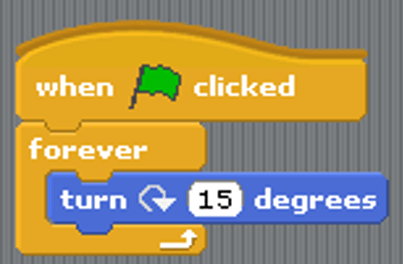
How many times would this code need to repeat to make a full circle?
60
120
180
360
How do you create a loop in scratch?
use a repeat block
snap a block
use a variable
use a condition block
You can keep score in Scratch by creating a
variable
sprite
loop
function
To program a sprite to duplicate itself on the stage while the program is running, you would need to use
make a copy
duplicate
clone
paste
Joe is trying to code his game to reset the score to 0 when the green flag is clicked. Which code will help him?


Variables in Scratch are found under where...
Motion
Variable
Events
Control
What happens to a sprite's script if this sprite was deleted?
The script will be saved if you decided to use this sprite later
You can't delete a sprite before deleting the script written in it.
The script will be deleted with the sprite

What does this block do?
It allows sprites to talk to each other
It plays music on the radio
It writes a message in a bottle

What is the variable in this code?
keep score
random position
edge

What does this code do?
It clicks the sprite forever
It allows you to draw shapes
It generates sprites forever


Which of the following sections of code will make the script follow the mouse pointer around the screen?


What does this script do?
When the project starts set my variable to 0, then change my variable by 1 forever
When the project stops set my variable to 1, then change my variable by 0 forever
When the project starts set my variable to 0, then change my variable by 1 then wait 1 second and repeat again forever
Select ways to change your sprite's color 🔽
Set color effect
Sprite editor
Set ghost effect
Go to front layer

How can you clean up scripts?
Right click delete all
Delete project and start over
Right Click clean up blocks
OTHER
( BONUS ) How many code types is there in scratch 3.0
9
20
21
8
17
It stores the most recent keyboard input.
Input
Value
Answer
The Horizontal line represents the -
X axis
Y axis
Z axis
None of the above
The vertical line represents the -
Z axis
D axis
X axis
Y axis
Why is set rotation style left-right used ?
To allow the sprite from rotating horizontally.
To avoid the sprite from rotating horizontally.
To allow the sprite from rotating vertically.
To avoid the sprite from rotating vertically.


Where to find these codes?


What happens when we click this?
Change the Sprite
Program Starts
Program Stops

How to make the character move up?


How to make one sprite run to the other sprite?




With Scratch we can make... ?
Games
Stories
Animation
All


What is the difference between a sprite and a costume in Scratch?
Costumes change the look of sprites.
Costumes and sprites are different names for the same thing.
Costumes are clothes only.
Sprites can only be animals or people.

Where do you click to add a background or stage?


When you add a sound, which code is best for music that you would like to loop?


What is an event in Scratch?
Code that makes a sprite move.
Code that ends the project.
Code that tells the code to run.
Code that changes the background or stage.

What would you click to send a message to start new code?
Motion
Looks
Events
Control
What would you click to find the show / hide code?
Motion
Looks
Events
Control
What would you click to find the repeat code?
Motion
Looks
Events
Control

What does this let you do?
Make the sprite disappear in the code.
Turn the background white.
Start the presentation.
Hide or show a sprite on screen, but not in code.

Where would you shrink sprite?


How do you control how fast your sprite moves?
Change the seconds to a higher number.
Change the seconds to a lower number.
Change the x to a higher number.
Change the y to a lower number.

Where is the best place to go to flip a sprite or character horizontally or vertically?
Code
Costumes
Sounds
Project page

Where do you tell people how to start your project?
Control
Events
Project Page
Looks

Where do you go to upload an image or sound?



