
 Worksheets
Rajans Robotics Club - Evaluation Test for Grade 6/7/8
Total questions: 25
Worksheet time: 13mins

Identify this component
Uno Cards
Raspberry Pi
Arduino Duo board
Arduino Uno board
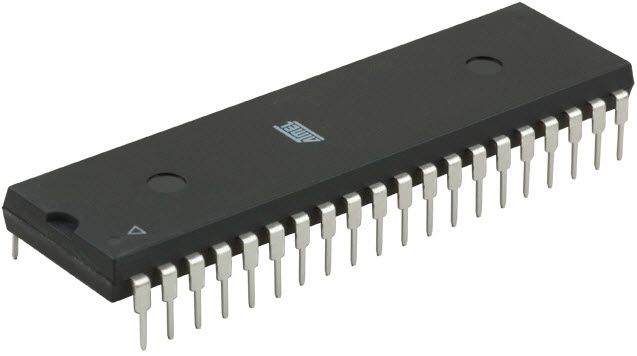
what is the main role of this chip
to heat the board
save the programmed input only
being the brain of the Arduino
there is no role at all

Identify this component
Arduino Uno board
Raspberry Pi
Breadboard / Protoboard
White Plastic Board
Arduino can interact with...
buttons, leds
smartphone
sensors
all of the above
A potentiometer is also known as a ___________________
knob
button
variable resistor
motor
In the RGB LED, the R stands for ___________
Ready
Red
Read only
Rigid

This part is called a
Piezo buzzer
Push button
Potentiometer
None of the Above

A breadboard is a tool used to temporarily check that circuits work before soldering.
True
False

Why do we use Resistors?
To protect the Arduino.
To save circuit energy.
To protect other components from high voltage
To increase efficiency.

How many digital pins in Arduino Uno?
5
6
13
14

What is this device?
PIR Motion Sensor
Infrared sensor
Ultrasonic sensor
Speakers

What is this device?
DC Motor
Servo Motor
Neither
Fan

Which device is used to build robot arms?
Resistors
DC Motor
Servo Motor
Potentiometer

What is the range of degrees for our micro servo output?
0 to 180
0 to 360
-180 to 180
0 to 90

What is this circuit element?
Jumper wires
Resistors
Light Dependent Resistors (LDRs)
Rainbow cords

What activates this sensor?
Motion
Light
Sound
Heat
What is another word for 'computer programming'?
Arduino
Control Technology
Sketch
Coding
What is an LED?
a light
a light emitting diode
a part of a circuit
a microcontroller
digitalWrite (LED1,HIGH);
What does it means by HIGH?
Blinking
Switch OFF
Switch ON
Sequence
delay (1000);
1000 in delay is equivalent to how many second?
10s
2s
60s
1s
digitalWrite (LED1, HIGH);
delay(1000);
digitalWrite (LED1, LOW);
What does the program do?
LED Switch Off at the beginning, wait for 60s and then switch ON.
LED Switch ON at the beginning, wait for 10s and then Switch OFF.
LED Switch ON at the beginning, wait for 1s and then switch ON.
LED Switch ON at the beginning, wait for 1s and then switch OFF.

