wayground logo

Free Printable Worksheets

NEW

Font size

S
M
L
XL
Worksheets

Form 1 Term 3

Total questions: 60

Worksheet time: 38mins

Name
Class
Date
1.
Any type of motion or movement that occurs in your presentation is called?
a)
slide
b)
place holder
c)
animation
d)
movement
2.
Displays the slides in the presentation numbered and on one screen as a set of thumbnails.
a)
SLIDE NOTES VIEW
b)
SLIDE SHOW
c)
SLIDE SHOW SORTER VIEW
d)
PLACEHOLDER
3.
A set of coordinated design elements, such as fonts, graphics, and colors, that provide a consistent look for your presentation.
a)
THEME
b)
TITLE
c)
CONTENT SLIDE
d)
PLACE HOLDER
4.
The first slide in the presentation; frequently contains special formatting so that it is easily distinguishable.
a)
CONCLUSION SLIDE
b)
TITLE SLIDE
c)
TEXT BOX
d)
PRESENTATION
5.
An animation effect that occurs when a presentation moves from slide to slide in Slide Show view.
a)
ANIMATION
b)
SLIDE SHOW 
c)
DESIGN
d)
TRANSITION
6.
Which tab lets you insert clipart?
a)
View
b)
Degsin
c)
Insert
d)
Picture
7.
Can I put a specific picture inside a shape?
a)
Yes
b)
No
8.
Which command is used to specify the length of the transition effect for each slide in a presentation?
a)
rehearse 
b)
preview 
c)
timing 
d)
duration
9.
NAME THE ICON
a)
Clip Art
b)
Word Art
c)
Smart Art
d)
Shape
10.
a)
Bold
b)
Font Size
c)
Font Type
d)
Font Color
11.

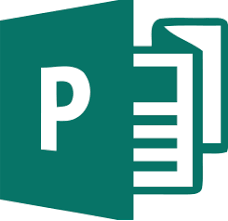
Which icon represents Power Point?
a)
b)
c)
d)
12.
What is Microsoft Power Point used to create?
a)
Slide Show
b)
Pictures
c)
Tables
d)
Spread Sheets
13.
When you want to make a Power Point and you want to design it yourself you should?
a)
Open Powerpoint - Click Blank Presentation
b)
Open Powerpoint - Click Gallery
c)
Open Powerpoint - Click ION
d)
Open Powerpoint and 
14.
What tab would you find online pictures on?
a)
Home
b)
Insert
c)
Transitions
d)
Animations
15.
Slides can have
a)
title, text, graphs
b)
drawn objects, shapes
c)
clipart, drawn art, visual
d)
any of the above
16.
What does the wavy, red line under a word in a presentation mean?
a)
Missspelling
b)
Grammar Error
c)
Synonym adavilable
d)
Antonym available
17.
What are each individual "pages" of a Power Point called?
a)
Sheet
b)
Page
c)
Slide
d)
Paper
18.
What is it called when one slide changes to the other?
a)
Transition
b)
Animation
c)
Switcharoo
d)
Style Effect
19.
In Slide Sorter view, which method is used to change slide order?
a)
move command from the shortcut menu
b)
move command form the quick access toolbar
c)
drag adn drop to new location 
d)
rearrange command form home ribbion
20.
Which commonly used animation effect makes text on a slide appear in the presentation? 
a)
motion 
b)
emphasis 
c)
entrance 
d)
exit 
21.

Power point is used to present ideas

a)

True

b)

False

22.

Using online presentation software, such as Google ___________ allows users to work with other people in a collaborative manner.

a)

Sheets

b)

Docs

c)

Slides

d)

Presents

23.

_________________ is a free web-based presentation application in which slide shows can be created, edited, and stored online. It was released to the public in 2007 and integrated with Google Drive.

a)

Microsoft PowerPoint

b)

Keynote

c)

Google Slides

d)

Presentations

24.

A good place to position the most important information is _______________ because this is where readers often look first.

a)

In the upper left hand corner of the page

b)

In the upper right hand corner of the page

c)

In the center of the page

d)

At the bottom of the page

25.

The look and feel of a surface in Graphic Design is known as

a)

Texture

b)

Line

c)

Space

d)

Shape

26.

The placement of elements on the page so they are evenly distributed

a)

Balance

b)

Proximity

c)

Unity

d)

Contrast

27.

What is a pixel?

a)

A single point on a computer screen.

b)

A saved Photoshop file.

c)

An object in the Tools Panel.

d)

A graphic design element.

28.

The look and feel of a surface in Graphic Design is known as

a)

Texture

b)

Line

c)

Space

d)

Shape

29.
what are the left hand keys?
a)
is the left hand keys asdv
b)
is the left hand keys wbmt
c)
is the left hand keys asdf
d)
is the left hand keys meos
30.
what are the right hand keys?
a)
is the right hand keys acmd
b)
is the right hand keys jkl[
c)
is the right hand keys wmyd
d)
is the right hand keys jkl;
31.
What hits the spacebar?
a)
pinkies
b)
middle fingers
c)
pointer fingers
d)
thumbs
32.
What keys are in the middle of home row?
a)
A S D F
b)
J K L ;
c)
G H
d)
U  I O P
33.
What does www stand for
a)
world web wide
b)
world wide web
c)
wide world web
d)
web wide world
34.
What is Google?
a)
A secondary source
b)
A search engine
c)
An operating system
d)
A word processing software
35.

What does WWW stand for?

a)

World Wide Web

b)

Wide World Web

c)

Web World Wide

d)

We Will Wait

36.

A collection of web pages is called a...

a)

web server

b)

web browser

c)

website

d)

WiFi

37.

What type of software/app do you need on a computer to view web pages?

a)

Camera

b)

Web Browser

c)

Web Server

d)

Text Editor

38.

Which of these is NOT a web browser?

a)

Safari

b)

Chrome

c)

Firefox

d)

Bing

39.

Web pages are viewed through a ...

a)

Monitor

b)

Magnifying glass

c)

Hyperlink

d)

Browser

40.
What is Google?
a)
A secondary source
b)
A search engine
c)
An operating system
d)
A word processing software
41.
In MS Word you create:
a)
spreadsheets
b)
documents
c)
presentations
d)
none of the above
42.
This is a:
a)
Group
b)
Tab
c)
Status Bar
d)
None of the above
43.
This is a:
a)
Quick Access Toolbar
b)
Group
c)
Ribbon
d)
None of the above
44.
This is the:
a)
Quick Access Toolbar
b)
Office Button
c)
Status Bar
d)
None of the Above
45.
In the red box what does the A with the red line under it mean?
a)
Bold
b)
Slant
c)
Font Style
d)
Font Color
46.
In the red box was does the black B mean? 
a)
Underline
b)
Font Style
c)
Bold 
d)
Text Size
47.

Name the following data storage device.

a)

DVD

b)

USB

c)

HDD

48.

Name the following data storage device.

a)

Floppy disc

b)

HDD

c)

CD

49.

CD stand for Compact Disc

a)

True

b)

False

50.

A data storage device is a device for recording (storing) information (data).

a)

True

b)

False

51.
a)
CPU
b)
Monitor
c)
Memory
d)
Mouse
52.
What does PC stand for?
a)
Personal Computer
b)
Problem Computer
c)
People Creator
d)
Personal Component
53.

What are raw facts and figures without context known as?

a)

Data

b)

Information

c)

Knowledge

54.

What are the stages of the data processing cycle?

a)

Input, Process, Output

b)

Input, Output, Process

c)

Process, Input, Output

d)

Output, Process, Input

55.

If someone on the internet says they want to meet you in real life, what should you do?

a)

Tell them where you live

b)

Tell an adult you trust

c)

Go meet them at the park

56.
When working at the computer for long periods of time you should glance away from the screen periodically to avoid eye strain.
a)
True
b)
False
57.
Sitting up straight at the computer is bad for your back
a)
True
b)
False
58.
Long sessions of typing may cause
a)
Repetitive stress injuries to your hands.
b)
Blisters on your fingers.
c)
 Deafness
59.
It is OK to drink near the computer
a)
True
b)
False
60.
Long sessions of typing may cause
a)
Repetitive stress injuries to your hands.
b)
Blisters on your fingers.
c)
 Deafness