wayground logo

Free Printable Worksheets

Font size

S
M
L
XL
Worksheets

Computing - Senior 3 - Annual Revision - Unit 1 to Unit 11

Total questions: 108

Worksheet time: 58mins

Name
Class
Date
1.

Which of the following are two examples of analogue input?

a)

Volume control with a slider

b)

LED of a smart phone on or off

c)

Colour wheel to select a particular RGB colour

d)

Push button for traffic light

2.

A mouse,touch-pad, and a trackball are all examples of:

a)

Scanning Device

b)

Voice-Input Devices

c)

Pointing Device

d)

Output Device

3.

Used to enter information on papers into a computer

a)

Printer

b)

Scanner

c)

QWERTY keyboard

d)

Touchpad

4.

Used by artists and designers to create and store digital graphics into a computer

a)

Touch screen

b)

Monitor

c)

Laptop

d)

Graphics tablet

5.

OCR

a)

detects marks on a paper

b)

detects unique ridges of a fingerprint

c)

understands and converts hand written text

d)

detects the shape of characters

6.

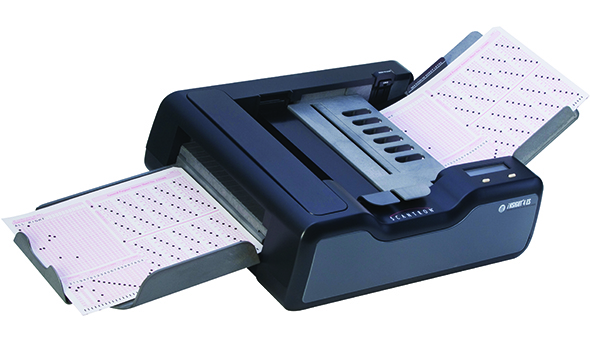
A process where scanned marks on a page are automatically converted to inputs.

a)

OCR

b)

OMR

c)

CAD

d)

AVR

7.

In barcode scanners, the signale recieved is .... signal

a)

digital

b)

analogue

8.
If you are shopping at Walmart and you need to know the price of an item, you could use a _____________.
a)
Barcode Scanner
b)
Scanner
c)
Web Cam
9.
What does OMR stand for?
a)
Optical Mark Recognition
b)
Optical Meter Reader
c)
Operator Mark Recognition
d)
Online Meter Reader
10.
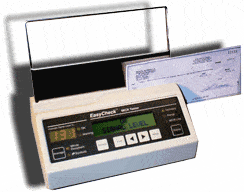
What does MICR stand for?
a)
Magnetic Ink Character Recognition
b)
Magnetic Ink Computer Recognition
c)
Multimedia Internet Computer Recognition
d)
Memory Internet Character Reader
11.
Which of these is not an input device?
a)
Scanner
b)
Screen
c)
Microphone
d)
Keyboard
12.
To convert analogue to digital data you will need what?
a)
ADC
b)
DIG
c)
ANA
d)
DDC
13.
A large printer used to print CAD line drawings...
a)
Plotter
b)
Dot Matrix
c)
Laser
d)
Inkjet
14.

Solid state storage has no moving parts?

a)

True

b)

False

15.

Which type of storage uses a laser?

a)

Magnetic

b)

Optical

c)

Solid State

16.

Which of the following storage devices is most suitable for use in mobile devices?

a)

Cloud

b)

Magnetic

c)

Solid State

d)

Optical

17.

What is a storage device?

a)

A device use for calculating data

b)

A device used to store data temporarily

c)

A device used to supply power to the computer

d)

A device used to store data permanently

18.
Optical device, fairly fragile, easy to snap or scratch.
a)
Flash memory
b)
Magnetic Tape
c)
CD
d)
Hard disk
19.
Not intended to be a portable storage device.
a)
CD
b)
Flash memory
c)
DVD
d)
Internal hard disk
20.
Large organisations use this type of storage device to  back up their systems daily.
a)
CD
b)
DVD
c)
Blu-ray
d)
Magnetic tape
21.
Typically has the largest storage capacity and is the cheapest per gb.
a)
Magnetic storage
b)
Solid state storage
c)
Optical storage
22.
Typically stores 650mb of data on it - usually music.
a)
DVD
b)
Blu-ray
c)
CD
d)
Floppy disk
23.
What is the most durable?
a)
Magnetic Tape
b)
Solid State Drive
c)
Hard Drive
d)
CD
24.

Cloud storage is very secure because the host has lots of security procedures in place.

a)

True

b)

False

25.

Magnetic storage devices have...

a)

Spinning discs that contain tracks and sectors

b)

Floating gates to trap electrons

c)

A read-write head that moves across the magnetic discs

d)

Has pits and lands that represent 0 or 1

26.

Cloud storage is...

a)

actually in the cloud

b)

storage that can be accessed from anywhere using the internet

c)

robust because it has no moving parts

d)

backed up very regularly

27.

Which of the following specifications would be better in terms of storage capacity speed of access to data?

a)

PC with Magnetic Storage of 2TB

b)

PC with SSD drive of 500GB

c)

Mobile Phone with SSD of 128GB

28.

Choose the most appropriate storage device for an all terrain camera crew tracking lions across Africa...

a)

Cloud Storage

b)

Solid State Storage

c)

Magnetic Storage

d)

Optical Storage

29.

Name the following data storage device.

a)

HDD

b)

DVD

c)

CD

30.

Name the following data storage device.

a)

Hard drive disc

b)

compact disc

c)

Floppy disk

31.

Data means information.

a)

True

b)

False

32.

USB stand for what?

a)

Universal series bus

b)

Universal serial bus

c)

Universal serial data

33.
CPU stands for
a)
Computer Processing Unit
b)
Central Processing Unit
c)
Core Processing Unit
d)
Central Power Unit
34.
Without a CPU the computer would not work.
a)
true
b)
FALSE
35.
The CPU would not work without the following component
a)
Hard drive
b)
USB memory stick
c)
Graphics card
d)
RAM
36.
Which two main components make up a CPU
a)
Control unit and Processing unit
b)
Control unit and RAM
c)
Control unit and Arithmetic Logic unit 
d)
Flash storage and Arithmetic Logic unit 
37.
ALU stands for
a)
Arithmetic Logic unit 
b)
Arithmetic Legal unit 
c)
Anti Logic unit 
d)
Arithmetic Logic undo
38.
The CPU needs access to the main memory and Cache memory
a)
true
b)
FALSE
39.
RAM is within the CPU
a)
true
b)
FALSE
40.
What is the job of the control unit?
a)
It carries out calculations
b)
It stores information.
c)
It does nothing.
d)
It controls the input and output of data to make sure that it gets to the right place.
41.
Which of the following CPU's will have a better better performance:
A: 3 GHz Quad Core CPU
B: 3 GHz Duel Core CPU 
a)
A
b)
B
42.
What is a bus?
a)
A circuit that connect one part of CPU to other components.
b)
A type of long term memory
c)
A type of permanent memory
d)
A method of transport
43.
How can a bigger cache improve CPU performance?
a)
By being able to carry out more calculations
b)
By being able to store more recently used instruction inside the CPU for quicker access times
c)
By being able to 
44.
What is cache memory?
a)
A very large, temporary memory
b)
A very small but expensive memory
c)
It is used to store data and programs permanently
d)
It is a type of payment
45.
a)

VGA

b)

USB Type A

c)

Ethernet

d)

HDMI

46.
a)

VGA

b)

Ethernet

c)

USB Type B

d)

HDMI

47.
a)

Ethernet

b)

USB Type C

c)

Micro USB

d)

VGA

48.
a)

USB Type B

b)

Power Socket

c)

Ethernet

d)

HDMI

49.

Define Computer Port

a)

A cable used to connect 2 electronic devices

b)

A connection point or interface between a computer and a device

c)

A special place where large amounts of data a temporarily stored

d)

A part of the computer that houses the CPU

50.

Which is the most common USB connector?

a)

USB Type A

b)

USB Type B

c)

USB Type C

d)

Mini USB

51.

What are VGA cables used for?

a)

Video

b)

Audio

c)

Data Transfer

d)

Power

52.

What are Ethernet cables used for?

a)

Networking

b)

Internet

c)

Audio

d)

Both Internet & Networking

53.

What can be plugged into this port?

a)

Monitor

b)

Speakers

c)

Mouse

d)

Keyboard

54.

What do you plug into this port?

a)

keyboard

b)

Game controller

c)

Speakers

d)

Monitor

55.

Which is the main power plug on the computer's power supply?

a)

1

b)

2

c)

3

d)

4

56.

This port is reversible and is known as the port of the future:

a)

USB C

b)

HDMI

c)

VGA

d)

parallel

57.

This USB B cable is used to plug a _________ into a computer

a)

Monitor

b)

Printer

c)

Mouse

d)

Keyboard

58.

Which of the following is a VGA port?

a)
b)
c)
d)
59.

These are used to connect cards to the PCI slots on the motherboard inside the computer case.

a)

Memory slots

b)

CPU socket

c)

Expansion slots

d)

AGP slots

60.

This image is the outside access for the:

a)

PCI slots

b)

Case fan

c)

Memory slots

d)

Hard drive

61.

What are the 2 main types of software?

a)

System and Application

b)

Informational and Entertainment

c)

Dynamic and Static

d)

Professional and Home-based

62.

Software that controls all of the computers hardware is...

a)

Program Software

b)

Application Software

c)

Instructional Software

d)

System Software

63.

The type of software that the users run to do various tasks on a computer is...

a)

System Software

b)

Application Software

c)

Utility Software

d)

Operative Software

64.

Creating a set of instructions that the computer can use is called...

a)

Application Creation

b)

Program Initialization

c)

Coding

d)

Instructional Command Prompting (ICP)

65.

A list of instructions to complete a task is...

a)

Algorithm

b)

Operating System

c)

Word Processor

d)

Cloud Computing

66.

Is what type of software?

a)

system software

b)

programming software

c)

application software

d)

utility software

67.

C++, Visual Basic and Cobol are example of ________________ software.

a)

application

b)

utility

c)

system

d)

programming

68.

Mac OS is an example of ______________ software.

a)

application

b)

utility

c)

system

d)

programming

69.

Mac OS is an example of ______________ software.

a)

application

b)

utility

c)

system

d)

programming

70.

Which of the following is the correct flow of data in computer operation?

a)

input-process-output

b)

process-input-output

c)

output-process-input

d)

input-output-process

71.

A computer's Operating System

a)

Manages the software on your computer.

b)

Manages the hardware on your computer

c)

Coordinates all of the actions of your computer

d)

All of the above

72.

Which are examples of apps?

a)

Word processing software

b)

Angry Birds

c)

Google Chrome

d)

All of the above

73.

Why is it important to regularly update your antivirus software?

a)

To fuel the software company's economic growth

b)

Because new malware is constantly being developed by the bad guys

c)

It will help to protect your printer, scanner, and other peripherals

d)

I have no clue

74.

Which type of business software can be used to create a presentation using text, graphics, animation, audio and video?

a)

Word

b)

Excel

c)

Access

d)

PowerPoint

75.

Which of the following is an application program for editing image?

a)

Media Player

b)

Photoshop

c)

Access

d)

PowerPoint

76.

Which of the following software is an example of spreadsheet?

a)

Word

b)

Excel

c)

Powerpoint

d)

Access

77.
Certain computing projects in education and science are free and maintained by a diverse community of people. Their software is usually distributed as:
a)
open source
b)
charity
c)
off the shelf
78.
Microsoft Office and similar software is an example of:
a)
off the shelf
b)
bespoke
c)
open source
79.
A bank thinks of getting a database package. They have particular needs, such as having their logo on every screen and timing employees performing tasks. The best software in this case would be:
a)
bespoke
b)
off the shelf
c)
open source
80.
A small office is thinking about getting productivity sofware for typing up letters and simple spreadsheet modelling. Their needs and budget are modest. The best software in this case would be:
a)
off the shelf
b)
bespoke
c)
none of the above�
81.
John needs to exchange information with a lot of people, sending documents back forth. He wants to get a data handling software that will keep track of his expenses and revenues. The best software in this case would be:
a)
off the shelf
b)
open source
c)
bespoke
82.
Some software programs develop rapidly, gaining new features and adapting to new uses, very often very specialised and experimental. The best software in this case would be:
a)
open source
b)
proprietory
c)
bespoke
83.
The following is not a good reason to use bespoke software:
a)
the need to perform a very wide range of tasks
b)
special features only needed by one company
c)
low computer skills of employees
84.
The following type of software will typically have the biggest number of users:
a)
off the shelf
b)
proprietory
c)
bespoke
85.
Bespoke sofware is otherwise known as custom written software.
a)
True
b)
False
86.

An ___________ is used to withdraw money.

a)

Mobile

b)

ATM

c)

None of these

87.

At School, Computers are used for

a)

Shopping

b)

Learning

c)

X-rays

d)

Reports

88.

Who invented the computer

a)

Allen Turing

b)

Charles Babbage

c)

Augusta Adaming

d)

Simur cray

89.
Which of the following operating systems can you freely modify if you choose?
a)
OS X
b)
iOS
c)
BlackBerry
d)
Linux
90.
Peter, a friend of yours, has a piece of software that was written for Mac OS X. Which of the following OSs will that software run on?
a)
Mac OS X only 
b)
Mac OS X and Linux
c)
Mac OS X and Chrome OS
d)
Mac OS X, Linux, and Chrome OS
91.
Function of system software is to serve as the _________ between the user, the application software, and the computer’s hardware
a)
interface
b)
program
c)
application
d)
server
92.
_____________is a type of system software allows that allow a user to perform  maintenance-type tasks
a)
Operating system
b)
System Software
c)
Application software
d)
Utility program
93.
The picture shows a type of user interface as a function of operating system
a)
Command line
b)
Graphical user interface
94.
The picture shows a type of user interface as a function of operating system
a)
Command Line
b)
Graphical user interface
95.
Keeping track of the location of processes in memory and allocating space to new processes is known as...
a)
Memory Management
b)
Process Management
c)
Memory Scheduling
d)
Process Scheduling
96.

A bit is

a)

a numerical label assigned to each device.

b)

the smallest unit of data in a computer.

c)

a keyboarding term for typing.

d)

just a lil bit.

97.
What flowchart symbol does this represent?
a)
Input/Output
b)
Start/End
c)
Decision
d)
Process
98.
What is this symbol?
a)
Decision
b)
Input/Output
c)
Start/End
d)
Process
99.
What is an Algorithm?
a)
A set of instructions in order
b)
A task for the computer
100.
What is this symbol used for in a flowchart?
a)
A decision/question
b)
A task to carry out
101.
Can this shape be used for both Start and Stop?
a)
Yes
b)
No
102.
What is used to connect the flowchart symbols together?
a)
Rectangles
b)
Lines
c)
Arrows
d)
Patterns
103.

A diagram that represents a set of instructions is called:

a)

Flow Chart

b)

Pseudocode

c)

Shapes

104.

What is a sequence

a)

Putting and executing instructions in order.

b)

A pattern of numbers.

c)

Instructions which a computer follows.

d)

A line of code

105.
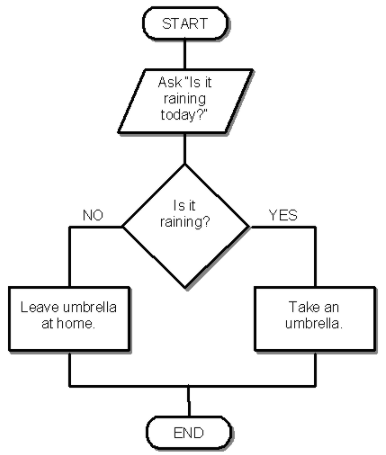
What is the Output if the user enters:
Yes
a)
Leave umbrella at home
b)
Take an umbrella
106.
What is the difference between a flowchart and pseudocode? 
a)
A flowchart is diagramatic whilst pseudocode is written in a programming language (eg. Pascal or Java) 
b)
A flowchart is textual but pseudocode is diagrammatic 
c)
A flowchart is a diagrammatic description of an algorithm whilst pseudocode is a textual description of an algorithm 
d)
A flwochart and pseudocode are the same thing 
107.
What algorithm do we use when we're making a cake?
a)
A set of directions
b)
A recipe
c)
A list of instructions
108.

Which of these is the set of rules that must be followed when typing code using a programming language?

a)

Syntax

b)

Value

c)

Expression

d)

Statement