

wayground logo

Free Printable Worksheets

NEW

Font size

S
M
L
XL
Worksheets

class 2 Revision 2 Input & output devices

Total questions: 25

Worksheet time: 10mins

Name
Class
Date
1.

Examples of pointing devices -

a)

Touch pad

b)

Touch Screen

c)

Joystick

d)

All of these

2.

——————- is like a rectangular box

a)

Hard disk

b)

CD

c)

Pen drive

3.

——————- is like a rectangular box

a)

Hard disk

b)

CD

c)

Pen drive

4.

——————- is like a rectangular box

a)

Hard disk

b)

CD

c)

Pen drive

5.

——————- is like a rectangular box

a)

Hard disk

b)

CD

c)

Pen drive

6.
Input devices allow us to send information to the CPU (Central Processing Unit) to tell the computer what to do.
a)
True
b)
False
7.
Output devices receive information from the CPU (Central Processing Unit), then translate it into sounds or images that we can understand.
a)
True
b)
False
8.

What type of device is this? (Smartphone screen)

a)

Input

b)

Output

c)

Input and Output

9.
What is the most suitable input device for inputting a short report?
a)
Mouse
b)
Scanner
c)
Keyboard
d)
None of the above
10.
What is the most suitable input device for highlighting or selecting an object on the screen?
a)
Mouse
b)
Joystick
c)
Keyboard
d)
None of the above
11.
Which of these would you use to digitise a paper photograph?
a)
Scanner
b)
 Joystick
c)
Touch screen
d)
None of the above
12.
What is the the definition for?
Allows the user to put data into the computer
a)
Input Device
b)
Output Device
13.
What is the the definition for?
Allows the user to see/hear data coming out of the computer
a)
Input Device
b)
Output Device
14.
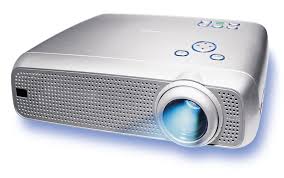
Is this device Input or Output?
Projector
a)
Input
b)
Output
15.

Three types of input devices are:

a)

Projector, Monitor and Printer

b)

Remote Control, Touch Screen and joystick

c)

Microphone, Video Cameras, Projector

d)

Graphic Tablet, LCD monitor, scanner

16.
To video call over the internet, what do you use?
a)
Touch Screen
b)
Web Cam
c)
Graphic Tablet
d)
Speaker
17.
A printer that uses toner to burn text / images onto a page...
a)
Laser
b)
Plotter
c)
Inkjet
d)
Dot Matrix
18.
A printer usually found in homes that uses cartridges and can produced high quality photos...
a)
Inkjet
b)
Plotter
c)
Dot Matrix
d)
Laser
19.

A display screen that is sensitive to the touch of a finger or stylus. Used in myriad applications, including ATM machines, retail point-of-sale terminals, car navigation and industrial controls.

a)

Touch Screen

b)

Mouse

c)

Light Pen

d)

Digitizer Tablet

20.

A device that can read text or illustrations printed on paper and translates the information into a form the computer can use.

a)

Scanning Devices

b)

Voice-Input Devices

c)

Pointing Devices

d)

Direct Entry

21.
Using an input device means we input _______ into the processor
a)
USB
b)
Instructions
c)
Outputs
d)
Information
22.
Using an output device means we output _______ from the processor
a)
USB
b)
Instructions
c)
Outputs
d)
Results
23.
An _______ is data that a computer receives
a)
Input
b)
Instructions
c)
Output
d)
Process
24.
An _______ is data that a computer sends
a)
Input
b)
Instructions
c)
Output
d)
Process
25.
Instructions are sent to the?
a)
GPU
b)
Printer
c)
Mouse
d)
Processor
