wayground logo

Free Printable Worksheets

Font size

S
M
L
XL
Worksheets

PC introduction

Total questions: 54

Worksheet time: 31mins

Name
Class
Date
1.

What is the Following a picture of

a)

PC

b)

PC case

c)

Iphone

d)

Tablet

2.

What is in the picture

a)

Random Access Memory (RAM)

b)

Keyboard

c)

Universal Serial Bus (USB)

d)

Hard Drive

3.

Name the Picture

a)

Hard Drive

b)

Central Processing unit (CPU)

c)

Motherboard

d)

Power Supply Unit (PSU)

4.

What does RAM stand for

a)

Random Access Memory

b)

Read Area Mail

c)

Romans Are Massive

d)

Reading Art Messages

5.

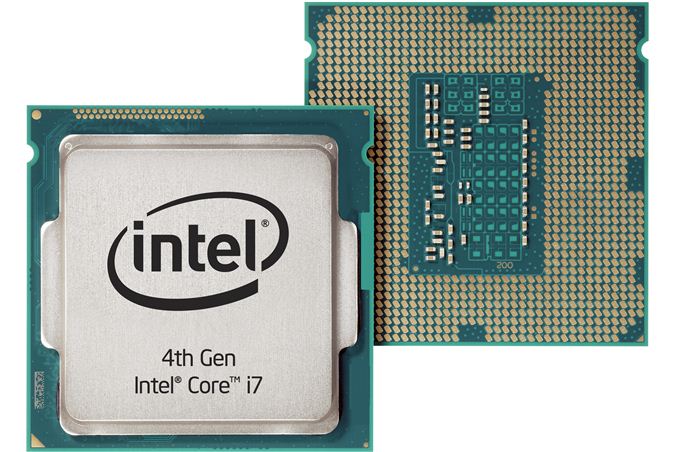
Name the picture

a)

Power Supply Unit (PSU)

b)

Heat Sink

c)

Central Processing Unit (CPU)

d)

Printer

6.

Name the picture

a)

Power Supply Unit (PSU)

b)

Heat Sink

c)

Central Processing Unit (CPU)

d)

RAM

7.

Name the image

a)

Central Processing Unit (CPU)

b)

Random Access Memory (RAM)

c)

Power Supply Unit (PSU)

d)

Hard Drive

8.
Brain of the computer that performs instructions defined by software
a)
Central Processing Unit (CPU)
b)
Hard Drive
c)
Motherboard
d)
Power Supply
9.
Power Supply
a)
A device that provides power to a computer.
b)
A device that cools the internal parts of a computer. Most computers have more than one.
c)
The case that holds all of the internal computer parts.
d)
The card that plugs into the motherboard and runs the monitor(s).
10.
The component that holds all of the internal computer parts.
a)
Case
b)
Optical Drive
c)
Central Processing Unit (CPU)
d)
Hard Drive
11.
Random Access Memory. A chip that stores temporary data that goes away when the computer is turned off.
a)
RAM
b)
Optical Drive
c)
Hard Drive
d)
Central Processing Unit (CPU)
12.
Which of the following is used to store data and programs for repeated use?
a)
Hard Drive
b)
RAM
c)
Internal cache memory
d)
ROM
13.
Identify
a)
Video expansion
b)
Memory
c)
CPU
14.
Identify
a)
Follower
b)
Admirer
c)
Fan
15.
This is the symbol for...
a)
Train to the Airport
b)
USB
c)
Firewire
16.
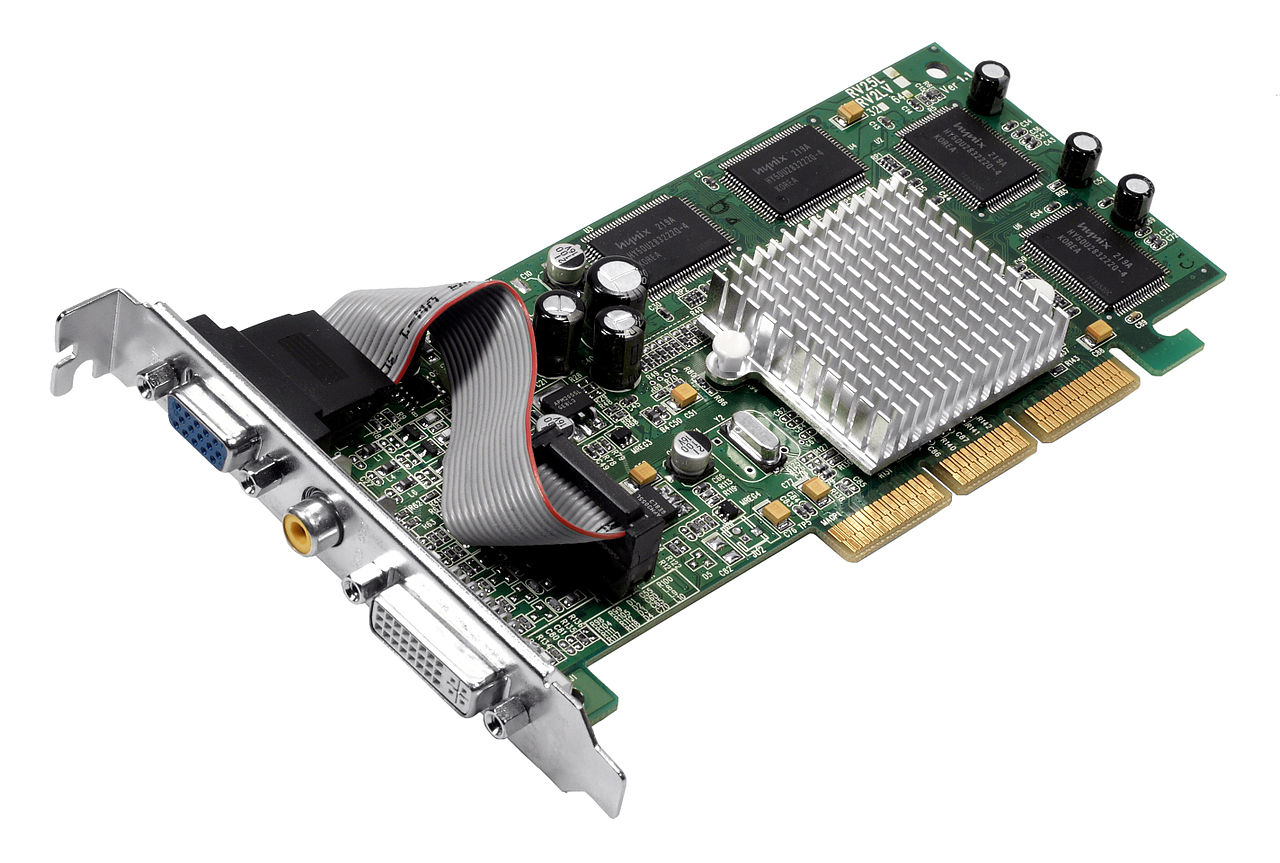
What is this component called?
a)
Motherboard
b)
CPU
c)
PC Case
d)
Optical Drive
17.
What is this component called?
a)
Power Supply
b)
Video Card
c)
CPU
d)
Motherboard
18.
What is this component called?
a)
Power Supply Unit
b)
CPU
c)
PC Case
d)
NIC
19.
What is this component called?
a)
Motherboard
b)
CPU
c)
RAM
d)
Graphics card
20.
What is this component called?
a)
CPU
b)
RAM
c)
Video Card
d)
NIC
21.
What is this component called?
a)
Motherboard
b)
Hard drive
c)
Optical Disc Drive
d)
Video card
22.
What is this component called?
a)
Hard drive
b)
Optical Disc Drive
c)
Video card
d)
Power Supply Unit
23.
What is this component called?
a)
Motherboard
b)
NIC
c)
Sound card
d)
Video card
24.
What is this component called?
a)
Sound card
b)
Video card
c)
RAID Controller
d)
Motherboard
25.
This component is the foundation of a computer.  It holds together and allows communication between most of the parts of a PC.
a)
Motherboard
b)
RAM
c)
NIC
d)
CPU
26.
This component is where most of the calculations take place.  It is the brain of a computer.
a)
RAM
b)
CPU
c)
Motherboard
d)
NIC
27.
This component is where data is physically saved for long term storage.
a)
Motherboard
b)
CPU
c)
RAM
d)
Hard drive
28.
This component is the computers short term memory.  Where data is stored for quick access and use by the rest of the computer.
a)
CPU
b)
RAM
c)
Hard drive
d)
Motherboard
29.
I/O stands for:
a)
Input / Output
b)
Inversion Options
c)
Indirect / Offer
d)
Industry / Out source
30.
Which of the following is an input device
a)
Mouse
b)
Speaker
c)
Monitor
d)
Printer
31.

What is the person doing in this picture?

a)

Click

b)

Type

c)

Read

d)

Speak

32.

What is the person doing in this picture?

a)

Click

b)

Type

c)

Read

d)

Speak

33.

What is the picture above?

a)

Headphone

b)

Mouse

c)

Keyboard

d)

Monitor

34.

What is the picture above?

a)

Headphone

b)

Mouse

c)

Keyboard

d)

Monitor

35.

What is the picture above?

a)

Headphone

b)

Tablet

c)

Laptop

d)

Monitor

36.

What is the picture above?

a)

Mouse

b)

Keyboard

c)

Laptop

d)

Monitor

37.

What is the picture above?

a)

Mouse

b)

Keyboard

c)

Laptop

d)

Tablet

38.

Which one this picture is a Speaker?

a)

USB

b)
c)
d)
39.

What is the picture above?

a)

USB

b)

Speaker

c)

Keyboard

d)

Monitor

40.

What is the picture above?

a)

USB

b)

Monitor

c)

Keyboard

d)

CPU

41.

What is it?

a)

Flash drive

b)

Plotter

c)

Printer

d)

Image setter

42.

What is it?

a)

Cd player

b)

Modem

c)

Printer

d)

Scanner

43.

What is it?

a)

Smartphone

b)

Telephone

c)

Tablet

d)

ipad

44.

What is it?

a)

Smart watch

b)

Smart wash

c)

iwatch

d)

Wrist watch

45.

What is it?

a)

Safari

b)

Home page

c)

Browser

d)

Google chrom

46.

What is it?

a)

File

b)

Speaker

c)

Mouse

d)

Keyboard

47.

What is it?

a)

Software

b)

Softwear

c)

Hardware

d)

Windows

48.

What is it?

a)

Smart home

b)

Television

c)

Smartphone

d)

SmartTv

49.

What is it?

a)

Internet

b)

World wide web

c)

Word wide web

d)

Network

50.

What is it?

a)

Soft ware

b)

Program

c)

Application

d)

Icon

51.

What is it?

a)

Softwear

b)

Computer language

c)

C language

d)

Program

52.

What is it?

a)

Digital camera

b)

Camera

c)

Webcam

d)

Go pro

53.

What is it?

a)

iPad

b)

Mac book

c)

Laptop

d)

Computer

54.

What is it?

a)

Cd

b)

Dvd

c)

Cd player

d)

Dvd player