
 Worksheets
Form 1 Pre-Test Computer Basics
Total questions: 60
Worksheet time: 20mins
What is a computer?
An electronic device that receives input, processes it and provides an output in the desired format.
An electronic device to do homework, play video games or surf on the internet.
An electronic device that receives input, stores or processes the input and provides an output in the desired format.
A Monitor is an example of what kind of device?
Input
Output
Speakers are considered an input device.
True
False
I am often referred to as "the brain" of the computer
RAM
monitor
mouse
CPU
CPU stands for....
Control processing unit
Central Processing Unit
Command processor unit
What provides long term memory for your computer
hard drive
soft drive
disk drive
RAM
Make sure you have _______ all programs before shutting the computer down.
finish
turn
closed
switch

Which of these is an example of a computer?
Personal desktop computer
Ipad
Smartwatch
All of these are examples of computers

A computer uses a combination of :
hardware and software
line paper and white paper
monitor and digital pixels
keyboard and mouse

Which of these is an example of Computer Hardware?
Google Chrome
Microsoft Windows
MacOS
Keyboard
Which of these is NOT an example of Computer Software?


Which of these is NOT an example of Computer Hardware?


An Operating System or OS is the most important software that runs on a computer; this software communicates with the hardware and allows other programs to run. Which of these are examples of Operating Systems?
iOS
Microsoft Windows
Android
All of these are Operating Systems
What should I add to increase the performance of my computer?
a faster battery
add more ROM
add more RAM
add a bigger hard drive
Data can be
Words, Sound and Vibration
Words, Numbers and Letters
Words, Pictures and Food

What icon is this?
Video
YouTube
Roblox
None of the above

What type of data is seen here?
Picture
Word
Letter

Computers can do many things, for example......
it manipulates data
it stores information
it connects people from different places
a computer can do all these

Which of these is NOT a way to take good care of a laptop computer?
Cleaning the screen with a microfiber cloth
Keeping food and drinks away from the device
Adding extra weight on it like a backpack
Holding it with both hands when you carry it

There are different types of storage to save your files. Which of these is NOT a type of computer storage?
USB pen drive
file cabinet
memory card
DVD
You should always follow the correct steps to __________ down your computer down safely.
turn
shut
put
start
Make sure you have _______ all programs before shutting the computer down.
finish
turn
closed
switch
You should give your eyes a ______ from the screen every 30 minutes.
break
beak
breake
brake
If you do not shut down your computer correctly, you could ________ your work!
loose
lose
loos
losse
You should sit upright and use good ___________.
colours
English
posture
software

This desktop icon is
Microsoft Word
recycle bin
the documents folder
Internet Explorer

This desktop icon is
Internet Explorer
Google Chrome
YouTube

This desktop icon is
Microsoft Word
Google Chrome
the Start button
Recycle bin
A computer that you can take anywhere and is small is called a
PC
laptop
keyboard
mobile

This desktop icon is:
Microsoft Excel
Microsoft Word
Windows
Google Chrome

This is:
A microphone
A game
A flash drive
A webcam

Choose the correct spelling:
caibles
cabls
cabels
cables

The _______ is the metal and plastic box that contains the main components of the computer, including the motherboard, central processing unit (CPU), and power supply.
Monitor
Computer Case
Keyboard
Mouse

These can be used to connect almost any type of device, including mice, keyboards, printers, and digital cameras.
Audio In
Audio Out
USB Port
Monitor Port

The _____ works with a video card, located inside the computer case, to display images and text on the screen.
Monitor
Computer Case
Keyboard
Mouse

This is where you'll connect the power cord to the computer.
USB Port
Audio In/ Audio Out
Power Socket
Serial Port

You can use this port for networking and connecting to the Internet.
USB Port
Serial Port
Ethernet Port
Power Button

The ________ is the computer's main circuit board. It's a thin plate that holds the CPU, memory, connectors for the hard drive and optical drives, expansion cards to control the video and audio, and connections to your computer's ports.
RAM
CPU
Optical Disc Drive
Motherboard

A _____ is used to print documents, photos, and anything else that appears on your screen.
Camera
Smartphone
Printer
e - Reader

A ________ is a general term for any type of handheld computer.
Device Mobile
Mobile Device
Laptop
Toplap

An _____________ is the most important software that runs on a computer. It manages the computer's memory and processes, as well as all of its software and hardware.
Banana
Hardware
Software
Operating System
The device that allows you to type on the computer screen and communicate with the computer is
Mouse
Keyboard
Speakers
None of the above
What piece of hardware do you use to navigate the screen ?
Mouse
Mouse Pad
Speakers
RAM
The Shift Key
Let us you type in all capitals only
Let you quickly navigate up and down a page
Allows you to reach the end of the page quickly
Allows you to capitalize letters and use the upper function of keys
The Backspace Key erases text to the left.
TRUE
FALSE
The Delete Key erases text to the right
TRUE
FALSE
How do you "drag" objects?
Right-click the object once
Left-click the object once
Double-click the object
Left-click the object and continue to hold while moving the mouse
What is a computer icon?
A symbol representing a program
A button on the menu bar
A button on the tool bar
A button on the title bar
Where is the "START" button located?
In the upper right corner
In the upper left corner
In the lower left corner
In the lower right corner
Computer Desktop is a computer term that refers to
The initial screen showing icons for folders, files and applications
The list of all of the contents on a computer
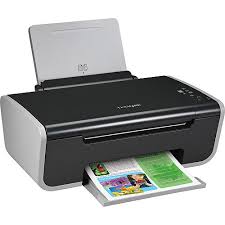
Is this device Input or Output?
Printer
Input
Output

Keyboard

Monitor
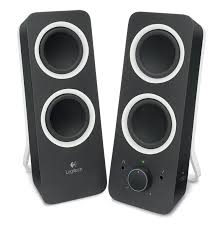
Speaker

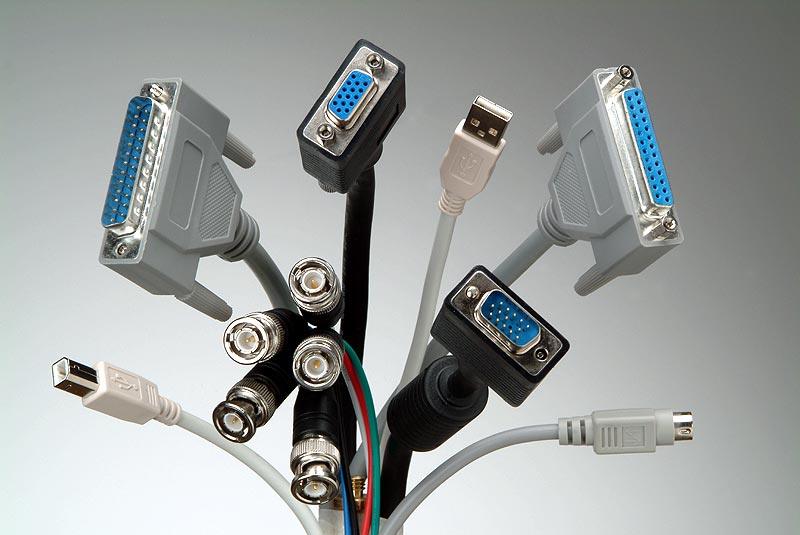
The term____________refers to the set of instructions that directs the hardware in a computer to accomplish a task.
Output
Software
Hardware
Input

